WooCommerce Accounting Software: Why Zoho Books Beats QuickBooks for Growing Stores
WooCommerce sellers default to QuickBooks. Once you're running multiple payment gateways, subscription products, and growing order volume, that default costs more than the $115/mo price tag suggests. Here's where Zoho Books fits WooCommerce operations better, and the cases where QuickBooks still makes sense.
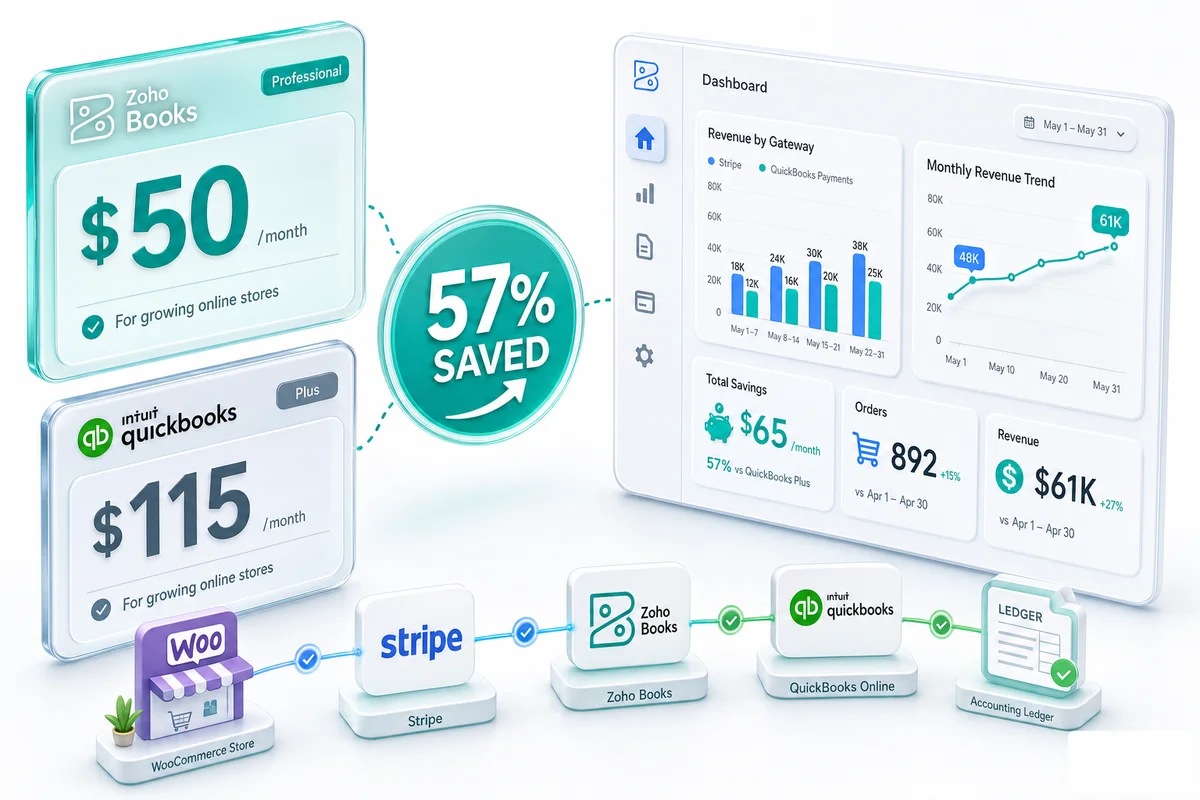
The short answer: For a WooCommerce store processing 200+ orders/month across multiple payment gateways, Zoho Books Professional at $50/month is the better-fit accounting platform than QuickBooks Plus at $115/month. The $65/month gap is real, but the more important difference is ecosystem depth: Zoho Books connects natively to Zoho Inventory, Zoho CRM, and Zoho Analytics without add-on costs, while QuickBooks charges extra for equivalent functionality and still needs third-party apps for WooCommerce-specific workflows.
WooCommerce powers roughly 38% of all online stores (BuiltWith, 2026), but when it comes to accounting, most sellers inherit a setup that was never designed for them. WooCommerce is self-hosted on WordPress, which means no built-in marketplace facilitator tax collection (unlike Shopify), no single default payment processor (most stores run Stripe and PayPal in parallel), and a plugin ecosystem that can add subscriptions, memberships, and wholesale tiers to the same transaction stream.
Most WooCommerce sellers default to QuickBooks. It holds 62% of the overall accounting software market (ElectroIQ, 2025), and that gravity carries into eCommerce. But market share is not the same as product fit.
TL;DR: Zoho Books Professional costs $50/mo vs QuickBooks Plus at $115/mo, a 57% saving for comparable functionality (Zoho Books Pricing, 2026). For WooCommerce sellers processing 200+ orders/month across multiple payment gateways, Zoho Books' native ecosystem removes the third-party integrations QuickBooks requires. Already decided on Zoho? See our WooCommerce Zoho integration guide for the technical setup. Evaluating accounting software more broadly? The eCommerce accounting software guide covers all major options. For a full platform-by-platform comparison including Shopify and Amazon pricing scenarios, see Zoho Books vs QuickBooks for eCommerce sellers.
What makes WooCommerce accounting different from other platforms
WooCommerce accounting complexity hides until month-end close. Three things separate it from Shopify or Amazon accounting:
Multiple payment gateways, multiple fee structures
Shopify Payments is one processor with one fee schedule. WooCommerce is agnostic: most stores run Stripe and PayPal simultaneously, and some add Square, Braintree, or a bank gateway for specific customer segments. Each processor charges differently:
| Gateway | US card fee |
|---|---|
| Stripe | 2.9% + $0.30 per transaction |
| PayPal (standard checkout) | 3.49% + $0.49 per transaction |
| Square | 2.6% + $0.10 per transaction |
When a customer pays $100 through Stripe, your deposit is $96.80. Through PayPal, it's $95.51. Same revenue, different net amounts, different fee line items. Your accounting software has to record the $100 gross sale and the gateway fee separately for each processor, every month. If fees from all processors pool into one "bank charges" line, your P&L shows revenue and a lump deduction with no visibility into processing costs by gateway.
Sales tax is your responsibility
Shopify and Amazon are marketplace facilitators: they collect and remit sales tax on your behalf in most US states. WooCommerce is not. You are the merchant of record on every transaction, responsible for determining nexus, calculating the correct rate, collecting from customers, and remitting to each state.
Since the 2018 South Dakota v. Wayfair ruling, economic nexus thresholds mean most active WooCommerce stores have obligations in multiple states even without physical presence. Your accounting software has to track taxable sales by jurisdiction and produce accurate liability reports for remittance — not just record a gross revenue line.
Subscription products complicate revenue recognition
WooCommerce Subscriptions generates billing patterns that standard accounting software wasn't built for: recurring charges on irregular cycles, upgrade and downgrade prorations mid-period, payment failure reversals, and partial period credits. A subscription cancelled on day 17 of a 30-day cycle doesn't record the same way as a one-time sale.
Neither QuickBooks nor Zoho Books handles subscription accounting natively — both require configuration — but Zoho's ecosystem includes Zoho Subscriptions for stores where revenue recognition rules matter. For basic recurring billing, Zoho Books handles the payment recording directly.
QuickBooks vs Zoho Books for WooCommerce: side-by-side comparison
| Feature | QuickBooks Plus ($115/mo) | Zoho Books Professional ($50/mo) |
|---|---|---|
| WooCommerce integration | Via third-party app (extra cost) | Native via Zoho ecosystem |
| Multi-gateway fee tracking | Manual or via third-party | Configured per gateway during setup |
| Sales tax (multi-state) | TurboTax add-on required | Native multi-jurisdiction support |
| Inventory tracking | Basic (no warehouse locations) | Basic included; Zoho Inventory for advanced |
| Multi-currency | QuickBooks Plus only | Included on all plans |
| Bank reconciliation | Manual match or feed import | Automated with Zoho Books bank feeds |
| BFCM / Q4 high-volume periods | Third-party connector lag risk at peak volume | Bank feeds reconcile natively at any volume |
| CRM integration | Third-party required | Native Zoho CRM |
| Analytics beyond built-in reports | Third-party required (Fathom, etc.) | Native Zoho Analytics connection |
| US accountant familiarity | Very high | Growing; smaller ecosystem |
| Monthly cost | $115/mo | $50/mo |
| Annual savings vs QuickBooks | — | $780/year |
The 57% cost difference is real and recurring — $65/month, $780/year, before add-ons. But cost is not the main reason to switch. The bigger difference is ecosystem depth: QuickBooks requires third-party apps for almost every WooCommerce-specific requirement, while Zoho Books connects natively to Zoho Inventory, Zoho CRM, and Zoho Analytics with no additional monthly fees.
Where QuickBooks still wins
QuickBooks has one clear advantage: accountant familiarity. In the United States, most bookkeepers and CPAs learned their craft on QuickBooks. If your external accountant bills by the hour and has never worked in Zoho, switching means paying them to learn a new system. That transition cost can offset 6-12 months of subscription savings depending on complexity.
If your accountant is comfortable in both platforms, the calculation tips to Zoho Books. If they're QuickBooks-only, factor that transition cost into the decision before committing.
QuickBooks Payroll also has a stronger US integration than Zoho Books for stores where payroll is a significant accounting workflow. Zoho Payroll exists but covers fewer geographies than QuickBooks Payroll's domestic footprint.
Where Zoho Books wins for WooCommerce
Gateway fee separation, configured from day one
With Zoho Books configured correctly, every Stripe fee lands in "Payment Processing - Stripe" and every PayPal fee lands in "Payment Processing - PayPal." At year-end, you can see blended processing costs by gateway, compare them against transaction volume, and make an informed decision about which gateway to promote at checkout.
Zolify's CA configures this mapping during implementation, not as an afterthought. QuickBooks records the fees but multi-gateway separation requires third-party setup that costs additional monthly fees.
Bank reconciliation that handles WooCommerce volume
WooCommerce stores processing 500+ orders/month generate hundreds of individual payment events in a given month — each with its own deposit, refund, or chargeback. Manual reconciliation at that volume is a guaranteed way to miss entries.
Zoho Books handles bank feeds from most major financial institutions and matches transactions against your recorded invoices and expenses. For WooCommerce-specific reconciliation — matching daily settlement batches from Stripe or PayPal against Zoho Books invoice records — the WooCommerce bank reconciliation setup guide covers the configuration in detail.
Q4 is the real test. A WooCommerce store that processes 500 orders in October might clear 1,400 over BFCM weekend alone, across Stripe, PayPal, and any promotional gateways added for the sale. That volume lands in your December close, when you're also reconciling year-end inventory, calculating COGS for everything shipped since January, and getting clean numbers to your accountant before they disappear for the holidays.
Zoho Books' bank feed handles BFCM volume the same way it handles a quiet Tuesday: settlement deposits match against recorded invoices automatically. Zoho Inventory posts COGS at fulfillment, so by December 31, your inventory valuation reflects what actually shipped rather than a lump adjustment made after the fact. For stores still chasing down November transactions in mid-December, the reconciliation volume isn't the issue. The setup is. Reducing the AP side of year-end workload (vendor invoices, payment runs, open purchase orders) is covered in eCommerce accounts payable automation with Zoho Books.
Native inventory without a separate subscription
Zoho Books Professional includes basic inventory. Zoho Inventory — a separate Zoho product — adds warehouse management, batch tracking, composite items, and multi-channel sync. For WooCommerce stores also selling on Amazon or managing multiple warehouse locations, Zoho Inventory as the master stock source means one system tracking everything rather than platform-specific counts that drift apart.
The Zoho Inventory WooCommerce integration guide covers the technical sync setup: how Zoho Inventory pulls WooCommerce orders in real time, updates stock levels across connected channels, and posts COGS entries to Zoho Books on fulfillment. For stores selling across WooCommerce, Amazon, and Shopify simultaneously, see Zoho Inventory for multi-channel eCommerce.
QuickBooks requires third-party add-ons for equivalent inventory functionality. Most cost more per month than the Zoho Books subscription itself.
Analytics beyond the default reports
Zoho Books connects natively to Zoho Analytics, which pulls financial data alongside operational data for custom dashboards. For WooCommerce stores that need channel P&L, customer cohort analysis, or marketing ROI reporting beyond what accounting software shows by default, that connection matters.
QuickBooks connects to Fathom or similar BI tools at additional cost and with a data pipeline to maintain.
Sales tax setup designed for non-facilitator merchants
WooCommerce stores carry the full sales tax obligation that Shopify stores in marketplace-facilitator states don't. Zoho Books handles multi-state tax configuration, economic nexus thresholds, and liability reporting natively. For stores with nexus in more than 15 states or complex product taxability rules, Zolify adds TaxJar or Avalara integration alongside Zoho Books. For more on how this works end-to-end, see eCommerce sales tax software with Zoho Books.
WooCommerce integration: what works and what to watch out for
Connecting WooCommerce to Zoho Books is not a single checkbox. The integration covers order sync, customer data, inventory updates, and payment reconciliation — each of which has its own failure mode if configured incorrectly.
The obvious shortcut is a no-code automation tool — Zapier, Make, or similar — pushing WooCommerce orders into Zoho Books. For a store with one gateway, low volume, and no subscription products, it holds together. Once you add volume or complexity, it breaks in predictable ways: partial payment allocation fails across open invoices, refund reversals drop the fee component, and API rate limits hit during order surges. Why no-code tools fall short for eCommerce integrations covers these failure modes with specific WooCommerce and Zoho Books examples.
For a properly structured WooCommerce-Zoho integration — API-based, handling all transaction types, with financial logic reviewed by a CA — see the WooCommerce Zoho integration guide.
Implementation: what "configured correctly" actually means
Both Zoho Books and QuickBooks can be self-installed. For a WooCommerce store processing under 100 orders/month with one payment gateway and no sales tax complexity, DIY is workable.
For stores at 200+ orders/month with multiple gateways, multi-currency, subscription products, or nexus in multiple states, self-configuration produces a chart of accounts that looks fine in the dashboard but breaks at tax time. The failure pattern is consistent: gateway fees pool into a single "bank charges" line, sales tax gets netted against revenue instead of posted to a liability account, and refund reversals drop the fee adjustment. Each mistake looks small in the month it happens. Across a year, the variance is significant.
We have migrated over 100 eCommerce businesses from QuickBooks, Xero, and spreadsheets to Zoho Books. Most came to us after a year-end close where their accountant found that fee categories were wrong, refunds had inflated reported revenue, or tax liability accounts didn't match what was actually owed. Fixing a year's worth of miscategorized transactions takes longer than setting up the chart of accounts correctly at the start.
Zolify's process includes a CA-led chart of accounts review for WooCommerce-specific line items, integration configuration for all active payment gateways, sales tax setup against current nexus obligations, and go-live support through the first month-end close. Implementation for a single-channel WooCommerce store takes 3-6 weeks. Multi-channel setups (WooCommerce plus Amazon or Shopify) take 6-10 weeks.
For stores migrating from QuickBooks, the QuickBooks to Zoho Books migration guide covers the data transfer, chart of accounts remapping, and accountant handoff process in full.
Which accounting software is right for your WooCommerce store?
| Scenario | Better fit |
|---|---|
| Single gateway, low volume, US only | Either; QuickBooks if your accountant insists |
| Multiple payment gateways, 200+ orders/month | Zoho Books |
| Subscription products via WooCommerce Subscriptions | Zoho Books (with Zoho Subscriptions for complex recognition) |
| International sales, multi-currency | Zoho Books |
| Also selling on Amazon, Shopify, or eBay | Zoho Books (Zoho Inventory as master source) |
| External accountant who only knows QuickBooks | QuickBooks, unless you can fund the transition |
| Evaluating the full Zoho One ecosystem | Zoho Books (included in Zoho One at $45/user/mo for 45+ apps) |
| Need bank reconciliation at 500+ orders/month | Zoho Books |
Zolify's track record on WooCommerce implementations
Zolify has completed 100+ eCommerce implementations, including WooCommerce sellers who migrated from QuickBooks, Xero, and spreadsheets. Every financial configuration goes through a CA review before go-live. As an Official Zoho Finance Partner, Zolify implements Zoho Books to the same standards Zoho's professional services team applies.
WooCommerce-specific work includes multi-gateway fee mapping, sales tax nexus configuration, WooCommerce Subscriptions integration, COGS automation through Zoho Inventory, and bank reconciliation setup for high-volume stores. The CA on Zolify's team reviews the chart of accounts and integration logic — not just the software configuration — so the books are right from month one.
If you're evaluating the switch and want to understand what the configuration would look like for your specific WooCommerce setup, get an eCommerce Ops Audit. We map your current accounting flow against what Zoho Books handles, flag what needs professional configuration, and give you a straight answer on whether the migration makes sense for your business — no commitment required.
WooCommerce accounting is one layer of the broader Zoho eCommerce platform. See our WooCommerce + Zoho integration for how WooCommerce connects alongside Shopify, Amazon, eBay, and Etsy in a unified operations backend — or the Zoho for eCommerce overview for the full platform picture. For WooCommerce stores switching to Shopify, the WooCommerce to Shopify migration guide for Zoho operations covers what happens to your Zoho Inventory, Zoho Books, and Zoho CRM when you move platforms — Shopify connector setup, chart of accounts changes for Shopify Payments, and what breaks on day one if the Zoho stack isn't reconfigured. The Shopify and Zoho integration guide covers the post-migration configuration once you're live on Shopify.
Frequently Asked Questions
Zoho Books connects to WooCommerce through the Zoho ecosystem. For standard order and revenue sync, Zoho's native connectors handle the basics. For full financial automation - gateway fee separation across Stripe, PayPal, and other processors, refund reversals, multi-currency, and sales tax by jurisdiction - a professional implementation ensures every transaction type maps correctly. Zolify has completed 100+ eCommerce implementations including WooCommerce stores running multiple simultaneous payment gateways. As an Official Zoho Finance Partner, our team implements Zoho Books to the same standards Zoho's professional services team applies.
For comparable inventory tracking functionality, yes. Zoho Books Professional costs $50/mo vs QuickBooks Plus at $115/mo. The gap widens once you account for the CRM, analytics, and inventory add-ons that QuickBooks requires separately. Zoho bundles all of that natively through Zoho One at $45/user/mo for 45+ apps.
Zoho Books records WooCommerce Subscriptions payments as they arrive. For stores where subscription accounting requires proper revenue recognition (deferred revenue, proration on upgrades, reversal on cancellations), Zoho Subscriptions handles the billing logic and posts the correct journal entries to Zoho Books. For basic recurring billing without complex recognition rules, Zoho Books alone is sufficient.
Yes, but WooCommerce stores require more setup than Shopify stores. Shopify is a marketplace facilitator and collects sales tax on your behalf in most US states. WooCommerce is not: you are the merchant of record and responsible for collection and remittance. Zoho Books handles multi-state tax configuration, economic nexus setup, and liability reporting. For stores with nexus in more than 15 states, a TaxJar or Avalara integration alongside Zoho Books handles rate lookup and filing automation. Zolify's Chartered Accountant configures the nexus rules as part of every WooCommerce implementation.
For a single-channel WooCommerce store processing 200-1,000 orders/month, the migration typically takes 3-6 weeks. That covers data migration (chart of accounts, contacts, open invoices, transaction history), WooCommerce integration configuration for all active payment gateways, sales tax setup, and go-live support for the first month-end close. Multi-channel sellers (WooCommerce plus Amazon or Shopify) take 6-10 weeks due to additional reconciliation complexity.
See exactly where your Shopify, Amazon, or WooCommerce ops are leaking — free.
Get a personalised eCommerce Ops Audit: inventory gaps, accounting leaks, and order-flow bottlenecks — with a Zoho fix roadmap. Delivered in 48 hours, at no cost.