Multi-Channel Inventory Management with Zoho: How Shopify, Amazon, and WooCommerce Sellers Stay in Sync
Most multi-channel sellers patch together Zapier workflows or native platform tools and live with the oversells and reconciliation work. Zoho Inventory configured as a master source removes both. Here's what that actually looks like across Shopify, Amazon, and WooCommerce.
Multi-channel inventory management with Zoho means running Shopify, Amazon, and WooCommerce from one stock count rather than three separate counts that drift apart the moment order velocity picks up. For eCommerce sellers already operating across two or more channels, the core problem isn't a lack of tools. It's that every platform was built to own inventory, not share it. Zoho Inventory, configured as a master source, replaces that per-channel ownership model with one pool that all channels read from and write to simultaneously.
Bottom line: Zapier can move order data between your channels. It cannot manage inventory state across FBA, self-fulfilled, and WooCommerce stock simultaneously. Zoho Inventory does. With native connectors for Shopify, Amazon, WooCommerce, eBay, and Etsy, plus direct COGS flow to Zoho Books on every fulfillment event, it's the system multi-channel sellers should evaluate before reaching for another no-code patch.
Why Multi-Channel Inventory Is Harder Than It Looks
The mechanics of listing products on four platforms are straightforward. The inventory problem underneath them is not.
The Overselling Problem: When Your Channels Don't Share Inventory Data
You have 5 units in stock. A Shopify customer buys 3. Before that sale reaches Amazon Seller Central, an Amazon customer buys 3. You've committed to 6 units you don't have. This isn't a fringe edge case; it's the predictable result of any setup where inventory syncs run on polling intervals rather than event-driven updates.
Most platform-native sync tools run on 15-to-60-minute intervals. During a promotion or any traffic spike, that window is wide enough to produce multiple oversells on every fast-moving SKU. The native tools can't fix this because Shopify and Amazon Seller Central weren't designed to share inventory. They were designed to own it.
SKU Proliferation: Why the Same Product Gets Listed Differently on Every Channel
Amazon uses ASINs. Shopify uses variant IDs. WooCommerce uses product and variation IDs. eBay uses item IDs. A single physical product carries four different identifiers across your channels, and nothing links them without deliberate configuration. Without that mapping, a sale on Amazon decrements the ASIN record, a Shopify sale decrements a separate variant record, and a WooCommerce sale decrements a third. The counts represent different product definitions. The discrepancies look like inventory drift; they're actually a structural problem in how channels identify products.
Mixed Fulfilment: Managing FBA, Self-Fulfilled, and 3PL Inventory Simultaneously
FBA stock sits in Amazon's fulfillment centers. Self-fulfilled Shopify orders ship from your warehouse. WooCommerce orders may route to a 3PL. Each location holds real inventory with different lead times and different cost structures. FBA inbound takes 14 to 21 days from shipping to Amazon to available-to-sell status. A reorder point calibrated for your self-fulfilled warehouse doesn't account for that lag. Without a system that tracks stock by location and channel simultaneously, a stockout on Amazon might mean FBA stock hit zero while your warehouse still holds 50 units; no one catches it until orders start failing.
What Most Multi-Channel Sellers Try First (and Why It Breaks)
Most sellers don't set up a centralized inventory system from the start. They build what works at low volume and upgrade when it stops working. The path typically runs through three approaches.
Spreadsheets: The First Casualty of Multi-Channel Growth
At under 50 SKUs and 100 orders per month, a spreadsheet can track stock across two channels if someone updates it consistently. That threshold is lower than most sellers expect. Three channels means three order streams hitting the same inventory pool. Keeping a spreadsheet current across all three in real time isn't realistic above 50 daily orders. Past 200 SKUs or 500 monthly orders, the manual update cycle is a full-time job that still produces inaccurate numbers. A spreadsheet can't receive a Shopify webhook or pull an Amazon inventory update; every data point requires a human to enter it.
No-Code Tools Like Zapier: What They Can Sync vs What They Miss
Zapier is the most common upgrade from spreadsheets. For simple automations (adding a CRM contact when a form submits), it works. For multi-channel inventory management, it breaks in ways that aren't visible until you're already dependent on it.
The core limitation: Zapier moves data, it doesn't manage inventory state. Syncing an order from Shopify to Zoho is step one. But when that same SKU has 10 units reserved at Amazon FBA, 5 committed to a pending WooCommerce order, and 2 flagged as FBA damaged, Zapier has no awareness of that inventory position. It cannot apply channel-priority rules, route fulfillment to the correct warehouse, or calculate the accounting impact of a multi-channel return.
| Factor | Zoho Inventory | Zapier / No-Code | Spreadsheets |
|---|---|---|---|
| Inventory state management | Centralized master pool | None (data pipe only) | Manual |
| Oversell prevention | Event-driven, real-time | Polling interval gaps | No protection |
| FBA vs self-fulfilled split | Separate warehouse locations | Not possible | Manual columns |
| COGS auto-flow to accounting | Native Zoho Books integration | No accounting logic | Manual entries |
| Channel-specific pricing rules | Built in | Not possible | Manual |
| Multi-channel returns | Inventory + accounting both update | Data move only | Manual |
| Scales with order volume | Yes, no per-task limits | Cost scales, reliability drops | Breaks at volume |
Under load (a promotion hitting multiple channels simultaneously), Zapier's polling architecture produces delayed updates. Two channels sell from the same stale number. The oversell happens precisely when order volume is highest. Zoho Inventory's native API connections are event-driven: the inventory decrement happens when the order happens, not 15 minutes later.
Platform-Native Inventory Tools: Right for One Channel, Not for Three
Shopify's inventory works for Shopify. Amazon Seller Central works for Amazon. Neither was built to manage stock shared with other platforms. Platform-native tools are designed to serve that platform's orders. Cross-channel inventory management isn't their job and they don't attempt it.
How Zoho Inventory Handles Multi-Channel Inventory Management
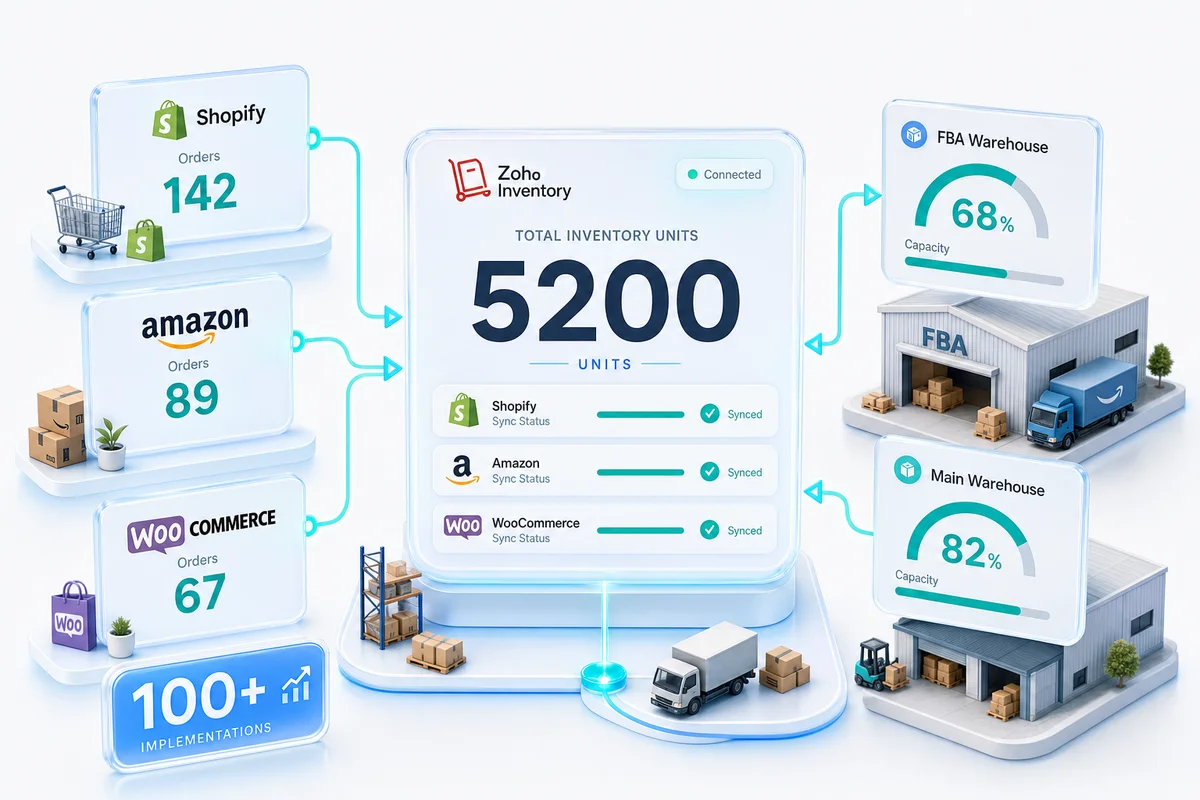
Zoho Inventory's multi-channel architecture is a single master stock pool that every connected channel reads from and writes to. Orders from any channel decrement one pool; every channel reads the same updated count.
One Stock Pool: Centralised Inventory Across Shopify, Amazon, and WooCommerce
When a Shopify order arrives, Zoho decrements the master count. When an Amazon order arrives simultaneously, Zoho decrements the same count. Neither order sees a stale number. Shopify's displayed stock is the Zoho count pushed outward; it isn't managed independently by Shopify's own inventory system. This is the structural difference between a master source and a sync tool. A sync tool tries to keep four counts equal. A master source maintains one count and serves it to every channel.
Channel-Specific Pricing and Availability Rules Without SKU Duplication
Zoho Inventory supports channel-specific pricing and availability rules against a single product record. Your Amazon listing price can differ from your Shopify storefront price for the same SKU. Availability rules can suppress a listing on a specific channel when stock drops below a safety buffer while keeping it active on others. One product record, four channel behaviors.
Fulfilment Routing: Which Orders Go to FBA, Which Go to Your Warehouse
Zoho Inventory supports multiple warehouse locations with separate stock positions. An FBA Warehouse tracks Amazon-managed stock; a Main Warehouse tracks self-fulfilled inventory. Shopify and WooCommerce orders route to the Main Warehouse. Amazon FBA orders route to the FBA Warehouse. If you run Amazon Multi-Channel Fulfillment (using FBA stock to also fulfill Shopify orders), Zoho tracks both fulfillment paths against the FBA pool without mixing it with self-fulfilled stock.
From Inventory to Accounts: How Every Sale Feeds One Zoho Books Entity
When Zoho Inventory connects to Zoho Books, each fulfillment event triggers an automatic COGS journal entry using your configured costing method (FIFO or weighted average). Revenue, inventory value, and cost of goods sold record from one transaction chain, not from separate systems reconciled at month-end. For how this works specifically for Amazon sellers including settlement reconciliation and FBA fee mapping, see our Amazon seller accounting guide. For the Zoho Books chart of accounts structure that produces accurate per-channel P&L across Shopify, Amazon, and WooCommerce — covering separate revenue accounts, clearing accounts, fee mapping, and reconciliation rules — see the multi-channel eCommerce accounting guide for Zoho Books.
Setting Up Multi-Channel Inventory in Zoho: What the Process Looks Like
Connecting Your Channels: Shopify, Amazon, and WooCommerce APIs in Zoho Inventory
Each channel connects through Zoho Inventory's Integrations section. Shopify connects via the Zoho Inventory app in the Shopify App Store. Amazon connects through your SP-API credentials in Seller Central. WooCommerce uses a REST API key from your WordPress admin. Connect one channel, verify orders pull and inventory pushes work, then add the next.
For a detailed look at how the Shopify connection works end-to-end, see our Shopify Zoho integration guide. For WooCommerce, the WooCommerce Zoho integration guide covers order sync, inventory flow, and returns handling.
SKU Mapping and Catalogue Alignment Across Channels
Map all SKUs to their canonical Zoho product records before enabling live sync. Export your Zoho product list and channel catalogs, match them by identifier (ASIN, variant ID, product ID), and import the mappings back. If you connect channels before completing this step, Zoho creates separate product records for each unmapped item. Cleaning up duplicate records after transactions have run against them is significantly more work than doing the mapping correctly the first time. An hour of mapping prevents days of cleanup.
Safety Stock Levels and Reorder Rules for Multi-Channel Operations
Set separate reorder points per warehouse. For your Main Warehouse, the reorder point covers supplier lead time plus a safety buffer. For the FBA Warehouse, add Amazon's inbound processing time (14 to 21 days in normal periods; longer in Q4) on top of supplier lead time. If your supplier takes 7 days and Amazon takes 14 days, your FBA reorder point needs to cover 21 days of sales velocity at the FBA warehouse, not 7. Sellers who calibrate FBA reorder points to supplier lead time alone run out of FBA stock on a predictable cycle. The reverse problem — overstocking FBA into Q4 — generates the aged inventory surcharge that Amazon assesses monthly; for accounting treatment in Zoho Books and the keep/remove/liquidate decision per ASIN, see Amazon FBA Storage Fees in Zoho Books: Q1 Decisions. The eCommerce demand forecasting setup guide for Zoho Inventory walks through pulling velocity baselines, adding seasonal buffers, and setting the full reorder formula before configuring multi-channel thresholds. For the BFCM peak specifically — where Shopify, Amazon, and eBay run simultaneous promotions on staggered schedules — the multi-channel BFCM operations guide covers the channel priority rules and per-channel stock reservation buffers that prevent eBay's early November surge from depleting stock reserved for the Shopify peak on November 26.
What Zolify Brings to a Multi-Channel Zoho Setup
100+ eCommerce Implementations: From Single-Channel to Full Multi-Channel Operations
Across 100+ eCommerce implementations as an Official Zoho Authorized Partner, we've configured Zoho Inventory as the multi-channel master source for sellers from 50 SKUs on two channels to 2,000-plus SKUs across Shopify, Amazon (FBA and FBM), WooCommerce, and eBay. The channel connections are the easy part. The configuration underneath (SKU mapping, warehouse structure, channel allocation rules, FBA reorder logic) is where most DIY setups break and where our implementation approach differs from a generic Zoho consultant. For context on the full range of eCommerce operations we support, that page covers the scope.
CA/CPA Review: When Inventory Decisions Have Accounting Consequences
Costing method choice (FIFO vs weighted average) affects how COGS flows to your P&L and how inventory value appears on your balance sheet. Channel-specific return handling affects both inventory counts and revenue accounting. FBA reimbursements for lost or damaged inventory need distinct accounting treatment, not a catch-all revenue account. Our CA reviews every inventory configuration before go-live to confirm that the accounting layer is correct, not just the sync layer. That's the difference between a system that passes an audit and one that creates liability quietly.
Custom Integration Logic: When Zoho's Native Connectors Need Extension
Zoho Inventory's native connectors handle the standard three-channel setup. When your fulfillment model has edge cases (a 3PL using a WMS without a native Zoho connector, complex bundle logic where Shopify bundles and Amazon individual items share component inventory, or split shipments from multiple locations), we build the custom integration logic on top of Zoho's API. After 100+ integrations delivered, we have documented patterns for most of the edge cases that surface mid-implementation. See our multi-channel eCommerce solution for the full scope of what a Zolify implementation covers.
Is Multi-Channel Zoho Inventory Right for Your Business?
Right Fit: Channel Count, SKU Volume, and Fulfilment Complexity
Zoho Inventory works well for sellers running two to five channels with up to a few thousand active SKUs. If you're on Shopify and Amazon today and plan to add WooCommerce or eBay within 12 months, the setup investment pays back quickly because you don't rebuild the inventory layer each time you add a channel. The clearest signals that a master source setup is overdue: spending more than two hours per month on inventory reconciliation, having had at least one oversell in the past quarter, or managing FBA and self-fulfilled stock from separate dashboards without a clear view of total available inventory.
For sellers north of 10,000 active SKUs or running manufacturing alongside multi-channel retail, Zoho Inventory has limits on bulk operations that are worth evaluating before committing. According to Zoho's integration documentation, the platform supports native connections to Shopify, Amazon Seller Central, WooCommerce, eBay, and Etsy; complex manufacturing workflows belong in Zoho Manufacturing rather than Inventory.
What Our Multi-Channel Clients Asked Before They Migrated
The most common pre-implementation questions: How long does setup take? (Four to eight weeks for three channels under 300 SKUs.) Will existing inventory data carry over? (Yes, opening balances import before go-live.) Do I need Zoho One or just Zoho Inventory? (Inventory standalone handles channel sync; Zoho Books integration is standard and included; Zoho One becomes relevant when you're also connecting CRM, analytics, or marketing ops to the same data layer.) For sellers whose primary requirement is accounting and inventory without the broader Zoho One suite, Zoho Finance Plus bundles Books, Inventory, Expense, and Subscriptions in one per-organisation plan.
Get an eCommerce Ops Audit
If you're managing inventory across Shopify, Amazon, and WooCommerce and still dealing with oversells, reconciliation sessions, or COGS guesswork at month-end, the underlying issue is almost always architecture, not effort. More spreadsheet discipline doesn't fix a structural sync problem.
Zolify's eCommerce Ops Audit covers your current channel setup, inventory state, fulfillment routing, and accounting integration. You'll leave with a clear picture of what's wrong, what a correct Zoho Inventory configuration looks like for your specific channel mix, and what the implementation involves.
For a focused look at the operational decisions behind a multi-channel inventory setup — channel priority, oversell prevention workflows, and the order routing logic that keeps Shopify and Amazon in sync — see Multi-Channel Inventory Management with Zoho.
Sellers adding Amazon to an existing Shopify or WooCommerce setup will also want to connect Zoho CRM to Amazon Seller Central for order and customer data — the Amazon Seller Central Zoho CRM integration guide covers how the two platforms share customer records and post-purchase workflows. For Etsy sellers scaling into new channels, Etsy multi-channel expansion with Zoho shows the operational model for adding Amazon or Shopify alongside Etsy. For a channel-agnostic overview of what multi-channel inventory management entails before committing to a specific platform, Multi-Channel Inventory Management: The Complete Guide is a useful starting point.
Frequently Asked Questions
Yes. Zoho Inventory has native integrations for Shopify, Amazon Seller Central, WooCommerce, eBay, and Etsy. When connected, all channels read from one master stock count in Zoho rather than maintaining separate counts. An order from any channel decrements the Zoho pool, and the updated count pushes to every other connected channel immediately. You configure one inventory, not one per platform.
Zapier moves data between platforms. Zoho Inventory manages inventory state. The distinction matters because multi-channel inventory isn't a data-movement problem; it's a state-management problem. Zapier can sync an order from Shopify to Zoho, but it has no awareness of how many units are reserved at Amazon FBA, committed to a pending WooCommerce order, or flagged as damaged. It cannot apply channel-priority rules, route fulfillment to the correct warehouse, or calculate the accounting impact of a multi-channel return. Under load (two channels selling the same SKU simultaneously), Zapier's polling interval means one channel sees stale inventory and an oversell results. Zoho Inventory's native API architecture manages the inventory state directly; channels read from it rather than waiting for a sync event.
Zoho Inventory uses multiple warehouse locations with separate stock positions. You create a dedicated FBA Warehouse for Amazon-managed stock and a Main Warehouse for self-fulfilled orders from Shopify and WooCommerce. FBA orders draw from the FBA Warehouse; Shopify and WooCommerce orders draw from the Main Warehouse. Each warehouse has its own reorder point, which matters because FBA inbound takes 14 to 21 days from shipping to available-to-sell status, so FBA reorder points need to account for that lead time, while self-fulfilled thresholds only need to cover your supplier lead time.
The channel connections themselves are configurable without a partner. The configuration underneath (SKU mapping across four different product identifier systems, warehouse allocation rules, FBA reorder logic, COGS flow to Zoho Books) is where most DIY setups break. The most common failure point is connecting channels before completing SKU mapping, which creates duplicate product records in Zoho that require manual cleanup before inventory counts are reliable. A partner who has done this across 100+ eCommerce implementations knows which configuration decisions compound into problems later and which defaults are safe to accept.
For a three-channel operation (Shopify, Amazon, WooCommerce) with under 300 SKUs, implementation typically takes four to eight weeks. The SKU mapping phase takes longer than most sellers expect because it requires reconciling product identifiers across all platforms before a single live connection goes active. Larger catalogs (800+ SKUs), additional channels (eBay, Etsy), 3PL involvement, or complex bundle logic extend the timeline. The setup includes discovery, configuration, testing with real transaction data, and a first month-end close walkthrough so your team knows what's automated and what needs a manual check.
See exactly where your Shopify, Amazon, or WooCommerce ops are leaking — free.
Get a personalised eCommerce Ops Audit: inventory gaps, accounting leaks, and order-flow bottlenecks — with a Zoho fix roadmap. Delivered in 48 hours, at no cost.