Zoho Books Bank Reconciliation for eCommerce: Match Shopify Payouts, Amazon Settlements, and PayPal
eCommerce bank reconciliation fails when sellers try to match deposits to revenue directly. Shopify sends a net payout after fees. Amazon settles every two weeks across hundreds of orders. PayPal batches transfers unpredictably. Clearing accounts in Zoho Books solve this-here's the setup.
Bank reconciliation for eCommerce sellers fails at the same point every month: the deposit doesn't match what's recorded. Shopify sends $4,318 but your sales records show $4,752. Amazon deposits $6,841 but you have no single transaction for that amount. PayPal batches four days of WooCommerce orders into one transfer.
The typical response is to force-match the deposit to revenue with a manual adjustment, accept a perpetual "unreconciled difference," or avoid reconciliation entirely. All three approaches produce books that are wrong. The actual fix is a clearing account for each payment channel in Zoho Books-and it makes bank reconciliation work structurally rather than by exception.
TL;DR: eCommerce deposits are net amounts (gross sales minus platform fees minus returns). Direct deposit-to-revenue matching doesn't work. Clearing accounts bridge the gap: gross revenue credits the clearing account when orders happen; fees and the bank deposit debit it. The clearing account balance represents only undeposited revenue, and bank reconciliation works cleanly.
Why eCommerce bank reconciliation breaks standard methods
Standard bank reconciliation matches each deposit to an invoice or sales entry, one-to-one. eCommerce breaks both sides of that equation.
The deposit side: Shopify pays you every 1-3 business days, net of payment processing fees. One payout covers multiple orders. Amazon pays bi-weekly, deducting referral fees, FBA fees, storage charges, advertising costs, and refund adjustments before the wire transfers. PayPal and Stripe aggregate transactions and transfer on their own schedules.
The revenue entry side: If you're running eCommerce correctly, you record revenue when orders occur, not when cash arrives. An order placed on November 30 should appear as November revenue even if the Shopify payout deposits on December 2. A direct deposit-to-revenue match fails because the deposit date and the revenue date are different, and the amounts don't match due to fee deductions.
The scale problem: At 100 orders per month, manual reconciliation is tedious but possible. At 1,000 orders across three channels, it breaks down entirely without a structural solution.
Fix Your eCommerce Bank Reconciliation
The clearing account structure
A clearing account is a current asset account in Zoho Books that acts as a staging area. It receives the gross revenue entry when an order occurs and gets cleared by the net bank deposit plus fee entries.
Set up one clearing account per payment channel:
| Account Name | Account Type | Clears Against |
|---|---|---|
| Shopify Clearing Account | Current Asset | Shopify Payments payouts |
| Amazon Clearing Account | Current Asset | Amazon bi-weekly settlements |
| PayPal Clearing Account | Current Asset | PayPal transfers |
| Stripe Clearing Account | Current Asset | Stripe payouts |
The logic for each: gross sales credit the clearing account, fee entries and returns debit it, and the bank deposit debits it. At any point, the clearing account balance equals orders processed but not yet deposited-a balance that should be small, predictable, and explainable.
For the full chart of accounts structure that supports this reconciliation setup, see our eCommerce chart of accounts guide for Zoho Books.
Reconciling Shopify Payments in Zoho Books
Shopify Payments bundles multiple orders into a single payout deposit, net of payment processing fees and any subscription or app fees deducted through the same payout.
Step 1: Record gross sales to the clearing account. For daily order entry or an aggregate journal entry at month end:
- Debit: Shopify Clearing Account (total gross sales for the period)
- Credit: Sales Revenue: Shopify
Step 2: Book Shopify fees. From the Payments > Payouts report in Shopify Admin, download the payout breakdown showing processing fees for each payout period:
- Debit: Platform Fees: Shopify
- Credit: Shopify Clearing Account
Step 3: Book returns. From the Orders report, total refunds for the period:
- Debit: Returns and Allowances: Shopify
- Credit: Shopify Clearing Account
Step 4: Match the bank deposit. When Shopify's payout deposit appears in the Zoho Books bank feed:
- Debit: Bank Account
- Credit: Shopify Clearing Account
At this point, the Shopify Clearing Account should net to zero (all orders from the payout period are accounted for) or carry a small positive balance representing orders processed but not yet paid out. If it shows a negative balance or an unexplained positive balance, there's a missing fee entry or a return that wasn't booked.
For the complete monthly close process including sales tax verification and COGS, see our Shopify monthly bookkeeping guide.
Reconciling Amazon settlements in Zoho Books
Amazon settlements are the most complex reconciliation in eCommerce because each settlement report contains orders, returns, fees, reimbursements, and advertising adjustments in a single document.
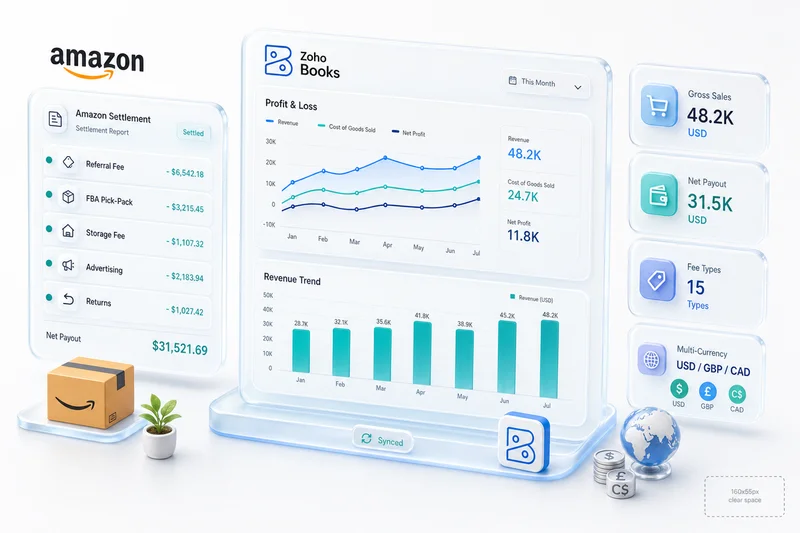
Download the settlement report. In Amazon Seller Central, go to Reports > Payments > All Statements. Download the settlement report for the period as a flat file or spreadsheet. Each settlement report shows: gross product sales, shipping credits, FBA fulfillment fees, referral fees, storage fees, advertising fees, refund adjustments, reimbursements, and the final settlement amount.
Step 1: Record gross sales.
- Debit: Amazon Clearing Account (gross product sales + shipping credits)
- Credit: Sales Revenue: Amazon
Step 2: Book each fee category. Amazon's fees belong in separate expense accounts:
| Fee Type | Debit Account | Credit |
|---|---|---|
| Referral fees | Platform Fees: Amazon - Referral | Amazon Clearing Account |
| FBA fulfillment fees | Platform Fees: Amazon - FBA | Amazon Clearing Account |
| Storage fees | FBA Storage Fees | Amazon Clearing Account |
| Advertising spend | Advertising: Amazon PPC | Amazon Clearing Account |
| Refund adjustments | Returns: Amazon | Amazon Clearing Account |
Tracking these fee lines every two weeks adds up fast for high-volume sellers. Zoho Books AP workflows can automate the recurring entries for predictable fee categories; see our eCommerce accounts payable automation guide for the setup.
Step 3: Book reimbursements. Amazon reimburses for lost or damaged inventory. These belong in Other Income: FBA Reimbursements, not Product Sales. Debit Amazon Clearing Account, credit Other Income: FBA Reimbursements.
Step 4: Match the settlement deposit. When the settlement wire arrives in the bank feed, match it to the Amazon Clearing Account. The clearing account should net to zero.
If the settlement math doesn't balance, Amazon's settlement report has a variance explanation section. Common causes: an in-progress reserve, a pending reimbursement, or an advertising adjustment from the previous settlement period that posted to this one. For a full breakdown of FBA fee categories and their correct account treatment, see our Amazon FBA accounting guide.
Handling PayPal and Stripe for WooCommerce
PayPal transfers from WooCommerce orders create a reconciliation challenge because PayPal batches transactions on an irregular schedule that doesn't match your order volume.
The approach: Create a PayPal Clearing Account (current asset) and treat it the same as the Shopify or Amazon clearing accounts. WooCommerce orders record gross sales to the PayPal Clearing Account. PayPal fees (typically 2.9% + $0.30 per transaction) debit the clearing account from the Platform Fees: PayPal expense account. When PayPal transfers to your bank, the bank debit clears the clearing account.
Stripe is similar but with a more predictable daily payout schedule. Create a Stripe Clearing Account using the same logic. Stripe's fee structure is simpler than Amazon's but needs its own fee account to keep processing costs visible and separated from gross revenue.
WooCommerce-specific note: If WooCommerce orders sync directly into Zoho Books via integration, verify that the sync creates entries to the correct clearing account, not directly to revenue. Many off-the-shelf connectors post directly to revenue, bypassing the clearing account structure and recreating the reconciliation problem the structure is designed to solve.
Using Zoho Books bank rules to speed up reconciliation
Once the clearing account structure is in place, Zoho Books bank rules automate some of the matching work. Go to Banking > Bank Rules and create rules for each channel's payout pattern:
- Shopify rule: When a deposit from "Shopify Payments" appears in the bank feed, create a transaction matching it to the Shopify Clearing Account.
- Stripe rule: When a deposit from "Stripe" appears, match to the Stripe Clearing Account.
- Amazon rule: Amazon settlements can't be fully automated because the deposit amount changes each period. Create a manual match workflow: when a deposit from Amazon appears, find the corresponding Amazon Clearing Account balance and match.
Zoho Books' auto-reconcile feature works for simple transaction patterns. For eCommerce multi-channel volumes, the combination of clearing accounts and bank rules reduces monthly reconciliation time from hours to under 60 minutes once the structure is stable. For how this fits into a full multi-channel accounting setup, see our multi-channel eCommerce accounting guide.
Audit My Bank Reconciliation Setup
Reconciling BFCM payouts in Zoho Books
Black Friday and Cyber Monday create a reconciliation spike most sellers don't prepare for. Order volume can jump 3-5x over a typical week, but payouts from Shopify, Amazon, and WooCommerce still arrive in the same batched, net-of-fees format. The clearing account structure handles the extra volume without any changes to your setup. The math gets bigger; the process stays the same.
Shopify BFCM payouts. Shopify Payments typically holds higher reserve amounts during peak periods to cover elevated chargeback risk. After a large BFCM weekend, payouts may arrive over several days with different amounts than usual, and some funds sit in a reserve until delivery confirmation clears. Record each payout separately against the Shopify Clearing Account. In Shopify Admin under Payments > Payouts, each payout shows the gross orders, processing fees, and any reserve holds. Reserve amounts stay in the clearing account as uncleared balance until Shopify releases them (usually 5-7 business days after confirmed delivery). Your clearing account balance during this window will be higher than normal. That's expected, not an error.
Amazon BFCM disbursements. Amazon settlements don't accelerate during BFCM; they stay on the standard bi-weekly schedule. What changes is the fee complexity: November settlements often include Black Friday promotional discounts, coupon redemption fees, and higher FBA inbound shipping surcharges. Pull the settlement report from Seller Central and map each fee type to its correct expense account before matching the deposit. Keep BFCM-period settlements separate from post-BFCM entries; consolidating across periods muddies your audit trail and makes December close harder.
WooCommerce and PayPal settlements. PayPal and Stripe volume spikes during BFCM trigger more frequent payout batches. Stripe often accelerates to daily payouts during high-volume periods; PayPal maintains its schedule but the batch amounts are larger. The clearing account logic stays identical. One useful habit for BFCM: add a "BFCM" tag to transaction memo fields on entries from November 28-December 1. This lets you pull a clean BFCM revenue report in Zoho Books without rebuilding it from scratch later.
Once BFCM reconciliation wraps, close November before December volume starts building. For the full sequence (inventory valuation, COGS true-up, and tax prep), see our eCommerce year-end accounting checklist for Zoho Books.
What Zolify sees in eCommerce reconciliation audits
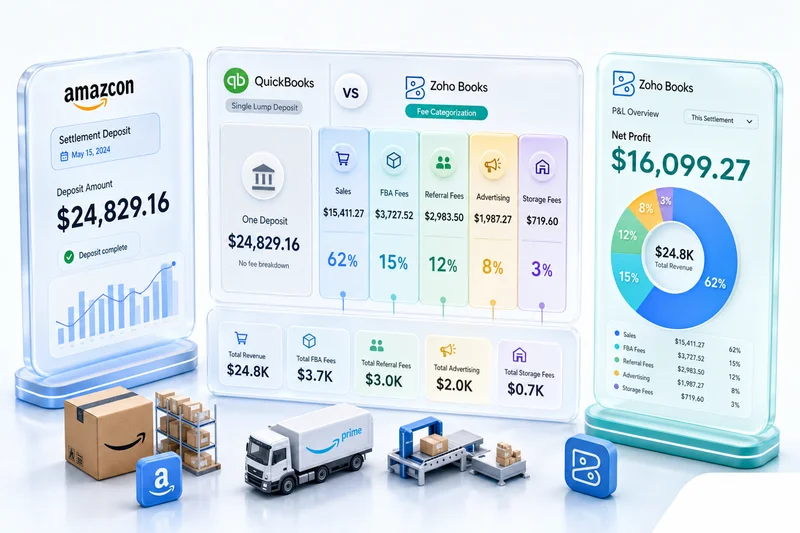
In over 100 eCommerce accounting implementations, Zolify's CA-backed team identifies the same reconciliation failure in the majority of seller books: no clearing accounts, deposits recorded directly as revenue, and a "bank difference" account absorbing the unexplained amounts. Sellers migrating from QuickBooks often carry this problem over from their previous setup. For a direct comparison of how each platform handles eCommerce reconciliation, see our Zoho Books vs QuickBooks for eCommerce guide.
The impact compounds over time. A bank difference account that grows each month signals unrecorded fees, missed returns, or revenue timing errors. By the end of a fiscal year, books built on direct deposit-to-revenue matching require significant cleanup before a CPA can close them or prepare a tax return.
As an Official Zoho Authorized Partner, Zolify's implementations set up the clearing account structure during initial Zoho Books configuration, before any live transactions. Retrofitting the structure to an existing setup with 12 months of transactions takes more work, but the same logic applies: the books become auditable once the clearing accounts are in place.
Get your reconciliation right from the start
Clearing accounts add one step to the recording process and eliminate hours of monthly reconciliation errors. The structure works for single-channel Shopify sellers and scales to multi-channel setups without adding complexity.
Get a Bank Reconciliation Audit Zolify reviews your current Zoho Books bank reconciliation setup, identifies clearing account gaps, and delivers a remediation plan. Most audits surface three to five months of correctable reconciliation errors.
For full eCommerce accounting setup guidance, visit our Shopify + Zoho integration page and Amazon + Zoho integration page.
Frequently Asked Questions
Standard businesses receive payment roughly matching what they invoiced. eCommerce platforms pay net amounts after deducting fees, across batched timeframes that don't match your order calendar. Shopify sends a 2-3 day rolling payout covering multiple orders minus processing fees. Amazon sends a bi-weekly settlement covering hundreds of orders minus 15-plus fee types. These deposits don't match any single transaction in Zoho Books, so direct deposit-to-revenue matching fails. Clearing accounts solve this by creating an intermediate account that bridges gross revenue records to net payout deposits.
A clearing account is a current asset account that holds transaction amounts temporarily while you wait for the corresponding bank movement. In eCommerce accounting, a Shopify Clearing Account receives the gross sales credit when an order occurs and a debit when the net payout deposits to your bank. The fee entries also debit the clearing account. When set up correctly, the clearing account balance represents only orders processed but not yet paid out-never a permanent balance.
Download the settlement report from Amazon Seller Central. Record gross sales debiting the Amazon Clearing Account and crediting Sales Revenue: Amazon. Then post each fee category from the settlement as a debit to the appropriate expense account (referral fees, FBA fees, storage fees) and credit Amazon Clearing Account. When the bank deposit arrives, debit the bank account and credit Amazon Clearing Account. The clearing account should net to zero or to the amount of orders placed but not yet settled.
Zoho Books can auto-match bank feed transactions to existing entries using bank rules. For Shopify, you can create a rule that matches deposits from Shopify Payments to the Shopify Clearing Account. Amazon settlements need manual matching because the deposit amount is unique each settlement period. The bulk of reconciliation work in eCommerce is recording gross sales and fees correctly before the bank feed arrives-once those entries exist, the bank feed match is straightforward.
For a single-channel seller with a clean chart of accounts and clearing account structure, monthly reconciliation takes 30-60 minutes. For a multi-channel seller running Shopify, Amazon, and WooCommerce, plan 2-3 hours unless the process is partially automated. Most of that time goes into downloading settlement reports and verifying fee categorizations. Sellers who skip the clearing account setup spend significantly longer each month manually hunting for deposit-to-revenue discrepancies that a clearing account eliminates structurally.
See exactly where your Shopify, Amazon, or WooCommerce ops are leaking — free.
Get a personalised eCommerce Ops Audit: inventory gaps, accounting leaks, and order-flow bottlenecks — with a Zoho fix roadmap. Delivered in 48 hours, at no cost.