Zoho Inventory for WooCommerce: Sync Products, Stock, and Orders in Real Time
WooCommerce inventory management works for a single store with a few hundred SKUs. [WooCommerce's built-in stock management](https://woocommerce.com/document/managing-products/) covers basic quantity tracking and low-stock notifications. Add a second warehouse, a third sales channel, or a 3PL, and that's where it runs out. Zoho Inventory operates as the backend layer that WooCommerce doesn't provide-and syncs back to your store in real time.
WooCommerce handles inventory well within a defined scope: one store, one warehouse, products you fulfill yourself. The ceiling appears when the business expands. A second warehouse creates split stock that WooCommerce can't reconcile. Adding Amazon or Shopify as a second channel means managing two separate stock counts with no connection between them. Bringing in a 3PL means emailing fulfillment instructions manually because WooCommerce has no native 3PL workflow.
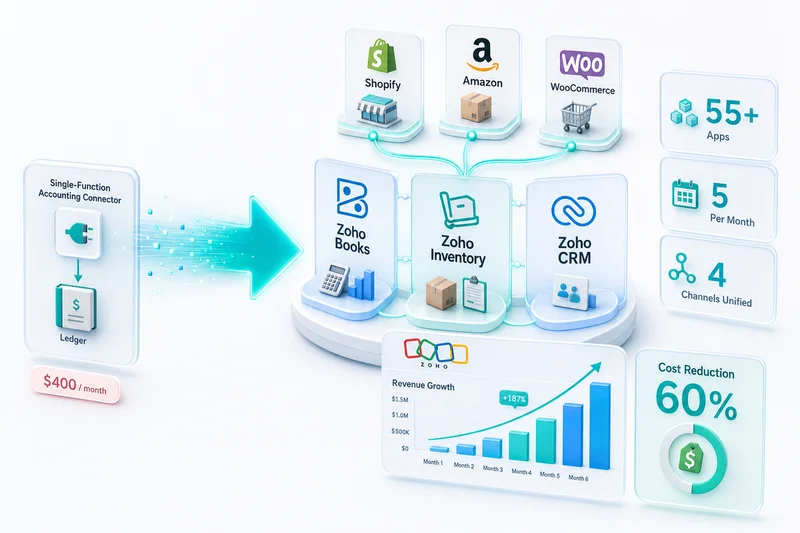
Zoho Inventory operates as the operational backend that WooCommerce doesn't provide. It manages stock across locations, automates purchase orders when levels drop, routes orders to the right fulfillment source, and posts COGS directly to Zoho Books. WooCommerce remains the customer-facing storefront. Zoho Inventory runs everything behind it.
TL;DR: Connect Zoho Inventory to WooCommerce for multi-warehouse stock management, automated reorder triggers, and accurate COGS accounting. Products sync from Zoho Inventory to WooCommerce; orders flow from WooCommerce to Zoho Inventory for fulfillment; updated stock counts return to WooCommerce in real time.
What WooCommerce inventory management can't do at scale
WooCommerce's stock management is built for simplicity: enable stock tracking on a product, set the quantity, and WooCommerce decrements it when orders process. That works for a small operation but breaks at three predictable points.
Multi-location inventory: WooCommerce tracks a single stock quantity per product. If you hold inventory in two warehouses, or if some stock is at a 3PL and some at your own location, WooCommerce has no way to represent that split. You manage two locations manually and hope the numbers stay synchronized.
Reorder automation: WooCommerce marks products "out of stock" but doesn't generate purchase orders. Knowing a product is low and automating the supplier order are two different capabilities. WooCommerce provides the first; it doesn't provide the second.
Cross-channel sync: If the same product sells on WooCommerce, Amazon, and Shopify, each platform has its own stock count. An oversell happens when a unit sells on Amazon but WooCommerce doesn't know the stock dropped. Preventing it requires either holding separate physical buffers per channel (expensive) or a centralized inventory system that pushes real-time counts to all channels.
For a broader look at WooCommerce's integration capabilities with Zoho's full app suite, see our WooCommerce to Zoho integration guide.
If you're considering moving your storefront from WooCommerce to Shopify entirely rather than adding it as a second channel, see our Zoho Inventory for Shopify guide — the Zoho Inventory connector cannot be transferred and needs to be rebuilt for the new platform.
What Zoho Inventory adds to a WooCommerce backend
Multi-warehouse stock management
Zoho Inventory supports unlimited warehouses (on appropriate plan tiers). Each warehouse has its own stock balance for every SKU. When a WooCommerce order arrives, Zoho Inventory's fulfillment rules determine which warehouse ships the order based on criteria you define: shipping destination, stock availability, fulfillment cost, or order tag.
Each shipment deducts stock from the assigned warehouse, keeping per-location counts accurate. The consolidated view shows total available stock across all locations; the warehouse view shows what's available at each location specifically.
Automated purchase orders
Zoho Inventory reorder points trigger purchase orders automatically. Set a reorder point and a preferred quantity per SKU per vendor. When stock at any location drops to the reorder point, Zoho Inventory generates a draft purchase order to the configured supplier. You approve the PO (or automate approval for trusted suppliers), and Zoho Inventory tracks the expected receipt, adjusting available-to-promise stock for WooCommerce accordingly.
Zoho Inventory's reorder automation documentation covers all configuration options including multi-warehouse and vendor-specific thresholds.
Composite items and kits
If you sell product bundles on WooCommerce, Zoho Inventory's composite item tracking deducts the component quantities when a bundle order processes. The WooCommerce bundle product maps to a Zoho Inventory composite item. When a customer orders the bundle, Zoho Inventory deducts each component from its individual stock balance. WooCommerce's stock display for the bundle product updates based on which component constrains availability.
Serial and batch number tracking
For WooCommerce sellers with traceability requirements-electronics, food products, supplements, medical devices-Zoho Inventory assigns serial numbers and batch numbers at receiving. When a product ships, the serial or batch number attaches to the fulfillment record. Returns link back to the specific batch received. This level of traceability isn't available in WooCommerce's built-in inventory.
How the WooCommerce–Zoho Inventory connection works
The integration between WooCommerce and Zoho Inventory operates as a bidirectional sync with WooCommerce as the customer-facing catalog and Zoho Inventory as the operational backend.
Product sync (Zoho Inventory → WooCommerce)
Products are created and managed in Zoho Inventory, then pushed to WooCommerce:
| Zoho Inventory Field | WooCommerce Field |
|---|---|
| Product name | Product name |
| SKU | SKU |
| Product description | Short/long description |
| Sales price | Regular price |
| Product images | Product gallery |
| Variants (size, color) | Variable product attributes |
| Stock quantity | Stock quantity |
| Low stock threshold | Low stock amount |
When you update a product price in Zoho Inventory, the change reflects on WooCommerce. When you add a new variant, WooCommerce receives the new attribute. The catalog is maintained in one system, not two.
Order flow (WooCommerce → Zoho Inventory)
When a customer places an order on WooCommerce:
- WooCommerce sends the order to Zoho Inventory via webhook
- Zoho Inventory checks stock availability at the assigned warehouse
- A pick list and packing slip generate for the fulfillment team
- The order ships and Zoho Inventory records the shipment
- WooCommerce order status updates to "Shipped" or "Completed" with the tracking number
- Stock count decrements at the warehouse level and updates on WooCommerce
For 3PL fulfillment, step 3 sends the fulfillment instruction to the 3PL's system via EDI or API, depending on the 3PL's capabilities.
Stock sync (Zoho Inventory → WooCommerce)
After each order ships, Zoho Inventory pushes the updated stock count to WooCommerce. For sellers running multiple channels, Zoho Inventory maintains a master stock count and distributes allocated quantities to each channel. WooCommerce sees its allocated quantity, not the total across all channels. This prevents overselling across channels when the same physical stock serves multiple storefronts.
For how multi-channel inventory allocation works across Shopify, Amazon, and WooCommerce at once, see our multi-channel inventory management guide.
The accounting bridge: Zoho Inventory to Zoho Books
When Zoho Inventory and Zoho Books connect (they're both part of the Zoho Finance stack and share a native integration), every inventory movement creates the corresponding accounting entry.
When goods are received from a supplier: Inventory Asset increases; Accounts Payable increases.
When a WooCommerce order ships: COGS posts automatically from the inventory cost assigned to the item. No manual journal entry required. COGS is calculated based on your costing method (FIFO, LIFO, or average cost) applied consistently to every unit shipped.
When a WooCommerce return processes: Inventory Asset increases; COGS reverses. The return records back to the product's cost basis, keeping your cost layer accurate.
This accounting bridge is what separates Zoho Inventory from WooCommerce plugins that track stock without accounting integration. For eCommerce sellers who need accurate gross margin reporting, the automatic COGS posting is the feature that justifies the implementation investment. See our WooCommerce monthly bookkeeping guide for how the accounting side of the process works.
Zoho Inventory vs. WooCommerce stock plugins: a comparison
| Capability | WooCommerce Built-In | WooCommerce Plugin | Zoho Inventory |
|---|---|---|---|
| Multi-warehouse | No | Limited (plugin-dependent) | Yes |
| Automated purchase orders | No | No | Yes |
| Reorder points per location | No | Limited | Yes |
| Cross-channel inventory sync | No | No | Yes |
| Composite item / kit tracking | No | Partial | Yes |
| Serial / batch tracking | No | Plugin-dependent | Yes |
| Zoho Books COGS integration | No | No | Native |
| 3PL fulfillment routing | No | No | Yes |
| Amazon / Shopify channel sync | No | No | Yes |
WooCommerce plugins can close some of these gaps individually-but each plugin adds another system to maintain, another configuration to break on a WordPress update, and another data source that doesn't talk to your accounting software. Zoho Inventory integrates across all of these dimensions in a single system that connects to Zoho Books by design.
How Zolify implements Zoho Inventory for WooCommerce
Zolify has completed 100+ eCommerce operations implementations, a significant portion of which involved connecting WooCommerce to Zoho Inventory and Zoho Books. The implementation sequence follows a consistent pattern:
- Catalog migration: Import the existing WooCommerce product catalog into Zoho Inventory, mapping variants, pricing, and existing stock quantities accurately.
- Warehouse setup: Configure locations in Zoho Inventory to match the client's actual stock locations (own warehouse, 3PL, consignment locations).
- Integration build: Build the WooCommerce–Zoho Inventory connector with webhook-triggered order sync, stock update callbacks, and error handling for edge cases (out-of-stock orders, partial shipments, returns).
- Accounting configuration: Connect Zoho Inventory to Zoho Books with the correct COGS accounts, inventory asset account, and AP setup for supplier invoices.
- Testing and go-live: Run parallel operations for one week to verify stock counts, order routing, and accounting entries before cutting over.
As an Official Zoho Authorized Partner, Zolify builds integrations to Zoho's implementation standards, which means the setup holds through Zoho platform updates and WooCommerce version changes.
Ready to upgrade your WooCommerce inventory backend?
Zoho Inventory solves the multi-location, multi-channel inventory problems that WooCommerce's built-in stock management can't address. The connection to Zoho Books means every inventory movement becomes an accounting entry automatically-no manual COGS journal entries, no separate inventory spreadsheet to reconcile monthly.
Get an eCommerce Ops Audit - Zolify reviews your current WooCommerce inventory setup, identifies the operational gaps, and delivers an implementation plan for connecting Zoho Inventory with your existing stack.
For a complete picture of the WooCommerce + Zoho integration, visit our WooCommerce + Zoho operations page.
Frequently Asked Questions
Yes. Zoho Inventory connects to WooCommerce via API integration, either through Zoho's native connectors or a custom integration built around your specific catalog and order flow requirements. The connection syncs products (name, description, images, price, SKU) from Zoho Inventory to WooCommerce, pulls customer orders from WooCommerce into Zoho Inventory for fulfillment, and pushes updated stock counts back to WooCommerce after each pick-pack-ship cycle.
WooCommerce's stock management is designed for a single location with products you fulfill yourself. Zoho Inventory adds: multi-warehouse stock allocation, automated purchase orders triggered by reorder points, composite item tracking (bundles and kits), serial and batch number tracking, 3PL and drop-ship fulfillment workflows, and a direct accounting bridge to Zoho Books for automatic COGS posting. It also supports additional sales channels (Amazon, Shopify, eBay) managed from a single inventory backend.
No, not when the integration is built correctly. Zoho Inventory's WooCommerce sync is event-driven: when a WooCommerce order processes, it triggers a stock deduction in Zoho Inventory, which pushes the updated stock count back to WooCommerce. For most setups, this loop completes in under 60 seconds. Delays occur only with polling-based connectors that check for changes on a scheduled interval rather than in response to order events. A custom integration using webhook-triggered sync eliminates the delay.
Yes. Zoho Inventory supports simple products and grouped products with variants (size, color, material). Product variants in Zoho Inventory map to WooCommerce variable products with their corresponding attributes. Each variant has its own SKU, stock level, and reorder point. Updates to variant stock in Zoho Inventory reflect on the WooCommerce product page. New variants added in Zoho Inventory can be pushed to WooCommerce; variants added in WooCommerce can be pulled into Zoho Inventory, depending on which system is the source of truth for product catalog management.
Zoho Inventory uses warehouse assignment rules to route WooCommerce orders to the correct fulfillment location. Rules can be based on product type, customer shipping address (country, state, zip), order tags, or custom logic. Orders assigned to a 3PL generate a fulfillment instruction to that 3PL. Orders fulfilled in-house generate a pick list and packing slip for your warehouse team. Stock deductions happen at the assigned warehouse level, so per-location stock counts stay accurate as orders process.
See exactly where your Shopify, Amazon, or WooCommerce ops are leaking — free.
Get a personalised eCommerce Ops Audit: inventory gaps, accounting leaks, and order-flow bottlenecks — with a Zoho fix roadmap. Delivered in 48 hours, at no cost.