Monthly Bookkeeping for WooCommerce Sellers Using Zoho Books: A Step-by-Step Workflow
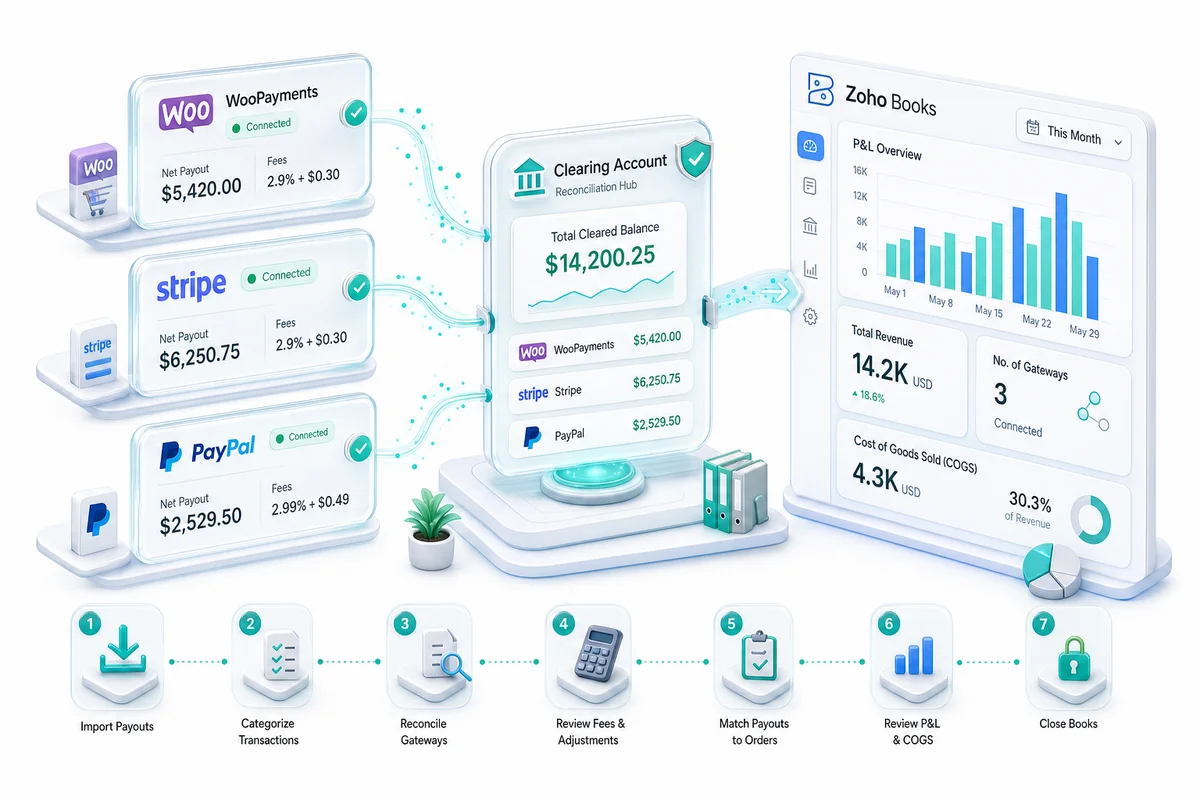
WooCommerce stores often run multiple payment gateways - WooPayments, Stripe, PayPal - each with different fee structures and settlement timing. This is the 7-step monthly close workflow for WooCommerce sellers in Zoho Books, covering multi-gateway revenue recording, fee separation, clearing account reconciliation, sales tax, and COGS.
WooCommerce stores don't follow a single payment structure. Most run two or three payment gateways simultaneously - WooPayments (or Stripe under the hood), PayPal, and sometimes Square or a regional processor - each with its own fee schedule, each depositing on its own timeline. A WooCommerce bookkeeping setup that treats all gateway deposits as a single revenue stream produces numbers that look fine until you try to reconcile them.
Zoho Books handles multi-gateway WooCommerce operations well, but only if the chart of accounts is structured to separate each gateway from the start.
Direct answer: Monthly WooCommerce bookkeeping in Zoho Books follows a 7-step process: download reports from WooCommerce and each payment gateway, record gross sales routed to gateway-specific clearing accounts, book processing fees by gateway, reconcile payouts via clearing accounts, update COGS, verify sales tax obligations (WooCommerce is not a marketplace facilitator - you own this), and review the P&L. The structural difference from Shopify or Amazon bookkeeping is the multi-gateway clearing account setup and the sales tax responsibility that falls entirely on you.
Why WooCommerce bookkeeping is more complex than Shopify or Amazon
Shopify sellers using Shopify Payments deal with one gateway, one clearing account, and Shopify handling marketplace facilitated sales tax in most US states. Amazon sellers deal with Amazon's settlement system, but at least it's one payer and Amazon handles sales tax in 46+ states.
WooCommerce gives you maximum control and maximum responsibility. You choose your payment gateways. You set up sales tax collection. You run the reconciliation for each processor. There is no platform-level marketplace facilitation to simplify the tax side.
For eCommerce operations on WooCommerce at $500,000+ in annual revenue, that responsibility translates to: multiple gateway reconciliations per month, potential sales tax nexus in multiple states, and a chart of accounts that needs to be precise enough to support all of it.
Before you start: the Zoho Books accounts your WooCommerce setup needs
The critical distinction from single-gateway stores: you need a separate clearing account for each payment gateway. Everything else in the setup is similar to other eCommerce platforms.
Income accounts:
- Sales Revenue: WooCommerce (gross order value before fees)
- Returns and Allowances: WooCommerce (refunds)
Asset accounts:
- WooPayments Clearing Account (Other Current Asset)
- Stripe Clearing Account (Other Current Asset)
- PayPal Clearing Account (Other Current Asset)
- Add one per gateway in use
Cost of Sales accounts:
- Cost of Goods Sold: WooCommerce
- WooPayments Processing Fees
- Stripe Processing Fees
- PayPal Processing Fees
Operating Expense accounts:
- WooCommerce Extension Fees (third-party plugin costs)
- Hosting Costs (if tracked separately from general operating expenses)
Liability accounts:
- Sales Tax Payable: [State] (one per state where you file, or consolidated with a tax service integration)
The complete chart of accounts mapping is in the eCommerce chart of accounts guide for Zoho Books. If you're integrating Zoho Books with WooCommerce via custom API, the WooCommerce to Zoho integration guide covers the technical setup in detail.
Step 1: Download reports from WooCommerce and each gateway
From WooCommerce Admin > Analytics > Orders: export the orders report filtered to the accounting month. The export should include: Order ID, Order Date, Payment Method, Gross Revenue, Refunds, and Net Revenue.
From each gateway:
- WooPayments: Payments menu in WooCommerce Admin > Transaction reports and Payout reports
- Stripe: dashboard.stripe.com > Reports > Balance summary and Payout reconciliation
- PayPal: Activity Reports in PayPal Business (filter to the accounting period)
Store each report by gateway and period. These are your source documents for every reconciliation step. For periods where a dispute or refund was processed, save the dispute record from the relevant gateway alongside the standard reports.
Step 2: Record gross sales and returns in Zoho Books
From the WooCommerce orders report, sum gross revenue by payment method. Each payment method maps to a gateway, and each gateway maps to its own clearing account.
Monthly aggregate journal entry for WooCommerce revenue:
| Account | Debit | Credit |
|---|---|---|
| WooPayments Clearing Account | WooPayments Gross Sales | - |
| Stripe Clearing Account | Stripe Gross Sales | - |
| PayPal Clearing Account | PayPal Gross Sales | - |
| Sales Revenue: WooCommerce | - | Total Gross Sales |
| Returns and Allowances: WooCommerce | Returns Total | - |
| WooPayments Clearing Account | - | WooPayments Returns |
| Stripe Clearing Account | - | Stripe Returns |
| PayPal Clearing Account | - | PayPal Returns |
For operations under roughly 150 orders per month where individual order detail matters for customer record-keeping, creating sales invoices or receipts in Zoho Books per order is manageable. Above that, monthly aggregate journal entries produce the same financial result with significantly less manual entry.
Step 3: Book payment gateway fees by processor
Each gateway's fee structure is different, which is why separate expense accounts matter:
WooPayments: Standard rate is 2.9% + $0.30 per transaction for US cards. International cards and currency conversions add additional fees. WooPayments' transaction report shows fees per transaction and a monthly total. WooCommerce's payment documentation details the current rate structure by geography.
Stripe: Standard rate is 2.9% + $0.30 per successful transaction (US). Stripe's dashboard shows a monthly fee summary under Reports. Dispute fees ($15 per dispute), Radar fees, and any custom pricing adjustments appear as separate line items.
PayPal: Rates vary by product. PayPal Checkout is typically 3.49% + $0.49 per transaction. PayPal Standard varies. Monthly fee statements are available in PayPal Business under Activity Reports > Statements.
Journal entry for gateway fees:
| Account | Debit | Credit |
|---|---|---|
| WooPayments Processing Fees | Total WooPayments Fees | - |
| WooPayments Clearing Account | - | Total WooPayments Fees |
| Stripe Processing Fees | Total Stripe Fees | - |
| Stripe Clearing Account | - | Total Stripe Fees |
| PayPal Processing Fees | Total PayPal Fees | - |
| PayPal Clearing Account | - | Total PayPal Fees |
After these entries, the clearing account balance for each gateway represents the net amount expected to arrive in your bank - gross sales minus fees minus returns.
Step 4: Reconcile gateway payouts to the bank feed
Each gateway deposits on its own schedule:
- WooPayments: Daily payouts to your bank, typically arriving 1-2 business days after processing
- Stripe: Daily payouts by default (US), arriving 2 business days after charge date; configurable to weekly or monthly
- PayPal: Manual or scheduled transfers; can hold funds for 21 days on newer accounts
Match each bank deposit from each gateway to the corresponding clearing account balance. For daily-payout gateways, you'll have 20-23 bank entries per month from that gateway alone.
Reconciliation for monthly close:
- In Zoho Books, match each bank deposit to the clearing account credit for the correct gateway
- Verify the clearing account balance at month end equals only in-transit payouts (processed in the last 1-2 days of the month, depositing in early next month)
- A clearing account balance significantly larger than 2-3 days of sales indicates unmatched transactions or an unrecorded fee entry
PayPal's hold behavior complicates this for newer accounts: PayPal may hold payment funds for 21 days on first transactions. The WooCommerce order records the sale; PayPal holds the cash. The clearing account approach handles this correctly - the PayPal Clearing Account balance includes held funds until they release and you match the bank deposit.
Step 5: Update COGS for items sold
If inventory is managed in Zoho Inventory and linked to your WooCommerce store via a custom integration, COGS posts automatically when sales are recorded. For stores managing inventory in WooCommerce's built-in system or a third-party plugin without a Zoho connection, COGS needs to be calculated from purchase records and posted monthly.
WooCommerce's built-in stock management tracks quantities but not costs. If your inventory costs are in a spreadsheet or a separate purchasing system, calculate total COGS from units sold multiplied by unit cost, then post:
| Account | Debit | Credit |
|---|---|---|
| Cost of Goods Sold: WooCommerce | Total COGS | - |
| Inventory Asset | - | Total COGS |
Stores selling bundles or kit products need to track component-level costs to calculate COGS correctly. If WooCommerce is using a bundled products plugin (like Composite Products or Product Bundles), ensure the cost allocation reflects the component structure, not just the bundle sale price.
Step 6: Verify and record sales tax obligations
This step has more weight for WooCommerce sellers than for Amazon or Shopify sellers because WooCommerce is not a marketplace facilitator. You are responsible for sales tax in every state where you have economic nexus.
Economic nexus thresholds vary by state but are typically $100,000 in sales or 200 transactions in a calendar year. Once nexus exists in a state, you must register, collect, and remit. Missing the registration deadline can create back-tax liability with penalties.
WooCommerce can be configured to collect sales tax via its built-in tax settings or via plugins like TaxJar or Avalara. Whichever method you use, the monthly close requires:
- Exporting the tax collected by state from WooCommerce (Analytics > Taxes)
- Comparing that to your Sales Tax Payable account balances in Zoho Books
- Adjusting the payable balance for any states where collection differs from your filing obligation
- Verifying that states where you don't have nexus (or where there's no applicable tax) aren't accumulating payable balances incorrectly
The eCommerce sales tax guide for Zoho Books covers the full US sales tax framework for multi-state eCommerce operations - including how to structure Zoho Books tax codes for the states most commonly affecting $1M+ WooCommerce stores.
Step 7: Review the P&L and close the month
Run the Profit and Loss report in Zoho Books before locking the month and check these three sets of figures:
Gross revenue (Zoho) vs WooCommerce order totals: Should match within return timing differences. A consistent gap in one direction often means a gateway's sales aren't routing to the correct clearing account, or a gateway was added mid-month without its clearing account being set up first.
Payment processing fees as a percentage of revenue: Add up total processing fees across all gateways and divide by total gross revenue. For a store using WooPayments and Stripe at standard rates, expect approximately 3.0-3.5% of revenue as processing costs. Higher percentages may mean dispute fees or international card fees are being captured correctly but not labeled separately.
Gateway clearing account balances: Each gateway's clearing account should have only in-transit payouts at month end - roughly equal to the last 1-2 days of sales through that gateway. A balance that persists across multiple months without a matching deposit means a payout was never received, which warrants a call to the gateway.
WooCommerce vs Shopify and Amazon: the key bookkeeping difference
Shopify Payments sellers get a single clearing account and Shopify as a marketplace facilitator. Amazon sellers get Amazon's settlement system and Amazon as a marketplace facilitator. WooCommerce sellers get as many clearing accounts as they have gateways and full sales tax responsibility.
The Shopify monthly bookkeeping workflow is structurally simpler than the WooCommerce workflow because Shopify Payments consolidates all transactions. WooCommerce's flexibility in accepting multiple gateways comes with proportionally more reconciliation work.
The advantage of the WooCommerce setup, done correctly in Zoho Books, is granularity: you can see exactly which gateway is cheaper across your transaction mix, which gateway is generating the most disputes, and whether your PayPal costs are worth the payment option. That data informs real decisions about which gateways to prioritize.
What Zolify's WooCommerce implementations include
Zolify has completed 100+ eCommerce implementations including WooCommerce + Zoho Books setups across single and multi-channel operations. For WooCommerce clients, the standard engagement includes a CA review of the chart of accounts before go-live, test reconciliation against a full month of real WooCommerce and gateway transaction data, and documentation of the specific monthly workflow for each client's gateway configuration and state nexus profile.
WooCommerce sellers most commonly arrive with books that consolidate all gateway deposits into a single revenue account without fee separation and with sales tax accounts missing or misconfigured. Reconstruction for a 12-month period requires downloading historical transaction reports from each gateway and re-mapping every entry - more expensive than the initial correct setup. As an Official Zoho Authorized Partner, Zolify has direct Zoho support access for custom WooCommerce-to-Zoho integrations that handle multi-gateway reconciliation automatically.
A free eCommerce Ops Audit includes a review of your current WooCommerce-to-Zoho Books configuration, the gateway accounts in use, and the sales tax setup, to surface any compliance gaps before they grow.
Frequently Asked Questions
WooCommerce sellers using multiple payment gateways benefit from weekly reconciliation rather than monthly, because daily payouts from WooPayments and Stripe create many small clearing account entries that are easier to match in smaller batches. The monthly workflow still covers recording gross sales, booking gateway fees by processor, reconciling all payouts to the bank feed, updating COGS, and verifying sales tax. For stores with 200+ orders per month across multiple gateways, weekly reconciliation of each gateway's payout activity saves several hours of reconstruction time at month end compared to reconciling the full month at once.
Zoho Books does not have a native WooCommerce integration that automatically pulls orders, gateway fees, and payment data. The practical options are: a custom API integration connecting WooCommerce to Zoho Books (handles multi-gateway fee categorization, clearing account logic, and COGS automatically); Zoho Flow automations that watch for WooCommerce order webhooks and create journal entries; or manual monthly entry using the 7-step workflow. A custom integration handles multiple gateways and sales tax tracking in a single configured system. The manual approach works at lower volumes but requires a rigorously structured chart of accounts and consistent data discipline across each gateway's reporting.
Create a separate clearing account for each payment gateway you use - WooPayments Clearing Account, Stripe Clearing Account, PayPal Clearing Account - each as an Other Current Asset. All revenue entries post to the clearing account that matches the gateway that processed the order. Fee entries debit the gateway-specific fee expense account and credit the same gateway's clearing account. Bank deposits from each gateway are matched against that gateway's clearing account balance. Mixing entries from multiple gateways into a single clearing account makes it impossible to reconcile when one gateway has a dispute, hold, or payout discrepancy without reconstructing which entries belong to which processor.
WooCommerce sellers are responsible for sales tax collection and remittance in every state where they have economic nexus. WooCommerce is not a marketplace facilitator - it does not collect or remit sales tax on your behalf the way Amazon or Shopify does in marketplace facilitator states. Economic nexus typically triggers at $100,000 in sales or 200 transactions in a state in a calendar year, though exact thresholds vary by state. Once nexus exists, you must register, collect, and remit. In Zoho Books, set up Sales Tax Payable accounts by state, configure tax codes on your product items, and reconcile the payable balance to your actual filing obligations each period. WooCommerce sellers at the $500k-$1M revenue range are often filing in 5-10 states per year without realizing the obligation has accumulated.
The most common cause is a period cutoff mismatch: WooCommerce records the order date, while Zoho Books may record the payment date or gateway settlement date, and these can differ by 1-3 days around month end. A second cause is returns: if refunds are recorded as negative sales rather than as contra-revenue entries in Returns and Allowances: WooCommerce, net revenue may match but gross sales and returns are both understated. A third cause is gateway-held funds: PayPal sometimes holds funds from accounts under review, and those amounts are recorded as received in WooCommerce but haven't cleared as Zoho Books transactions yet. Using gateway-specific clearing accounts resolves the timing issue; using a proper Returns and Allowances account resolves the refund recording issue.
See exactly where your Shopify, Amazon, or WooCommerce ops are leaking — free.
Get a personalised eCommerce Ops Audit: inventory gaps, accounting leaks, and order-flow bottlenecks — with a Zoho fix roadmap. Delivered in 48 hours, at no cost.