eBay Seller Zoho Books: The Complete Accounting Setup Guide
eBay Managed Payments deposits are net figures — gross sales minus multiple fee categories deducted before the payout arrives. Recording that deposit as revenue is the most common eBay accounting error. This guide covers the complete Zoho Books setup for eBay: chart of accounts, Managed Payments reconciliation, Promoted Listings Standard vs Advanced accounting, COGS automation, and tax compliance.
eBay sellers who connect Zoho Books without the right configuration end up with a system that processes transactions and still produces wrong financial statements. The problem is structural: your eBay Managed Payments deposit is not revenue. It's gross sales minus every fee category — listing fees, final value fees, Promoted Listings fees, international transaction fees, and payment processing fees — all deducted before the payout arrives. Record that single deposit as revenue and every margin figure in your books is wrong from day one.
This guide covers the complete Zoho Books setup for eBay: chart of accounts design, Managed Payments reconciliation, COGS automation through Zoho Inventory, multi-currency handling for UK, AU, and CA markets, and tax compliance for US and international sellers.
TL;DR: eBay Managed Payments deposits are net figures after all fee categories are deducted. Zoho Books handles eBay correctly when configured with separate expense accounts for each fee type — including distinct accounts for Promoted Listings Standard (pay-per-sale) and Advanced (CPC) — order-date revenue recognition (not payout-date), Zoho Inventory for COGS automation, and reconciliation driven by the transaction report rather than the bank deposit alone.
Why eBay Sellers Need a Specialised Zoho Books Setup
eBay Managed Payments: Your Deposit Is Not Your Revenue
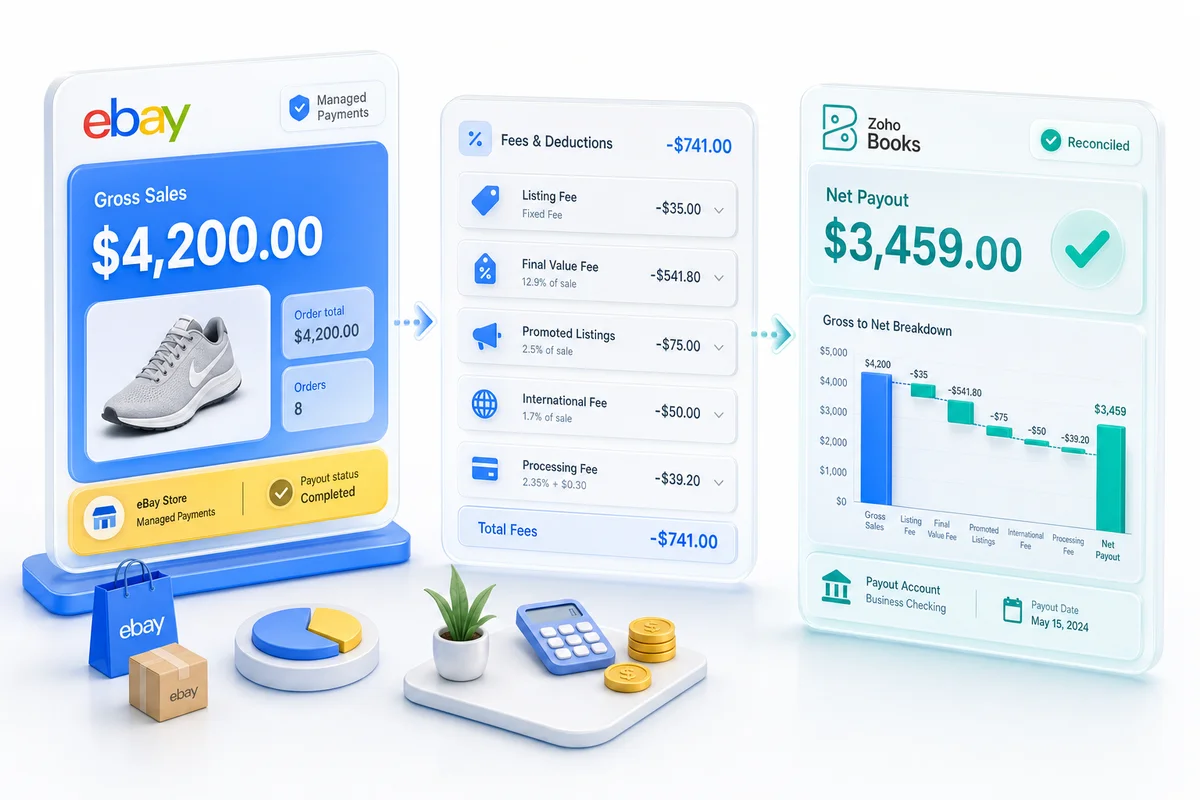
eBay Managed Payments replaced third-party payment processors for most sellers by 2023. Sellers receive a direct payout from eBay — typically daily or weekly — that reflects gross sales after all fees for the period have been deducted. A seller with $4,200 in gross eBay sales who incurs $741 across all fee categories receives a payout of approximately $3,459.
Recording $3,459 as revenue understates gross sales by the full $741 in fees and makes those $741 of legitimate business expenses invisible in the books. Both errors compound with every statement and show up as margin shortfalls that don't tie to anything in the books at year end.
The correct setup: record gross sales as revenue when each order completes, record each fee category to its designated account, and reconcile the net deposit to confirm the arithmetic checks out.
The eBay Fee Types Every Seller Must Track Separately
| Fee type | Rate | Account |
|---|---|---|
| Listing fee | $0.35 per listing (varies by category) | Operating expense |
| Final value fee | 10–15.55% of sale price + $0.30 | Cost of Sales |
| Promoted Listings Standard | Ad rate (seller-set %) × sale price, charged per sale | Advertising expense |
| Promoted Listings Advanced | CPC bid, charged per click regardless of sale | Advertising expense |
| International transaction fee | 1.65% on cross-border sales | Cost of Sales |
| Payment processing fee | 2.35% + $0.30 per transaction | Cost of Sales |
Final value fees and payment processing fees are direct transaction costs — they belong in Cost of Sales and reduce gross margin. Promoted Listings Standard fees (charged only when a buyer purchases within 30 days of clicking your promoted listing) and Promoted Listings Advanced fees (CPC-based, charged per click whether or not the sale converts) both belong in a dedicated advertising account, but they accrue on different triggers: Standard on sale, Advanced on click. This distinction matters for accrual accounting. Listing fees are operating overhead. A single "eBay fees" account tells you what you paid, not what kind of expense it was or whether it's deductible the same way.
eBay Returns and Partial Refunds: How Zoho Books Handles Them
When a buyer returns an item, eBay reverses the final value fee and payment processing fee for that transaction. In Zoho Books, issue a credit memo against the original invoice to reduce revenue, then post the fee reversals back to their source accounts. With accounts mapped correctly from setup, returns are routine entries rather than manual reconciliation problems at month end.
Multi-Currency eBay Sales: UK, AU, CA, and EU Markets
eBay operates separate storefronts for the UK (GBP), Australia (AUD), Canada (CAD), and EU markets. Zoho Books handles multi-currency natively at no extra cost. Each transaction records at the exchange rate on the order date. Sellers managing eBay UK alongside a US store can maintain currency-specific revenue accounts and consolidate into one reporting currency for the P&L. For sellers with significant international volume across multiple channels, the full configuration approach — including FX gain/loss accounting and currency-specific clearing accounts — is covered in Multi-Currency eCommerce Accounting with Zoho Books.
eBay + Shopify or eBay + Amazon: Keeping Multi-Channel Revenue Separate
Most eBay sellers also sell on other platforms. eBay paired with Amazon for liquidation or with Shopify for primary brand sales is a common configuration. Separate revenue accounts per channel in Zoho Books, supported by Zoho's multi-channel inventory management, produce a per-channel P&L that shows actual profitability per platform rather than a pooled total.
Setting Up Zoho Books for eBay: Step by Step
Step 1 - Chart of Accounts: eBay Revenue and Five Fee Expense Accounts
Configure these accounts before connecting anything to eBay:
Revenue: eBay Product Sales (gross), eBay Shipping Revenue (if you charge shipping separately)
Cost of Sales: eBay Final Value Fees, eBay Payment Processing Fees, eBay International Transaction Fees, eBay COGS (linked to Zoho Inventory), eBay Fulfilment Costs
Operating Expenses: eBay Listing Fees, eBay Store Subscription (if applicable)
Advertising: eBay Promoted Listings
Other Income: eBay Fee Credits and Reimbursements (FVF credits, below-standard adjustments)
This account structure means your gross margin reflects direct transaction costs only. Final value fees and processing fees reduce gross margin. Promoted listings appear below as a measurable advertising line. Listing fees stay in operating overhead where they belong.
Step 2 - eBay Managed Payments Setup: Connecting the Statement to Zoho
In Zoho Books, add your eBay Managed Payments account as a bank account. The eBay Managed Payments transaction report from Seller Hub is the authoritative reconciliation source — not the bank deposit alone. The report gives you line-item detail for every fee category. The bank deposit confirms the net total. You need both. For a step-by-step walkthrough of configuring the eBay marketplace connection itself — including OAuth setup, order sync settings, and SKU mapping — see eBay Zoho Integration: Connect Your eBay Store to Zoho Books and Inventory.
Step 3 - Import Your eBay Transaction Report: Monthly Statement Reconciliation
Download the eBay Managed Payments transaction report from Seller Hub as a CSV. Import it into Zoho Books and map each line type to the corresponding account from your chart of accounts. When complete, the sum of all entries should equal the net deposit amount. Any gap indicates a missing fee category or an unrecorded return.
Step 4 - Bank Rules: Auto-Categorise eBay Deposits When They Arrive
Set a bank rule in Zoho Books to recognise incoming eBay payouts by their bank description (typically "eBay Payout" or similar). Route identified deposits to an eBay Managed Payments clearing account — not directly to revenue. The clearing account holds the net deposit until reconciliation against the transaction report splits it into the correct accounts. That's the structural fix that prevents the "net deposit as revenue" error from recurring after initial setup.
Step 5 - Tax Setup: Sales Tax or VAT for Your eBay Markets
In the US, configure eBay-collected sales tax as a marketplace facilitator pass-through for each applicable state — not as your tax liability. For UK, EU, and Australian sales, configure VAT and GST the same way. eBay collects and remits on your behalf in most cases; these amounts are pass-throughs in Zoho Books, not your income.
eBay Managed Payments Reconciliation in Zoho Books
Gross Sales vs Net Payout: Recording the Difference Correctly
Record gross sales to the eBay Product Sales revenue account when each order completes — not when the payout arrives. The net deposit from eBay confirms that gross sales minus all fee categories equals the amount received. Zoho Books' reconciliation view flags any discrepancy between the transaction report total and the bank deposit, so gaps are visible immediately rather than discovered at year end.
eBay Listing Fees, Final Value Fees, Promoted Listings: Three Separate Expense Lines
These three fees touch different parts of your P&L. Final value fees reduce gross margin directly. Promoted Listings appear below gross margin as advertising spend you can compare to ad-driven revenue. Listing fees sit in operating overhead. Running them through separate accounts answers questions a blended "eBay fees" account cannot: what is my gross margin before advertising spend? What is my effective Promoted Listings rate as a percentage of revenue?
Note the Promoted Listings accounting split: Standard fees accrue when a sale completes within the 30-day attribution window (expense matches the sale event); Advanced CPC fees accrue when a shopper clicks (expense precedes the sale, or occurs with no sale at all). Both belong in an advertising expense account, but recognising them on different triggers keeps your accruals accurate, especially during high-volume periods when click counts and sale counts diverge sharply.
International Fees and Payment Processing: Two More Expense Lines
International transaction fees (1.65% on cross-border sales) apply when a buyer's eBay country differs from the seller's registered account country. Payment processing fees (2.35% + $0.30 per transaction) cover eBay's cost of processing the card payment. Both are variable costs that scale with volume and belong in Cost of Sales alongside final value fees — not in a general operating expenses bucket.
Returns and Adjustments: How Zoho Books Handles eBay Refunds
Issue credit memos in Zoho Books for returned orders. The credit memo reduces revenue; the accompanying fee reversals from eBay (final value fee credit, payment processing fee credit) post back to their respective expense accounts. For returns that arrive in a different month than the original sale, the credit memo approach avoids restating prior-month revenue.
Zoho Inventory + eBay: Managing eBay Stock and COGS
Connecting eBay to Zoho Inventory: Real-Time Order Pull
Zoho Inventory's native eBay marketplace integration pulls orders automatically as they're placed on eBay. Stock levels update on each sale. Order data flows to Zoho Books for accounting. Returns sync back and reverse the original entries. The connection handles orders, stock, and customer data — no manual transfer between the eBay order and the accounting record.
eBay Orders → Zoho Inventory → COGS → Zoho Books: The Automated Chain
Each eBay fulfilment event triggers a COGS calculation in Zoho Inventory based on your valuation method (FIFO is the most common for eBay sellers with standard product lines). The COGS figure passes to Zoho Books automatically. Month-end COGS in your P&L reflects actual fulfilment costs rather than an end-of-month estimate reconstructed from memory.
Multi-Location Inventory: Fulfilling eBay Orders From Multiple Warehouses
Zoho Inventory supports multiple warehouse locations. eBay orders route to the assigned fulfilment location, COGS records from the correct warehouse's inventory cost, and stock updates by location. For eBay sellers with stock split across multiple fulfilment centres or regional warehouses, location-level tracking prevents COGS distortion from cost differences between locations.
eBay + Shopify + Amazon in One Inventory Pool: Preventing Oversells
Zoho Inventory maintains a single master inventory pool across all connected channels. When a SKU sells on eBay, the same SKU's stock updates across Shopify and Amazon simultaneously. Oversells are an inventory management problem, not a platform limitation. One connected pool through Zoho's multi-channel eCommerce solution eliminates them by treating all channels as draws from one master count.
Common eBay Accounting Mistakes in Zoho Books
Recording the Net Payout as Revenue (The Most Common Error)
This error comes from setting up Zoho Books to read the bank feed and categorise the incoming eBay deposit as revenue. The fix is the clearing account approach: the deposit routes through a clearing account, the transaction report reconciliation splits the total into the correct accounts, and the error cannot recur once the workflow is in place.
Missing Promoted Listings Fees — They're Deductible Expenses, Not Revenue Reductions
Promoted Listings fees are advertising expenses, not reductions against revenue. Sellers who omit them have advertising spend invisible in the P&L and no basis for measuring ROI on the investment. Map them to a dedicated advertising expense account — split by Standard and Advanced if you run both campaign types — and they appear as measurable, comparable lines. The stakes are highest during peak season: the eBay BFCM seller strategy in Zoho Books covers how Promoted Listings fees can spike 3–8× normal volume during high-traffic periods and what the reconciliation workflow looks like when that happens. Sellers running Advanced (CPC) campaigns during BFCM are particularly exposed: a surge in clicks without a proportionate rise in conversions means the fee accrues in November while the Zoho Books P&L looks fine — until the statement arrives.
Forgetting International Transaction Fees on Cross-Border Sales
International fees (1.65%) are small per-transaction but material for high-volume cross-border sellers. They belong in Cost of Sales with final value fees. Omitting them understates the true cost of international eBay sales and overstates gross margin on those transactions.
Not Separating eBay, Shopify, and Amazon Revenue Into Distinct Accounts
Multi-channel sellers who pool all revenue into one account cannot identify which platform is profitable. One revenue account per platform is a one-time account setup that produces channel-level gross margin on every report after. See the eBay accounting software comparison for how different tools handle channel separation — and why Zoho Books is the only option that handles all major marketplace channels natively in one system.
eBay Seller Tax Compliance in Zoho Books
US Sales Tax on eBay: eBay Collects and Remits for Most States
eBay is a marketplace facilitator in virtually all US states. Sales tax collection and remittance is eBay's responsibility. In Zoho Books, configure US marketplace-collected taxes as pass-through items — they appear in your eBay statement but are not your income or your liability to remit. See our eCommerce accounting software guide for how this applies across Shopify, Amazon, and other platforms.
What to Track in Zoho Books Even When eBay Remits Sales Tax
Retain transaction-level documentation showing eBay-collected tax by state. Some audit scenarios require sellers to prove that marketplace-collected tax was handled by eBay rather than the seller. Zoho Books' tax reports document this automatically when configured correctly, with no additional manual recordkeeping.
International Sellers: UK VAT, EU VAT, Australian GST on eBay Sales
For sales to UK, EU, and Australian buyers, eBay collects and remits VAT and GST on behalf of sellers in most cases. Configure these as pass-throughs in Zoho Books. VAT or GST that eBay collected is not your revenue. Recording it as income inflates reported sales and creates a tax liability that isn't actually yours. The same pass-through logic applies to Etsy Managed Payments, which has the same structure.
1099-K Reporting: What Your eBay Managed Payments Statement Means for Tax Filing
eBay issues a 1099-K reflecting gross payments to US sellers who exceed the reporting threshold. The 1099-K figure should match your Zoho Books gross sales total for the year. Your six fee expense accounts provide the deductible cost documentation that reduces taxable income from that gross amount. A correctly configured Zoho Books setup makes 1099-K reconciliation a verification step rather than a year-end reconstruction project. See our eCommerce bookkeeping guide for broader recordkeeping context. December is also the window to run an eBay year-end seller performance review before eBay's January evaluation; the eBay year-end seller performance review guide covers auditing your Q4 defect rate and Managed Payments data in Zoho Analytics alongside the books close.
How Zolify Sets Up Zoho Books for eBay Sellers
Chart of Accounts Built for eBay's Fee Structure: CA-Configured From Day One
Every Zolify eBay implementation starts with a CA-reviewed chart of accounts. The six eBay fee categories map to the correct account types before any data imports. This prevents structural errors from entering the system on the first statement.
eBay Managed Payments Import and Reconciliation Workflow
We build the complete reconciliation workflow: eBay Managed Payments account setup in Zoho Books, transaction report import mapping, clearing account structure, and bank rules that route deposits correctly. Month-end reconciliation becomes a five-step review task rather than a data entry exercise.
Zoho Inventory COGS Configuration for eBay Fulfilment
Zoho Inventory connects to eBay, pulls orders in real time, and records COGS per fulfilment event. We configure the inventory valuation method, warehouse assignments, and the order-to-COGS-to-Books chain. Multi-warehouse configurations and multi-channel inventory pools combining eBay with Amazon, Shopify, and Etsy are standard for sellers operating across platforms.
Month-End Close Checklist for eBay Sellers on Zoho Books
A correctly configured system produces a structured month-end close:
- Download eBay Managed Payments transaction report from Seller Hub
- Confirm import or sync is complete in Zoho Books
- Reconcile net payout against clearing account — amounts should match
- Review all fee accounts against statement totals for the period
- Confirm returns and credit memos are posted
- Run channel P&L and verify gross margin against prior month
For the complete step-by-step monthly close workflow covering all six fee types, COGS posting from Zoho Inventory, returns, and clearing account reconciliation, see the eBay monthly bookkeeping guide for Zoho Books.
As an Official Zoho Finance Partner with 100+ eCommerce implementations delivered, Zolify has configured Zoho Books for eBay sellers across single-channel operations and multi-channel setups combining eBay with Amazon, Shopify, WooCommerce, and Etsy. A CA (Chartered Accountant) reviews every implementation before go-live — not after the first month-end close surfaces errors. Zoho Finance Partner status means our team works directly with Zoho's finance product group; eBay-specific integration behaviour gets resolved faster than going through general support.
Get an eBay Accounting Assessment
If your current eBay setup records Managed Payments deposits as revenue, groups fee categories into one account, or calculates COGS manually at month end, the numbers are drifting from reality — and the gap grows with every statement.
Get an eCommerce Ops Audit and we'll review your current eBay accounting setup, identify where the numbers are wrong, and show you what a correctly configured Zoho Books implementation looks like for your operation. As a Zoho Authorized Partner serving eCommerce businesses across eBay, Amazon, Shopify, WooCommerce, and Etsy, we've handled every eBay-specific accounting scenario: Managed Payments timing quirks, Promoted Listings fees that roll across statement periods, multi-currency exchange rate gaps. We've built the configuration to handle all of them correctly from day one.
eBay accounting is one part of the broader Zoho eCommerce platform. For how eBay connects alongside Shopify, Amazon, WooCommerce, and Etsy in a single operations and accounting backend, see Zoho for eCommerce: The Complete Operations Platform Guide.
Frequently Asked Questions
eBay Managed Payments sends a single daily or weekly deposit to your bank account, net of listing fees, final value fees, Promoted Listings fees, international fees, and payment processing fees already deducted. In Zoho Books, the correct approach is to record gross sales as revenue when each order completes, then record each fee category as a separate expense. The deposit confirms the arithmetic: gross sales minus all fees should equal the net payout. Recording the deposit itself as revenue understates gross sales and hides every fee category as a deductible expense.
eBay has six distinct fee types that each require a separate expense account: (1) Listing fees — operating expense, charged per listing regardless of sale; (2) Final value fees — 10 to 15.55 percent of sale price plus $0.30, Cost of Sales; (3) Promoted Listings Standard — seller-set ad rate percentage of sale price, advertising expense, charged only when a buyer purchases within 30 days of clicking; (4) Promoted Listings Advanced — CPC bid charged per click whether or not a sale follows, advertising expense; (5) International transaction fees — 1.65 percent on cross-border sales, Cost of Sales; (6) Payment processing fees — 2.35 percent plus $0.30 per transaction, Cost of Sales. Combining any of these into one account hides which fee category is compressing your margin and makes it impossible to evaluate ad spend return separately from transaction costs.
Zoho Inventory connects directly to eBay and pulls orders in real time. Each time an eBay order fulfils, Zoho Inventory calculates COGS based on your chosen valuation method (FIFO or weighted average) and the current cost for that SKU. That figure passes automatically to Zoho Books. No manual COGS entry is needed at month end — fulfilment events record cost as they happen, so your P&L reflects actual cost of goods rather than an estimate.
Yes, for most states. eBay is a marketplace facilitator in all US states with marketplace facilitator laws, which now covers virtually the entire country. eBay collects and remits sales tax to state authorities on behalf of sellers. In Zoho Books, configure US marketplace-collected taxes as pass-through items — the tax appears in your eBay statement but is not your income or liability. Verify with your accountant for any remaining states where seller-direct remittance may still apply.
Zoho Books includes multi-currency support at no extra cost. For each international eBay sale, Zoho Books records the transaction in the relevant currency and converts to your functional currency at the exchange rate on the sale date. Sellers with separate UK, Australian, or Canadian eBay storefronts can maintain currency-specific revenue accounts while consolidating into one reporting currency for P&L purposes. Exchange rate gains and losses are tracked automatically.
See exactly where your Shopify, Amazon, or WooCommerce ops are leaking — free.
Get a personalised eCommerce Ops Audit: inventory gaps, accounting leaks, and order-flow bottlenecks — with a Zoho fix roadmap. Delivered in 48 hours, at no cost.