Zoho Books vs QuickBooks Online: Complete Comparison for 2026
Zoho Books costs 40-70% less than QuickBooks Online and includes deeper automation and native eCommerce inventory management. Full feature comparison for 2026.
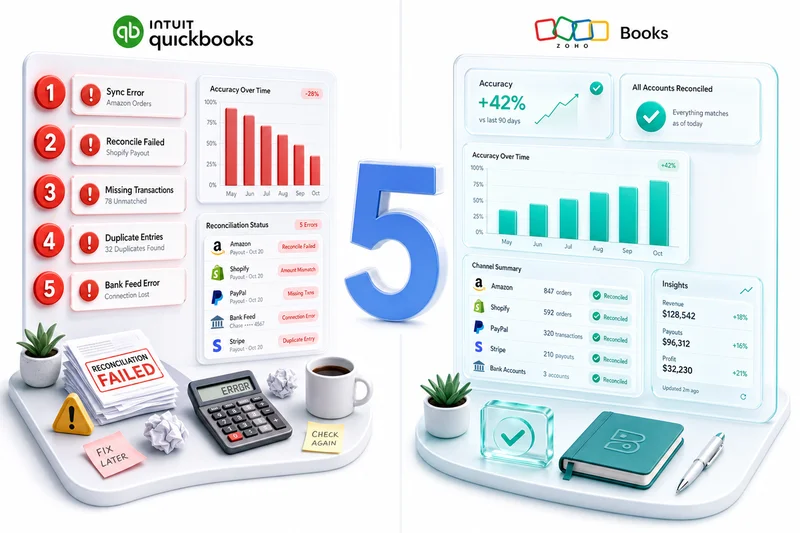
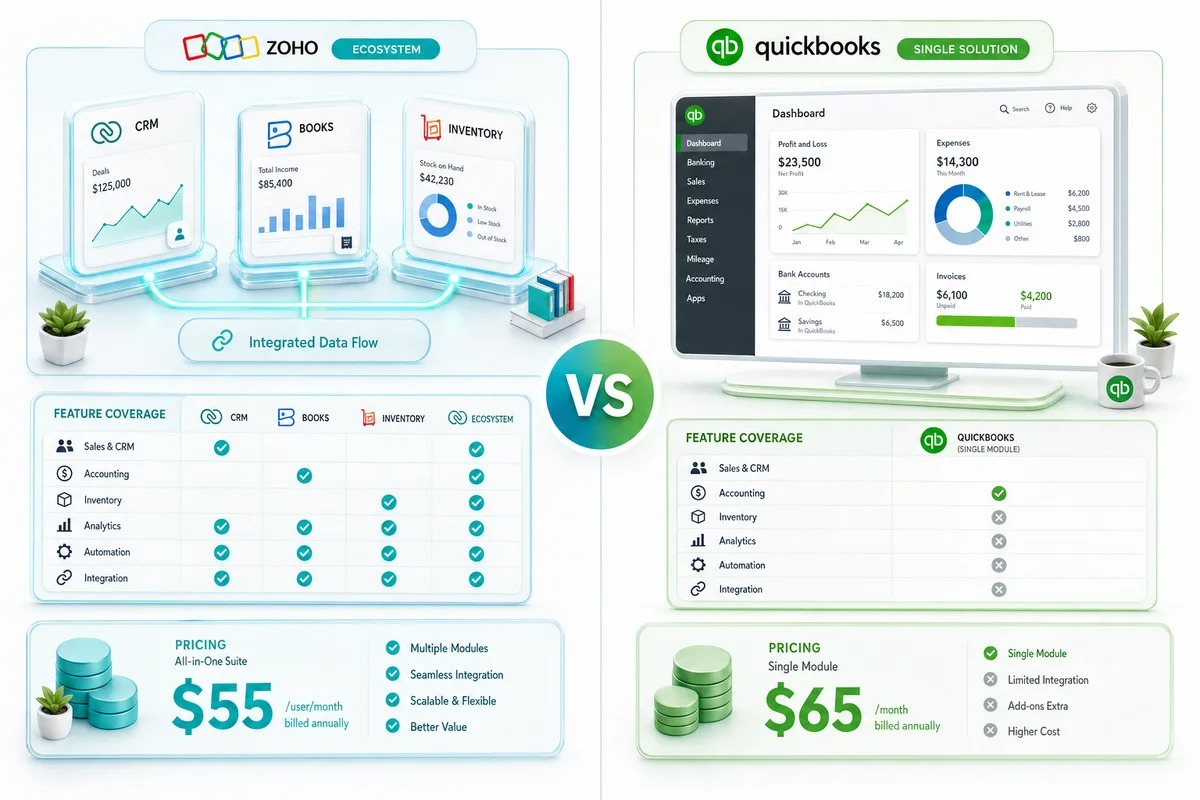
Zoho Books vs QuickBooks: Zoho Books costs 40-70% less than QuickBooks Online at every plan tier, includes deeper workflow automation via Zoho Flow and Deluge scripting, and connects natively to Zoho Inventory for multi-channel eCommerce sellers on Shopify, Amazon, and WooCommerce. QuickBooks Online holds a real advantage in the US accounting ecosystem: built-in payroll, accountant familiarity, and tight tax software connectivity (TurboTax, ProConnect). For a simple, single-entity US business with an accountant already on QuickBooks, the switching cost is hard to justify on price alone. For eCommerce operators managing multi-channel inventory and repetitive accounting tasks, Zoho is the better-suited platform.
| Zoho Books | QuickBooks Online | |
|---|---|---|
| Full-featured plan | $40/month (Professional) | $115/month (Plus) |
| Savings vs QuickBooks | 40-70% less across comparable plans | Baseline |
| eCommerce inventory | Native (Zoho Inventory) | Third-party add-on required |
| Automation | Zoho Flow + Deluge scripting | Bank rules only |
| US payroll | Limited (Zoho Payroll, regional) | Excellent (Intuit Payroll) |
| Multi-currency | Stronger native support | Available; less mature |
| Ecosystem | 55+ native Zoho apps | 750+ third-party apps |
| Best for | eCommerce, multi-entity, automation | US-only, accountant-led setups |
Disclosure: Zolify is an Official Zoho Authorized Partner. We implement Zoho Books for our clients. We're transparent about this because it means we know Zoho Books deeply, including its limitations. We also migrate businesses from QuickBooks, so we know QB deeply too. This comparison is honest because our reputation depends on it.
Quick Summary
Choose Zoho Books if: You want lower cost, better multi-currency support, deeper automation, and native integration with a broader business platform (CRM, inventory, HR, projects). You're comfortable with a platform that has a smaller US user base.
Choose QuickBooks Online if: You need the deepest US accounting ecosystem (payroll, tax prep, accountant tools), your accountant strongly prefers QB, or you need a platform that every bookkeeper in the US already knows.
Feature-by-Feature Comparison
Pricing
| Plan | QuickBooks Online | Zoho Books |
|---|---|---|
| Starter/Basic | $35/month (Simple Start) | $0/month (Free plan, limited) |
| Mid-tier | $65/month (Essentials) | $15/month (Standard) |
| Full-featured | $115/month (Plus) | $40/month (Professional) |
| Premium/Advanced | $235/month (Advanced) | $60/month (Premium) |
| Additional users | $3-15/user/month depending on plan | Included in plan allowance (varies by tier) |
Pricing as of October 2026. QuickBooks frequently raises prices; verify at quickbooks.com before deciding.
Verdict: Zoho Books wins on price. On the most-compared tier (QuickBooks Plus at $115 vs Zoho Books Professional at $40, same five-user limit), Zoho costs 65% less. That pattern holds across the range. QuickBooks charges per additional seat on top; Zoho includes the user allowance in the plan price.
The catch: QuickBooks frequently offers promotional pricing (50% off for 3-6 months) that makes the initial comparison look closer. Compare on regular pricing, not promo rates.
Core Accounting Features
| Feature | QuickBooks Online | Zoho Books |
|---|---|---|
| Double-entry accounting | Yes | Yes |
| Invoicing | Excellent | Excellent |
| Bill management | Good | Good |
| Bank reconciliation | Excellent (broad bank support) | Good (growing bank support) |
| Accounts receivable | Excellent | Excellent |
| Accounts payable | Good (Plus and above) | Good |
| Journal entries | Yes | Yes |
| Recurring transactions | Yes | Yes |
| Budgeting | Basic (Plus and above) | Basic |
| Class/location tracking | Plus and above | Available on all paid plans |
| Project tracking | Plus and above | Professional and above |
Verdict: Roughly even on core accounting. Both platforms handle standard accounting workflows well. QuickBooks has a slight edge in US bank connectivity (more banks supported for direct feeds). Zoho Books has a slight edge in including features like class tracking at lower plan tiers.
Multi-Currency
| Capability | QuickBooks Online | Zoho Books |
|---|---|---|
| Multi-currency support | Essentials and above | Standard and above |
| Number of currencies | Unlimited | Unlimited |
| Auto exchange rates | Yes | Yes |
| Customer invoicing in foreign currency | Yes | Yes |
| Vendor bills in foreign currency | Yes | Yes |
| Foreign currency bank accounts | Yes | Yes |
| Realized gain/loss tracking | Yes | Yes |
| Unrealized gain/loss reports | Limited | Yes |
| Base currency change | Not possible | Not possible |
| Currency-specific reporting | Basic | Detailed |
Verdict: Zoho Books wins for multi-currency. Zoho Books handles multi-currency more natively and provides better reporting on currency gains and losses. For businesses operating in multiple countries, that's a meaningful difference. QuickBooks Online's multi-currency has been described as "bolted on" rather than built in. The multi-currency eCommerce accounting guide for Zoho Books walks through foreign-currency invoicing, realised gains, and multi-entity reporting.
Inventory Management
| Capability | QuickBooks Online | Zoho Books |
|---|---|---|
| Basic inventory tracking | Plus and above | Standard and above |
| FIFO costing | Yes | Yes |
| Barcode scanning | No (requires add-on) | Via Zoho Inventory |
| Composite/bundled items | No | Via Zoho Inventory |
| Warehouse management | No | Via Zoho Inventory |
| Purchase orders | Plus and above | Standard and above |
| Serial/batch tracking | No | Via Zoho Inventory |
Verdict: Zoho wins for inventory-heavy businesses. QuickBooks has basic inventory. For anything beyond simple stock tracking, you'll need a third-party add-on. Zoho Inventory is a full warehouse management system that integrates natively with Zoho Books. If you sell physical products, that's a major advantage. See the eCommerce inventory management software guide for what Zoho Inventory covers across Shopify, Amazon, WooCommerce, and multi-warehouse operations.
Integrations
| Category | QuickBooks Online | Zoho Books |
|---|---|---|
| Third-party app marketplace | 750+ apps | 200+ apps (smaller but growing) |
| Payroll | Intuit Payroll (native, excellent) | Zoho People (basic) or third-party |
| CRM integration | Via third-party (Salesforce, HubSpot) | Zoho CRM (native, fully integrated) |
| eCommerce | Good (Shopify, Amazon, etc.) | Good (Shopify, Amazon via Zoho Inventory) |
| Payment processing | Strong (Intuit Payments, Stripe, etc.) | Good (Stripe, PayPal, Razorpay, etc.) |
| Tax preparation | Excellent (TurboTax, ProConnect, etc.) | Limited (export-based) |
| API access | Good | Excellent |
| Custom scripting | No | Yes (Deluge scripting) |
Verdict: QuickBooks wins for breadth of integrations. Zoho wins for depth of native ecosystem. If you need your accounting software to connect to hundreds of third-party tools, QuickBooks has the larger marketplace. If you want CRM, inventory, HR, project management, and accounting in one connected platform, Zoho's native ecosystem is stronger.
The US tax advantage: QuickBooks' integration with tax preparation software (TurboTax for individuals, ProConnect for accountants) is a genuine advantage for US businesses. Zoho Books' tax reporting is functional but requires manual export to tax software.
Automation
| Capability | QuickBooks Online | Zoho Books |
|---|---|---|
| Bank rules | Good | Excellent |
| Recurring transactions | Good | Good |
| Payment reminders | Basic | Configurable sequences |
| Workflow automation | Limited | Zoho Flow + Workflow Rules |
| Custom scripting | Not available | Deluge scripting |
| Scheduled functions | Not available | Yes |
| Approval workflows | Not available | Yes |
| Conditional logic | Not available | Yes (via Deluge and Flow) |
Verdict: Zoho Books wins decisively on automation. This is probably the biggest functional gap between the two platforms. QuickBooks automation stops at bank rules and recurring transactions. Zoho Books, combined with Zoho Flow and Deluge scripting, can automate complex multi-step workflows with conditional logic, approvals, and scheduled execution. If you want to reduce manual accounting work, Zoho's automation capabilities are significantly more powerful.
Reporting
| Capability | QuickBooks Online | Zoho Books |
|---|---|---|
| Standard financial reports | Excellent | Good |
| Custom report builder | Good | Good |
| Dashboard | Good | Good |
| Scheduled reports | Yes | Yes |
| Advanced analytics | Limited (built-in) | Zoho Analytics (powerful, separate app) |
| Export formats | PDF, Excel | PDF, Excel, CSV |
| Report memorization | Yes | Yes (saved views) |
Verdict: Even for basic reporting. Zoho wins for advanced analytics. QuickBooks' built-in reporting is mature and well-designed. Zoho Books' built-in reporting is good but slightly less polished. However, Zoho Analytics (a separate but natively integrated app) provides business intelligence capabilities that far exceed anything QuickBooks offers: custom dashboards, cross-module data blending, and advanced visualizations.
Scalability
| Factor | QuickBooks Online | Zoho Books |
|---|---|---|
| Maximum users | 25 (Advanced) | Varies by plan, up to 15+ |
| Transaction limits | None listed | Varies by plan |
| Multi-entity | Multiple subscriptions | Multiple organizations |
| Enterprise path | QuickBooks Enterprise (different product) | Zoho One / Zoho Finance Plus |
| International expansion | Limited | Strong (Zoho operates globally) |
Verdict: Zoho wins for international scaling. QB wins for US-centric scaling. If your growth path includes international operations, Zoho is built for it with strong multi-currency, multi-language, and global compliance support. If you are growing within the US and may need enterprise-level features, QuickBooks Enterprise (a separate desktop/hosted product) is a well-established path.
eCommerce sellers who need accounting and inventory but are not yet ready for the full Zoho One suite can start with Zoho Finance Plus, which bundles Books, Inventory, Expense, and Billing per organisation — without per-employee Zoho One licensing.
When QuickBooks Online Is the Better Choice
Be honest with yourself about these scenarios:
- Your accountant or CPA is deeply invested in QuickBooks. If your accountant knows QB inside and out and has their practice built around QB Accountant tools, switching to Zoho creates friction for them. That friction has a real cost.
- You need US payroll integration. Intuit Payroll is deeply integrated with QuickBooks and handles the complexity of US payroll (state taxes, benefits deductions, W-2/1099 generation). Zoho's payroll options in the US are less mature.
- You rely on the QB app ecosystem. If your business uses multiple QB-connected apps (time tracking, receipt capture, industry-specific tools) that don't have Zoho equivalents, switching means replacing those tools too.
- You're a simple, single-entity, US-only business. If you don't need multi-currency, deep automation, or ecosystem integration, QuickBooks does everything you need and your accountant already knows it. There's no compelling reason to switch.
- You're in the middle of tax season or an audit. Never migrate accounting platforms during a period where you need stability. Wait for a natural boundary.
When Zoho Books Is the Better Choice
- You're already using Zoho products (CRM, Inventory, Projects). Adding Zoho Books to an existing Zoho stack gives you native integration that no third-party connector can match. Data flows between CRM deals and invoices, between inventory and books, without middleware.
- You need strong multi-currency support. If you invoice in multiple currencies, have international vendors, or operate across countries, Zoho Books handles this more cleanly than QuickBooks.
- You want to cut manual work with automation. If your accounting team spends hours on repetitive tasks that could be automated, Zoho's workflow rules, Deluge scripting, and Zoho Flow give you tools QuickBooks simply doesn't have.
- Cost matters. For a growing team, the pricing difference compounds. A 10-person company can save $1,000-2,000/year on software alone by switching to Zoho.
- You sell physical products. Zoho Inventory (integrated with Zoho Books) provides warehouse management, composite items, serial tracking, and multi-warehouse support that QuickBooks can't match without expensive add-ons.
- You want a platform, not just accounting software. Zoho One includes 45+ apps (CRM, accounting, HR, projects, helpdesk, marketing) at one per-user price. If you're currently paying for 5+ SaaS tools, Zoho One may replace all of them at a lower total cost.
- You need custom integrations. Zoho's APIs are well-documented and Deluge scripting allows custom logic without external development tools. If your business has unique integration requirements, Zoho is more extensible.
eCommerce Comparison: Zoho vs QuickBooks
If you sell on Shopify, Amazon, WooCommerce, or multiple channels, the Zoho vs QuickBooks decision has additional dimensions that matter significantly. The eCommerce accounting software guide covers how the full accounting stack maps to multi-channel operations if you want a wider frame than just Zoho vs QuickBooks. For a focused cost breakdown of the QuickBooks plan wall and connector tax for eCommerce sellers, see Zoho Books vs QuickBooks for eCommerce Sellers. For businesses at the point where a full operations platform is the real question, the Zoho One vs QuickBooks Enterprise full-stack comparison covers how the platforms stack up as complete business operating systems for multi-channel sellers.
For sellers still on Wave Accounting before committing to a paid platform, our Zoho Books vs Wave Accounting for eCommerce sellers explains where Wave's free tier stops being free in real terms and when Zoho Books pays for itself within the first month.
Zoho Inventory vs QuickBooks Commerce
This is where the gap is largest:
| Capability | Zoho Inventory | QuickBooks Commerce (formerly TradeGecko) |
|---|---|---|
| Multi-channel sync | Native (Shopify, Amazon, eBay, Etsy) | Limited (acquired and partially integrated) |
| Warehouse management | Full (multi-warehouse, picking, packing, shipping) | Basic |
| Composite/bundled items | Yes | Limited |
| Serial and batch tracking | Yes | No |
| Barcode scanning | Yes (mobile app) | Limited |
| Accounting integration | Native with Zoho Books (same ecosystem) | Integrated but separate product history |
| Purchase order management | Full | Basic |
| Reorder automation | Yes (reorder points with auto-PO) | Limited |
Verdict: Zoho Inventory is significantly more capable for eCommerce businesses. QuickBooks Commerce (the rebranded TradeGecko) was acquired and has not received the same development investment as Zoho Inventory. For multi-channel sellers, Zoho Inventory provides warehouse-level features that QuickBooks simply does not match.
Marketplace Connections
| Platform | Zoho | QuickBooks |
|---|---|---|
| Shopify | Native via Zoho Inventory + Zoho Flow | Via third-party apps (A2X, Webgility, etc.) |
| Amazon | Native via Zoho Inventory | Via third-party apps (A2X, Webgility, etc.) |
| eBay | Native via Zoho Inventory | Via third-party apps |
| Etsy | Via Zoho Inventory or custom integration | Via third-party apps |
| WooCommerce | Via Zoho Inventory or custom integration | Via third-party apps |
The key difference: Zoho connects to marketplaces natively through Zoho Inventory. QuickBooks requires third-party middleware (A2X, Webgility, SKUPlugs) for every marketplace connection. That means additional monthly costs ($50-200/month per connector), additional points of failure, and data flowing through systems you don't control. For WooCommerce sellers specifically, the WooCommerce Zoho integration guide covers how orders, inventory, and accounting sync without a middleware layer.
Multi-Channel Support
For a business selling on Shopify + Amazon + wholesale:
On QuickBooks:
- QuickBooks Online for accounting
- A2X or Webgility for marketplace payout sync ($50-150/month)
- Third-party inventory tool for multi-channel stock management ($100-300/month)
- Separate CRM (HubSpot, Salesforce) for customer data ($50-500/month)
- Zapier or Make for connecting everything ($20-100/month)
- Total additional cost: $220-1,050/month on top of QuickBooks
On Zoho:
- Zoho Books for accounting
- Zoho Inventory for multi-channel stock management (native integration)
- Zoho CRM for customer data (native integration)
- Zoho Analytics for reporting (native integration)
- Custom integration for marketplace sync (one-time setup cost via your Zoho partner)
- Total additional cost: Zoho One subscription covers everything
Why the Zoho Ecosystem Is Better for eCommerce Operations
The Zoho advantage is not any single feature. It is the whole ecosystem:
- One database. When a customer orders on Shopify, the order appears in Zoho Inventory, the invoice appears in Zoho Books, and the customer record updates in Zoho CRM. No syncing. No middleware. No data conflicts.
- One inventory count. Zoho Inventory is the single source of truth for stock levels across every channel. When something sells on Amazon, Shopify stock adjusts immediately. No delay. No overselling.
- One reporting layer. Zoho Analytics pulls data from Books, Inventory, CRM, and Campaigns into unified dashboards. You see channel profitability, customer lifetime value, and inventory turnover in one place, without stitching data from five different tools.
- One automation engine. Zoho Flow connects everything without third-party middleware. When inventory hits a reorder point, a PO generates automatically. When a high-value order comes in, CRM creates a task. When a customer returns a second item, a support ticket opens. All within one platform.
- Lower total cost. A Zoho One subscription ($45/user/month) replaces QuickBooks + inventory tool + CRM + marketing tool + middleware connectors. For a 5-person eCommerce team, the savings can be $10,000-15,000/year.
Our honest take: If you're a simple, single-channel Shopify store with under 100 orders per month and no inventory complexity, QuickBooks with a basic Shopify integration works fine. But the moment you add a second channel, need real inventory management, or want to understand customer lifetime value, the Zoho ecosystem provides a meaningfully better foundation for eCommerce operations.
The Migration Question
If you've decided Zoho Books is the right move, here's what the migration actually involves:
What migrates cleanly:
- Chart of accounts
- Customer and vendor lists
- Products and services
- Open invoices and bills
- Opening balances
What requires work:
- Historical transaction detail (possible but time-consuming)
- Bank rules and automation (must be recreated)
- Recurring transactions (must be set up fresh)
- Third-party integrations (must be reconnected or replaced)
- Custom reports (must be rebuilt)
Timeline: A straightforward migration takes 1-2 weeks of setup plus one month of parallel operation (running both systems simultaneously to verify accuracy).
Cost of migration: DIY is free (use our QuickBooks to Zoho Migration Guide). Professional migration through our QuickBooks migration service starts at $2,000-8,000 depending on complexity. Across 100+ QuickBooks-to-Zoho migrations, our CA-reviewed process catches chart of accounts mapping errors before go-live, not after the first month-end close.
Once you've made the decision, our Zoho Books setup guide for accountants walks through chart of accounts configuration, bank rules, and eCommerce-specific setup.
Bottom Line
QuickBooks Online is a mature, reliable accounting platform with the deepest US ecosystem. It's the safe choice. Your accountant knows it. Your bookkeeper knows it. It works.
Zoho Books is a modern platform that offers more for less: more automation, more integration, more scalability, at a lower price point. It's the forward-looking choice. The trade-off is a smaller US ecosystem and the learning curve of switching.
Our honest recommendation:
- If you're starting fresh (new business, no existing platform), choose Zoho Books. The cost savings and automation capabilities give you a better foundation.
- If you're on QuickBooks and reasonably satisfied, switching just for cost savings probably isn't worth the disruption.
- If you're on QuickBooks and frustrated (by limitations, cost increases, integration gaps, or lack of automation), Zoho Books is worth serious evaluation.
- If you're already using other Zoho products, switching to Zoho Books is almost always the right move.
Need Help Deciding?
Zolify offers a free 30-minute discovery call where we review your current accounting setup and help you evaluate whether Zoho Books is the right fit. We're an Official Zoho Finance Partner. There's a Chartered Accountant on staff and 100+ QuickBooks-to-Zoho migrations behind us. We'll tell you honestly if QuickBooks is the better choice. A bad migration helps no one.
If you've already decided to switch, our paid discovery ($500-700) includes a detailed migration plan with timeline and fixed-price quote. Our CA-supervised process covers chart of accounts mapping, opening balance verification, and a parallel run month before cutover.
Also comparing: Zoho Books vs Xero for eCommerce | Xero vs Zoho Books for eCommerce sellers
Frequently Asked Questions
It depends on your priorities. Zoho Books wins on pricing (40-70% less at every tier), multi-currency support, automation depth via Deluge scripting, and native ecosystem integration with 55+ Zoho apps. QuickBooks wins on US bank connectivity, payroll integration, and accountant familiarity. For eCommerce businesses, Zoho Books' native Zoho Inventory integration gives it a meaningful edge.
Zoho Books costs 40-70% less than QuickBooks on the most-compared plans. QuickBooks Plus runs $115/month in 2026; Zoho Books Professional is $40/month. That is a 65% difference on the same five-user limit. The gap compounds when you add team members: Zoho Books includes a user allowance in each plan while QuickBooks charges extra per seat.
Yes. QuickBooks data including your chart of accounts, customer and vendor lists, products, open invoices, and historical transactions can be exported and imported into Zoho Books. A typical migration takes 4 to 8 weeks, mostly spent on planning and chart of accounts mapping. Zolify has completed 100+ QuickBooks-to-Zoho migrations.
Zoho Books does not include a built-in payroll module equivalent to QuickBooks Payroll in all regions. However, Zoho Payroll is available as a separate product in supported regions and integrates natively with Zoho Books. For regions without Zoho Payroll, you can use a third-party payroll provider and record journal entries in Zoho Books.
Zoho Books has a clear advantage for eCommerce businesses because Zoho Inventory provides native multi-channel inventory management across Shopify, Amazon, eBay, and other marketplaces. QuickBooks requires third-party add-ons for similar functionality, adding cost and complexity. Zoho's integrated stack handles order-to-cash and inventory in one ecosystem.
See exactly where your Shopify, Amazon, or WooCommerce ops are leaking — free.
Get a personalised eCommerce Ops Audit: inventory gaps, accounting leaks, and order-flow bottlenecks — with a Zoho fix roadmap. Delivered in 48 hours, at no cost.