Zoho CRM vs Salesforce: Complete Comparison for 2026
Feature-by-feature comparison of Zoho CRM vs Salesforce Sales Cloud for eCommerce and SMB teams. Covers pricing, automation, AI features, and when each platform is the better choice.
Short answer: For small and mid-sized businesses, including Shopify, Amazon, and WooCommerce sellers, Zoho CRM delivers 90% of Salesforce's functionality at 60-75% lower total cost. Salesforce is the better choice only if you have 200+ sales reps, depend on AppExchange apps with no Zoho equivalent, or need enterprise-grade CPQ.
Zoho CRM and Salesforce Sales Cloud are the two CRM platforms that come up in nearly every evaluation. Both are mature, both are capable, and both have millions of users. They are built for different segments of the market, though, and choosing the wrong one costs real money every month it stays deployed. This comparison covers the actual differences in pricing, features, and limitations so you can decide based on facts, not vendor demos.
Disclosure: Zolify is an Official Zoho Authorized Partner. We implement Zoho CRM for our clients and migrate businesses from Salesforce to Zoho. We're transparent about this because it means we know both platforms deeply, including their limitations. This comparison is honest because our reputation depends on it.
Quick Summary
Choose Zoho CRM if: You're a small to mid-sized business (5-200 users) that wants powerful CRM without enterprise pricing. You value an all-in-one ecosystem (CRM, finance, HR, helpdesk) over a massive third-party app marketplace. You want AI and automation included in the base price rather than sold as add-ons.
Choose Salesforce if: You have 200+ sales reps, need advanced CPQ (configure-price-quote), depend heavily on AppExchange apps, have complex territory management requirements, or have already invested heavily in Salesforce-certified staff. The platform justifies its cost at enterprise scale.
Feature-by-Feature Comparison
Pricing
| Plan Tier | Zoho CRM | Salesforce Sales Cloud |
|---|---|---|
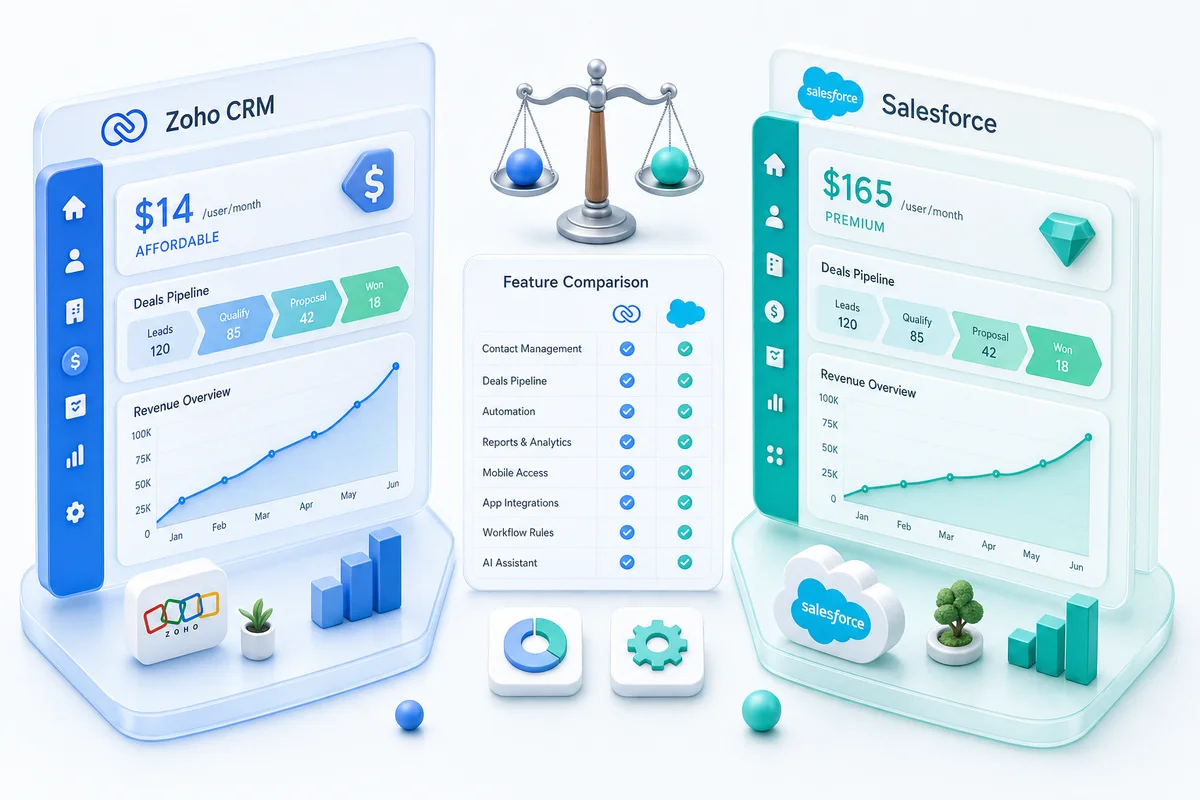
| Entry | $14/user/month (Standard) | $25/user/month (Essentials) |
| Mid-tier | $23/user/month (Professional) | $80/user/month (Professional) |
| Full-featured | $40/user/month (Enterprise) | $165/user/month (Enterprise) |
| Top tier | $52/user/month (Ultimate) | $330/user/month (Unlimited) |
Verdict: Zoho CRM wins on price at every tier. Zoho CRM Enterprise costs 76% less than Salesforce Enterprise. For a 25-person sales team on Enterprise plans, you pay $12,000/year on Zoho vs $49,500/year on Salesforce. That's $37,500/year in savings before you factor in Salesforce add-ons.
The hidden cost problem with Salesforce: The per-user price is just the beginning. Salesforce charges extra for features that Zoho includes in base plans: additional storage ($125/GB/month beyond your allocation), API calls above limits, Einstein AI credits, CPQ modules, and Pardot for marketing automation. A Salesforce deployment that starts at $165/user often ends up at $250-400/user when you add the pieces most teams actually need.
Zoho's pricing advantage compounds: Zoho One ($45/user/month) gives you CRM plus 45+ business apps: finance, HR, helpdesk, projects, marketing, analytics. There's no Salesforce equivalent at any price point.
Core CRM Features
| Feature | Zoho CRM | Salesforce Sales Cloud |
|---|---|---|
| Contact & account management | Excellent | Excellent |
| Deal/opportunity tracking | Excellent | Excellent |
| Pipeline management | Multiple pipelines, visual Kanban | Multiple pipelines, visual Kanban |
| Activity tracking (calls, emails, meetings) | Built-in | Built-in |
| Email integration (Gmail, Outlook) | Native | Native |
| Lead management & scoring | Included (Enterprise+) | Included (Enterprise+) |
| Territory management | Available (Enterprise+) | Advanced (Enterprise+) |
| Forecasting | Good | Excellent |
| Products & price books | Yes | Yes |
| Quotes & proposals | Built-in | Requires CPQ add-on for advanced |
| Web forms | Built-in (all paid plans) | Web-to-Lead (all plans) |
Verdict: Roughly even on core CRM. Both platforms handle contacts, deals, pipelines, and activities well. Salesforce has a slight edge in forecasting depth and territory management for large, complex sales organizations. Zoho includes quotes and proposals natively where Salesforce pushes you toward a paid CPQ add-on for anything beyond basic quotes.
Automation & Workflows
| Capability | Zoho CRM | Salesforce Sales Cloud |
|---|---|---|
| Workflow rules | Yes (all paid plans) | Yes (all plans) |
| Visual process builder | Blueprint (drag-and-drop) | Flow Builder (drag-and-drop) |
| Approval processes | Yes | Yes |
| Assignment rules | Yes | Yes |
| Escalation rules | Yes | Yes |
| Scheduled actions | Yes | Yes |
| Custom functions (scripting) | Deluge (included) | Apex (requires developer) |
| Process validation | Blueprint enforces process steps | Validation rules |
| Macros | Yes | Yes |
| Automation limits | Generous per-plan limits | Stricter governor limits |
Verdict: Even for most use cases. Edge cases favor different platforms. Salesforce Flow Builder is more powerful for complex enterprise logic and has deeper integration with the Salesforce ecosystem. Zoho Blueprint is easier to learn and deploy without a dedicated developer. The practical difference: a Zoho admin can build most automations in-house. Salesforce automations frequently require a Salesforce developer or consultant, adding $100-200/hour to your implementation cost.
The Deluge advantage: Zoho's Deluge scripting language lets business-savvy admins write custom automation logic without hiring a developer. Salesforce's equivalent (Apex) is a full programming language that requires a trained developer. For SMBs, that's a meaningful difference in ongoing operational cost.
AI & Intelligence
| Capability | Zoho CRM (Zia) | Salesforce (Einstein) |
|---|---|---|
| Lead scoring | Included (Enterprise+) | Requires Einstein add-on or Enterprise+ |
| Deal prediction | Included (Enterprise+) | Requires Einstein add-on |
| Anomaly detection | Included (Enterprise+) | Requires Einstein add-on |
| Email sentiment analysis | Included | Requires Einstein add-on |
| Best time to contact | Included | Requires Einstein Activity Capture |
| Conversation intelligence | Included (Ultimate) | Einstein Conversation Insights (add-on) |
| Data enrichment | Zia enrichment (included) | Requires third-party or Data.com (discontinued) |
| Generative AI (email drafts, summaries) | Zia generative features (included) | Einstein GPT (additional cost) |
| Pricing for AI features | Included in plan price | $50-75/user/month add-on for full Einstein |
Verdict: Zoho CRM wins on AI value. Both platforms offer comparable AI features: lead scoring, deal prediction, anomaly detection, email analysis. The difference is pricing. Zia is included in Zoho CRM Enterprise at $40/user/month. Einstein's full feature set requires additional licensing that can add $50-75/user/month on top of your Salesforce subscription. For a 25-person team, that's $15,000-22,500/year extra just for AI.
Honest caveat: Einstein's underlying models have more training data from Salesforce's larger enterprise customer base. For very large datasets (millions of records, hundreds of reps), Einstein's predictions may be marginally more accurate. For teams under 200 users, the difference in prediction quality is not meaningful enough to justify the cost gap.
Customization
| Capability | Zoho CRM | Salesforce Sales Cloud |
|---|---|---|
| Custom fields | Yes (generous limits) | Yes (generous limits) |
| Custom modules/objects | Yes (Enterprise+) | Yes (all editions) |
| Page layouts | Multiple per module | Multiple per object |
| Custom buttons & links | Yes | Yes |
| Canvas (visual layout designer) | Yes (drag-and-drop, no code) | Lightning App Builder (similar) |
| Custom apps within CRM | Yes (via Zoho Creator) | Yes (via Lightning Platform) |
| Sandbox for testing | Yes (Enterprise+) | Yes (Enterprise+, full copy on Unlimited) |
| Custom code deployment | Deluge + client scripting | Apex + Visualforce + LWC |
Verdict: Salesforce wins for deep customization. Zoho wins for accessible customization. Salesforce's customization ceiling is higher. Apex, Visualforce, Lightning Web Components, and the Lightning Platform let you build virtually anything. But you need developers. Zoho's customization covers 90% of what SMBs need through point-and-click configuration, Canvas designer, and Deluge scripting that a trained admin can handle without writing Java-level code.
Reporting & Dashboards
| Capability | Zoho CRM | Salesforce Sales Cloud |
|---|---|---|
| Standard reports | 100+ pre-built | 100+ pre-built |
| Custom report builder | Good (drag-and-drop) | Excellent (drag-and-drop) |
| Dashboard builder | Good | Excellent |
| Scheduled reports | Yes | Yes |
| Cross-module reporting | Yes | Yes |
| Advanced analytics | Zoho Analytics (native, included in Ultimate) | Einstein Analytics/Tableau CRM (add-on, $75-150/user/month) |
| Report export | PDF, Excel, CSV | PDF, Excel, CSV |
| Real-time dashboards | Yes | Yes |
Verdict: Salesforce wins for built-in reporting. Zoho wins on analytics value. Salesforce's native report builder is more mature and flexible, especially for complex cross-object reports. However, Salesforce's advanced analytics (Tableau CRM) costs $75-150/user/month extra. Zoho Analytics is a full business intelligence platform (cross-module dashboards, data blending, advanced visualizations) included in higher-tier plans or available as a reasonably priced add-on.
Integrations & Ecosystem
| Category | Zoho CRM | Salesforce Sales Cloud |
|---|---|---|
| App marketplace | Zoho Marketplace (1,000+ extensions) | AppExchange (5,000+ apps) |
| Native ecosystem | 45+ Zoho apps (Books, Inventory, Desk, People, etc.) | Salesforce ecosystem (Service Cloud, Marketing Cloud, etc.) |
| Email marketing | Zoho Campaigns (native) | Pardot/Marketing Cloud (separate, expensive) |
| Helpdesk | Zoho Desk (native) | Service Cloud (separate subscription) |
| Accounting | Zoho Books (native) | No native accounting (third-party only) |
| Project management | Zoho Projects (native) | No native PM (third-party only) |
| API access | REST API (included) | REST + SOAP API (included, with call limits) |
| iPaaS/middleware | Zoho Flow (native) | MuleSoft (expensive add-on) |
| Third-party connectors | Good (Zapier, Make, etc.) | Excellent (Zapier, Make, Workato, etc.) |
Verdict: Salesforce wins for third-party breadth. Zoho wins for native ecosystem depth. If you need your CRM to connect to 5,000+ specialized apps, Salesforce's AppExchange is unmatched. If you want CRM, accounting, helpdesk, HR, project management, marketing, and analytics from a single vendor with native data flow between them, Zoho's ecosystem is superior and dramatically cheaper.
The ecosystem math: Salesforce CRM ($165/user) + Service Cloud ($165/user) + Pardot ($1,250/month) + Tableau CRM ($75/user) can easily reach $500+/user/month. Zoho One gives you CRM + helpdesk + marketing + analytics + 40 other apps for $45/user/month. For an SMB that needs more than just CRM, this is the single biggest cost advantage.
For eCommerce sellers specifically: Zoho CRM connects natively with Zoho Books and Zoho Inventory, so Shopify, Amazon, and WooCommerce order data flows directly into customer records and financial reporting. Salesforce has no native accounting or inventory layer; you need third-party connectors (and the maintenance overhead that comes with them) to replicate what Zoho does out of the box. See how Zoho CRM, Books, and Inventory connect for eCommerce sellers.
Mobile Experience
| Capability | Zoho CRM | Salesforce Sales Cloud |
|---|---|---|
| Native mobile app | iOS + Android | iOS + Android |
| Offline access | Yes (with sync) | Yes (with sync, limited on lower plans) |
| Mobile customization | Card view designer | Mobile Publisher (Enterprise+) |
| Business card scanner | Built-in | Requires third-party |
| Route planning | Included (for field sales) | Requires Salesforce Maps (add-on) |
| Mobile analytics | Yes | Yes |
| Voice notes | Yes | Via Einstein Voice (limited) |
Verdict: Zoho CRM wins on mobile. Both apps are functional, but Zoho includes field-sales features (business card scanner, route planning, offline access) that Salesforce charges extra for. Salesforce Maps, which covers route planning and territory visualization on mobile, is a paid add-on.
Admin & Ease of Use
| Factor | Zoho CRM | Salesforce Sales Cloud |
|---|---|---|
| Setup complexity | Low-medium (self-service possible) | High (admin/consultant typically required) |
| Learning curve | 1-2 weeks for admins | 4-8 weeks for admins, ongoing learning |
| Dedicated admin needed? | Not until 50+ users | Recommended from day one |
| Admin certification | Zoho Certified Consultant | Salesforce Certified Administrator |
| Configuration approach | Point-and-click + Deluge | Point-and-click + Apex/LWC |
| Documentation | Good | Excellent (Trailhead) |
| Community | Growing | Massive (Trailblazer Community) |
Verdict: Zoho CRM wins for ease of administration. This is one of the most underestimated differences. Salesforce is powerful, but that power comes with complexity. Most Salesforce deployments need a dedicated admin ($70,000-120,000/year salary) or ongoing consultant engagement ($150-250/hour). Zoho CRM can be managed by a trained operations person who handles CRM alongside other responsibilities. For a 25-person company, the admin cost difference alone can exceed the software cost difference.
Trailhead is genuinely excellent: Salesforce's Trailhead learning platform is one of the best free training resources in SaaS. Zoho's documentation and training are good, but Trailhead sets a standard Zoho hasn't matched yet.
Support & Training
| Factor | Zoho CRM | Salesforce Sales Cloud |
|---|---|---|
| Included support | Email + chat (business hours) | Online case submission |
| Premium support | 20% of license fee | 30% of net license fee (Premier) |
| Phone support | Premium plan | Premier plan only |
| Implementation assistance | Zoho partner network | Salesforce partner network (larger) |
| Community forums | Active | Very active |
| Knowledge base | Good | Extensive |
| Guided onboarding | Available (paid plans) | Available (Accelerator packs, paid) |
Verdict: Roughly even, with different trade-offs. Salesforce has a larger partner ecosystem and more extensive knowledge base. Zoho's support is more accessible at lower price points. Both platforms are best implemented with a partner who knows the platform deeply. That is where firms like Zolify fit in for Zoho deployments.
When Salesforce Is the Better Choice
Be honest with yourself about these scenarios:
- You have 200+ sales reps with complex territory structures. Salesforce's territory management, advanced forecasting, and enterprise-scale automation are genuinely more capable for large, multi-layered sales organizations.
- You need advanced CPQ (configure-price-quote). Salesforce CPQ handles complex product configuration, pricing rules, approval chains, and contract generation at a depth that Zoho's native quoting cannot match. If your sales process involves hundreds of SKUs with interdependent pricing rules, Salesforce CPQ is the better tool.
- Your business depends on specific AppExchange apps. If your workflow relies on niche AppExchange applications (industry-specific tools, compliance solutions, specialized integrations) that have no Zoho equivalent, switching means replacing those tools too.
- You have invested heavily in Salesforce-trained staff. If your organization has multiple Salesforce-certified admins and developers, the institutional knowledge has real value. Retraining has a cost.
- You need MuleSoft-level integration. For enterprise integration scenarios (connecting to legacy ERP systems, custom middleware, complex event-driven architectures), Salesforce's MuleSoft acquisition gives it integration capabilities beyond what Zoho Flow provides.
- Your board or investors expect Salesforce. This isn't a technical reason, but it's a real one. Some investors and board members associate Salesforce with maturity. If this matters in your context, factor it in.
When Zoho CRM Is the Better Choice
- You're a small to mid-sized business (5-200 users). Zoho CRM provides 90%+ of the CRM functionality most SMBs need at 60-75% lower cost. The features you give up (advanced CPQ, enterprise territory management) are ones most SMBs never use.
- Cost matters: not just license cost, but total cost. Zoho's lower license fees, included AI, no-cost automation, and self-service administration mean your total CRM spend (software + admin + consulting) can be 70-80% less than a comparable Salesforce deployment.
- You want an integrated business platform, not just CRM. If you need CRM + accounting + helpdesk + HR + project management, Zoho One replaces five or six separate SaaS subscriptions with a single platform. No middleware. No data syncing. No integration maintenance.
- You don't want to hire a dedicated CRM administrator. Zoho CRM is designed to be managed by a capable operations person or office manager. Salesforce realistically requires a dedicated admin once you move beyond basic usage.
- You're starting fresh with no existing CRM. For new implementations, Zoho CRM gets you to a functional system faster and cheaper. You can always migrate to Salesforce later if your needs outgrow Zoho, but most businesses in the 5-200 user range never reach that point.
- You're already using other Zoho products. If you run Zoho Books for accounting, Zoho Desk for support, or Zoho Projects for delivery, adding Zoho CRM gives you native integration that no Salesforce connector can replicate. Data flows between deals and invoices, between support tickets and account records, without middleware.
- Your team sells internationally. Zoho CRM handles multi-currency, multi-language, and global compliance more naturally than Salesforce at comparable plan tiers. Zoho also has data centers in the US, EU, India, Australia, and Japan for data residency requirements.
Total Cost of Ownership
Software licensing is only part of the cost. Here's what a realistic CRM deployment costs annually, including the expenses that vendor pricing pages don't show.
Annual Cost Comparison (Enterprise Plans)
| Cost Category | 10 Users | 25 Users | 50 Users |
|---|---|---|---|
| Zoho CRM Enterprise | |||
| License ($40/user/month) | $4,800 | $12,000 | $24,000 |
| AI (Zia — included) | $0 | $0 | $0 |
| Advanced analytics (included in Ultimate or Zoho Analytics add-on) | $0-1,200 | $0-1,200 | $0-1,200 |
| Admin (part-time internal) | $0-5,000 | $5,000-10,000 | $10,000-20,000 |
| Implementation (one-time, amortized) | $2,000-5,000 | $5,000-10,000 | $8,000-15,000 |
| Zoho Total (Year 1) | $6,800-16,000 | $22,000-33,200 | $42,000-60,200 |
| Salesforce Enterprise | |||
| License ($165/user/month) | $19,800 | $49,500 | $99,000 |
| Einstein AI ($50/user/month) | $6,000 | $15,000 | $30,000 |
| Tableau CRM ($75/user/month for 10 seats) | $9,000 | $9,000 | $9,000 |
| Dedicated admin (full-time from ~25 users) | $0-10,000 | $80,000-120,000 | $80,000-120,000 |
| Implementation (one-time, amortized) | $10,000-25,000 | $25,000-75,000 | $50,000-150,000 |
| Salesforce Total (Year 1) | $44,800-69,800 | $178,500-268,500 | $268,000-408,000 |
The gap isn't just license cost. For a 25-person team, the total cost difference between Zoho CRM and Salesforce can be $150,000-235,000 in the first year. Even after year one (when implementation costs drop out), the annual difference remains $100,000+ because of admin salary and add-on licensing.
Important note: These are estimates based on typical deployments. Your actual costs depend on complexity, customization requirements, and how much you do in-house vs. with a partner. Salesforce deployments with minimal customization and no Einstein will cost less. Zoho deployments with heavy custom development will cost more.
Migration Guidance
If you're currently on Salesforce and considering Zoho CRM, here's what the migration involves.
What migrates cleanly:
- Contacts, accounts, and leads
- Deals/opportunities with stage history
- Activities (calls, emails, tasks, events)
- Notes and attachments
- Custom fields and their data
- Products and price books
- Standard reports
What requires work:
- Custom objects (must be recreated as custom modules in Zoho)
- Apex triggers and automation (must be rebuilt in Deluge/Blueprint)
- Salesforce Flow automations (must be rebuilt in Zoho workflow rules)
- AppExchange integrations (must be replaced with Zoho equivalents or third-party tools)
- Complex reports and dashboards (must be rebuilt)
- User roles, profiles, and sharing rules (must be reconfigured)
What you should plan for:
- Data validation and cleanup before migration
- Parallel operation period (2-4 weeks running both systems)
- User training (1-2 days for most teams)
- Integration reconnection (email, calendar, phone system, etc.)
Timeline: A straightforward Salesforce-to-Zoho migration takes 3-6 weeks. Complex migrations with extensive custom objects, heavy automation, and large data volumes can take 8-12 weeks.
If you are ready to switch, Zolify handles the entire Salesforce to Zoho migration process: data migration, automation rebuild, user training, and parallel operation support. We are an Official Zoho Authorized Partner with a CA on staff and have completed 100+ migrations with zero data loss.
You can also explore our Zoho CRM implementation services if you are setting up Zoho CRM from scratch, or read our case study on Salesforce migration to see what the process looks like in practice.
Bottom Line
Salesforce is the most powerful CRM on the market. It earned that position with decades of development, a massive ecosystem, and genuine enterprise capabilities that no competitor fully matches. If you're a large enterprise with complex sales operations, heavy CPQ requirements, and a budget to match, Salesforce is the right choice.
Zoho CRM is the best CRM value on the market. It delivers 90%+ of the functionality that small and mid-sized businesses actually use, at 60-75% lower total cost. The AI is included. The automation is accessible. The ecosystem covers everything you need. And you don't need a six-figure admin to keep it running.
Our honest recommendation:
- If you're evaluating CRMs for the first time and have under 200 users, start with Zoho CRM. You can always migrate to Salesforce later if you outgrow it, but most businesses in this range never do.
- If you're on Salesforce and happy with it, don't switch just for cost savings. Migration has a cost, and disruption has a cost. Stay where you are.
- If you're on Salesforce and frustrated (escalating costs, add-on fatigue, admin dependency, or features you're paying for but never using), Zoho CRM is worth a serious evaluation.
- If you're already using Zoho Books, Zoho Desk, or other Zoho products, moving your CRM to Zoho is almost always the right call. The native integration alone justifies the switch.
Need Help Deciding?
Zolify offers a free 30-minute discovery call where we review your current CRM setup and evaluate whether Zoho CRM is the right fit. We are an Official Zoho Authorized Partner with a CA on staff and 100+ migrations completed. We will tell you honestly if Salesforce is the better choice for your situation. A bad migration helps no one.
If you have already decided to switch, our paid discovery ($500-700) includes a detailed migration plan with timeline and fixed-price quote.
For eCommerce sellers specifically: before evaluating any CRM switch, map your post-purchase customer journey. Zoho CRM's RFM segmentation and repeat-revenue workflows deliver results that Salesforce requires expensive add-ons to replicate. See how eCommerce sellers use Zoho CRM for customer retention and repeat revenue.
Book a Free eCommerce Ops Consultation
Ready to Make the Switch?
If you have decided to move from Salesforce to Zoho CRM, our Salesforce to Zoho CRM Migration Guide covers the full process: data mapping, automation rebuilds, common pitfalls, and realistic timelines.
Zoho CRM's versatility extends beyond eCommerce: the platform is also used in healthcare for patient management workflows and by early-stage startups who need a CRM that scales without an enterprise price tag.
See also: Salesforce to Zoho CRM Migration Service | Salesforce to Zoho Migration Case Study
Frequently Asked Questions
For Shopify, Amazon, and WooCommerce sellers, Zoho CRM is the stronger choice. It connects natively with Zoho Books and Zoho Inventory, so order data, customer records, and financial data stay in sync without middleware. Salesforce requires expensive third-party connectors for the same result.
Zoho CRM Enterprise costs $40/user/month vs Salesforce Enterprise at $165/user/month, a 76% difference. For a 20-person team, that's $9,600/year on Zoho vs $39,600/year on Salesforce, before add-ons like Einstein AI and Tableau CRM push Salesforce costs higher.
Yes. Zolify migrates contacts, accounts, deals, custom objects, workflows, and reporting from Salesforce to Zoho CRM with zero data loss. Our CA-supervised migrations typically complete in 3-6 weeks with a parallel operation period.
Yes. Zoho CRM includes Zia AI: lead scoring, deal prediction, anomaly detection, and email sentiment analysis, all included in Enterprise plans at no extra cost. Salesforce Einstein requires additional licensing that can add $50-75/user/month on top of your subscription.
Salesforce has a larger AppExchange marketplace (5,000+ apps vs Zoho's 1,000+), deeper CPQ (configure-price-quote) capabilities for complex enterprise pricing, more advanced territory management for large sales orgs, and a bigger pool of certified administrators.
See exactly where your Shopify, Amazon, or WooCommerce ops are leaking — free.
Get a personalised eCommerce Ops Audit: inventory gaps, accounting leaks, and order-flow bottlenecks — with a Zoho fix roadmap. Delivered in 48 hours, at no cost.