eCommerce Sales Tax Accounting Software: What Actually Solves the Problem
Most eCommerce sellers searching for tax accounting software find TaxJar or Avalara, connect it to Shopify, and assume the problem is solved. Six months later, their books don't reconcile. The issue is not the compliance tool. Sales tax compliance and sales tax accounting are two separate problems, and most sellers only solve one of them.
Most eCommerce sellers looking for tax accounting software start by searching for a compliance tool. They find TaxJar or Avalara, connect it to Shopify, and assume the problem is solved. Six months later, their books still don't reconcile. Tax collected on the storefront doesn't match what's in Zoho Books. Revenue figures include tax that should be a balance-sheet liability. The accountant has to rebuild three months of entries before filing.
The problem is not the compliance tool. Sales tax compliance and sales tax accounting are two different things, and most eCommerce sellers only solve one of them.
Direct answer: eCommerce tax accounting software needs to do two things correctly: record what tax was collected per order in your chart of accounts, and attribute that liability to the correct jurisdiction. Compliance tools like TaxJar and Avalara handle the filing side. Zoho Books handles the accounting side. For most Shopify, Amazon, and WooCommerce sellers operating across multiple states, both are needed. But they serve different functions, and confusing them is where the books go wrong.
Why eCommerce Sales Tax Is Different From Regular Business Tax
A single-location retail business collects sales tax at one rate for one jurisdiction. Most accounting software handles that without configuration. eCommerce changes both variables: the number of jurisdictions and the question of who actually collects the tax.
The Wayfair Ruling Changed Everything for Online Sellers
Before South Dakota v. Wayfair (2018), US sales tax obligations were tied to physical presence. If you had a warehouse or office in a state, you collected tax there. If you didn't, you didn't.
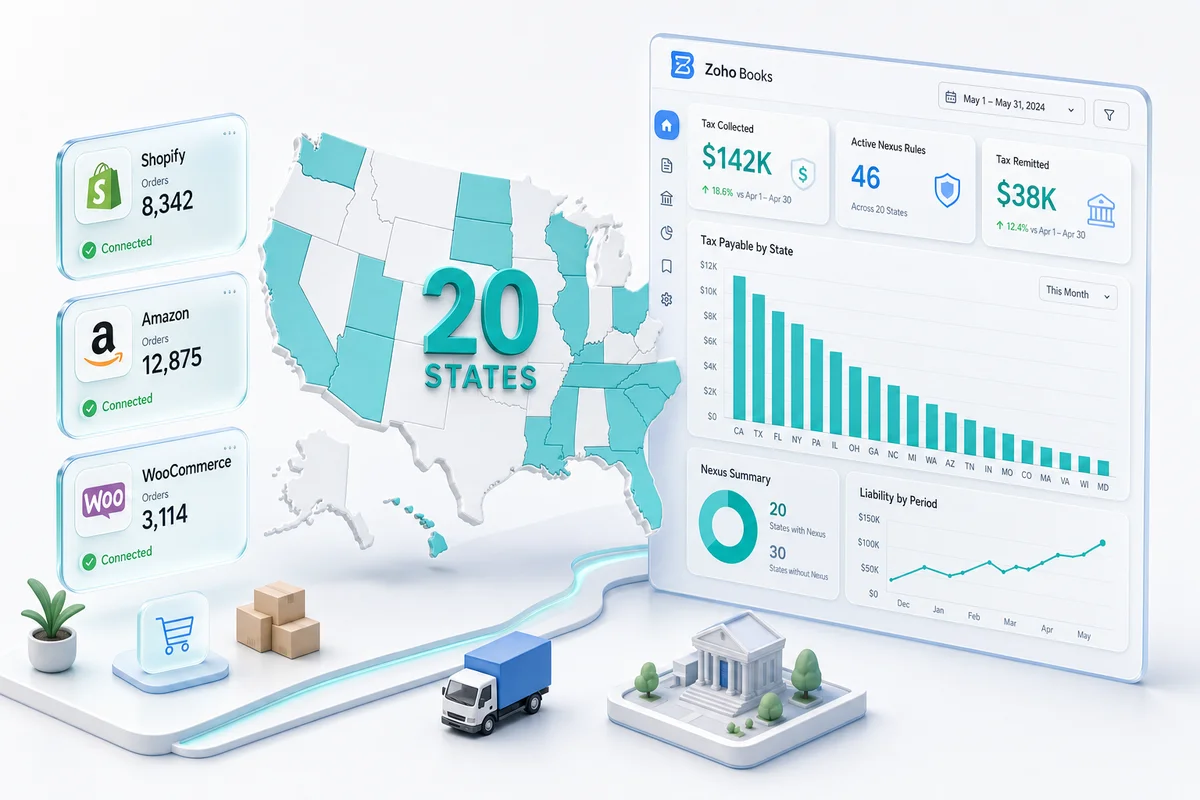
Wayfair introduced economic nexus. A seller with no physical presence in a state now has sales tax obligations once they exceed that state's revenue or transaction threshold. In most states, that threshold is $100,000 in annual sales or 200 transactions. A growing Shopify seller shipping to customers nationwide can have nexus in 20 states without a single office outside their home state.
The accounting impact is direct: every state where you have nexus requires its own tax liability account in your chart of accounts, its own tax agency in Zoho Books, and its own reconciliation at month-end.
Marketplace Facilitator Laws: What Amazon, Shopify, and eBay Handle for You (and What They Don't)
Marketplace facilitator laws now exist in 46 US states. Under these laws, the platform collects and remits sales tax on behalf of sellers for sales made through that platform.
For Amazon FBA sellers, Amazon collects and remits sales tax in marketplace facilitator states. For Shopify sellers using Shopify Payments or Shopify Tax, the platform collects where configured. eBay and Etsy operate as marketplace facilitators in all 50 states as of 2024.
The accounting problem: even when the platform collects the tax, the transaction still flows through your books. An order including marketplace-facilitated tax needs to be recorded as a pass-through, not as revenue. If your Zoho Books integration books the gross Amazon payout as a single revenue line without separating the marketplace facilitator component, your revenue figure is overstated and your tax position misrepresents what you actually owe.
Economic Nexus vs Physical Nexus: Why It Matters for Your Chart of Accounts
Physical nexus triggers on warehouses, offices, and employees in a state. Economic nexus triggers on revenue and transaction thresholds. An Amazon FBA seller with inventory stored in Amazon fulfillment centers across multiple states may have physical nexus in states they never deliberately chose. A Shopify seller who crossed $100,000 in sales to California customers in a calendar year has economic nexus there from that point forward.
Each nexus state requires separate configuration in Zoho Books: a tax agency representing that state's revenue department, the applicable tax rate including county and city components, and a dedicated tax payable account on the balance sheet. A seller with nexus in 12 states needs 12 tax agencies and 12 liability accounts configured correctly. That configuration is an accounting decision, not a default software setting.
What eCommerce Sellers Actually Need From Tax Accounting Software
Collecting Sales Tax Is One Thing. Recording It Correctly Is Another.
Your storefront collects sales tax. That part works. The accounting problem starts when that collection reaches your books.
If Shopify collects $47.82 in sales tax on a $598 order, the correct Zoho Books entry credits revenue for $598 and creates a separate tax liability entry for $47.82 assigned to the correct state tax agency. If the integration instead creates a single revenue entry for $645.82, the tax is buried in revenue and the liability never appears on your balance sheet.
Most connector-only setups produce the second version. A CA-configured setup produces the first. The difference compounds every month it goes unaddressed.
Platform-by-Platform Tax Handling: Shopify, Amazon, WooCommerce, eBay, Etsy
Each platform sends tax data differently, and each requires specific configuration in Zoho Books to record it correctly.
| Platform | Tax handling | What the Zoho Books setup needs |
|---|---|---|
| Shopify | Collects per-order tax with itemised tax lines in payout data | Tax agency per nexus state; tax payable account per state; payout reconciliation that nets tax out of revenue |
| Amazon FBA | Marketplace facilitator in 46 states; collects and remits; tax in settlement report as separate line | Facilitator exemption flag per state; pass-through liability entry; FBA fee and tax separation in settlement mapping |
| WooCommerce | Collects per order based on configured tax zones; full order data including tax via API | Tax agency mapping by WooCommerce tax class; line-item tax entries; nexus zone verification against Zoho Books agencies |
| eBay | Marketplace facilitator in all 50 states; collects all US sales tax | Exemption entries for eBay-remitted states; verification of any non-facilitator seller obligations |
| Etsy | Marketplace facilitator in all 50 states; collects and remits | Same as eBay; confirm remittance in Etsy payment account before booking pass-through entries |
When Zoho Books Handles Sales Tax Natively (and When You Also Need a Compliance Tool)
Zoho Books handles the accounting side of sales tax natively: recording what was collected, attributing it to the correct tax agency, and generating the tax liability report per jurisdiction. This works for sellers with straightforward nexus configurations and platforms that pass clean, itemised tax data.
For high-volume sellers with nexus in 20+ states, complex product taxability rules, or the need to auto-calculate and file across multiple jurisdictions, a compliance tool sits alongside Zoho Books. The compliance tool calculates and files. Zoho Books records. They serve complementary functions.
For a Shopify seller with nexus in five states, Zoho Books native tax handling is sufficient for recording and reporting. For an Amazon FBA seller with nexus in 25 states who needs automated nexus monitoring and multi-state filing, the Zoho Books and Avalara combination is the appropriate setup.
Zoho Books includes a native Avalara connector documented in Zoho Books' tax configuration guide. The connector pushes confirmed Avalara liability figures directly into Zoho Books invoices at creation time.
How Zoho Books Handles eCommerce Sales Tax
Setting Up Tax Agencies and Tax Groups for Multi-State Compliance
In Zoho Books, a tax agency represents a tax authority: a state revenue department, county tax office, or combined authority. Each nexus state gets its own agency record, linked to a dedicated tax payable account on the balance sheet.
Tax groups combine state, county, and city rates into a single invoice line item and split the liability between the correct payable accounts automatically. A seller with nexus in California, where state, county, and city components combine to produce a rate that varies by ZIP code, creates a tax group that applies the correct total rate while maintaining separate account entries for each component.
At month-end, the balance in each state's tax payable account equals the tax collected for that state minus any tax already remitted. That per-state balance is what your CA reconciles before issuing tax payments.
Shopify Sales Tax in Zoho Books: Itemised Tax Line Entries That Match Your Shopify Payouts
Shopify passes tax data at the order level, with individual tax lines for each rate applied. When a Shopify order syncs to Zoho Books, the integration maps each tax line to the corresponding tax agency. The resulting Zoho Books invoice shows product revenue lines, shipping revenue where applicable, and separate tax lines attributed to each nexus state.
Shopify payouts include a tax component that needs to be separated from net revenue in the payout entry. The correct Shopify payout entry in Zoho Books credits net revenue to the sales account, debits payment processing fees to a fee expense account, and credits tax collected to the appropriate state tax payable account. An integration that books the gross payout as a single revenue line skips this step and produces a growing discrepancy between what Shopify collected and what your books show.
Amazon Marketplace Facilitator Exemptions: Recording What Amazon Already Collected
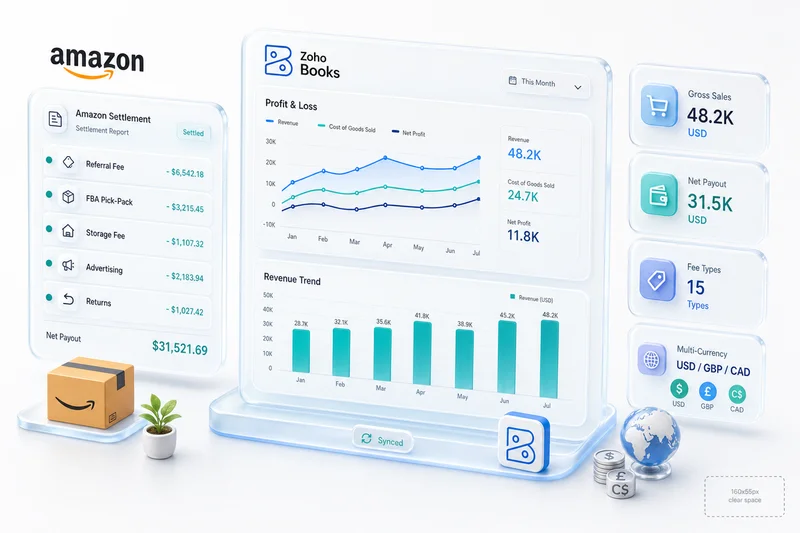
For FBA sellers, Amazon's settlement report includes tax collected by Amazon as the marketplace facilitator. Amazon collected it from the buyer and will remit it directly to the state. The seller does not remit this portion.
The correct Zoho Books setup flags marketplace facilitator state transactions as exempt from seller remittance. The settlement entry records the sale at gross and includes a memo tax line for tax collected but not seller-owed. This preserves an accurate record of the transaction without creating a false tax payable on the seller's balance sheet.
States where the seller still has remittance obligations require separate tax agency entries. The Amazon settlement-to-Zoho-Books integration needs to distinguish between facilitator-remitted states and seller-remitted states at the transaction level. That distinction requires CA-level knowledge of the applicable state laws, not just an API connection. For a deeper walkthrough of Amazon-specific accounting in Zoho Books, see Amazon Seller Zoho Books: The Complete Accounting Guide.
WooCommerce Tax Sync: Order-Level Tax vs Line-Item Tax Recording in Zoho Books
WooCommerce sends tax data at both the order level and the line-item level, depending on the integration configuration. Order-level tax entries aggregate all tax for the order into a single line, which simplifies data transfer but loses the per-jurisdiction breakdown needed for multi-state reporting.
Line-item tax sync preserves each tax component separately: state tax, county tax, local tax where applicable. For a seller with nexus in California, Colorado, or New York (all of which have multiple tax levels), line-item sync is required to produce the correct tax payable breakdown in Zoho Books.
The integration mapping needs to align WooCommerce tax classes (standard, reduced, zero-rated) with Zoho Books tax agencies. If the WooCommerce store uses geographic tax zones, those zones need to correspond to tax agencies in Zoho Books. Getting that mapping right for a seller operating across multiple states requires reviewing the WooCommerce configuration alongside the chart of accounts before any data flows through the integration. See Shopify Zoho Integration Guide for how the same principle applies to the Shopify side of a multi-channel setup.
The Difference Between a Compliance Tool and a Tax-Configured Books Setup
TaxJar and Avalara Handle Filing. Not Your P&L.
TaxJar and Avalara calculate tax owed per transaction based on ship-to address and product taxability rules. They track economic nexus thresholds and alert when a new state threshold is crossed. They file returns.
What they do not do: configure your Zoho Books chart of accounts, create tax agencies and tax groups, map platform tax data to accounting entries, or produce a month-end tax payable reconciliation. The compliance tool tells you what to pay. Zoho Books records whether you collected it, where it sits on the balance sheet, and whether it reconciles against the compliance tool's figures.
Both are necessary for a complete setup. Neither substitutes for the other.
Why Your CA Needs to Configure the Tax Codes, Not the Connector
A connector syncs tax numbers from your storefront to Zoho Books. It does not determine whether those numbers are being recorded in the right accounts.
Multi-state sales tax configuration requires answering accounting questions. Should the $47.82 in California sales tax appear as a current liability or as a deduction from revenue? Should Amazon marketplace facilitator tax appear on the balance sheet at all, or only as a memo entry? How do you reconcile tax collected in Zoho Books against tax remitted in TaxJar when collection and filing periods don't line up?
These are not connector questions. They are chart of accounts questions. A developer who installed the integration knows the API. A CA who has configured Zoho Books for a seller with nexus in 12 states knows the account structure and how the monthly close actually works.
Multi-State Nexus in 12 States: What the Configuration Actually Looks Like
For a seller with nexus in 12 states, the Zoho Books configuration includes:
- 12 tax agencies, one per state, with state-specific rates including combined county and city rates where applicable
- 12 corresponding tax payable accounts on the balance sheet (Sales Tax Payable - CA, Sales Tax Payable - NY, Sales Tax Payable - TX, and so on)
- Marketplace facilitator exemption flags for Amazon, eBay, and Etsy transactions in all applicable states
- Tax group configurations for states with multiple rate components (California, Colorado, New York, Louisiana)
- Integration mapping for each storefront: Shopify tax lines to state agencies, Amazon settlement tax to facilitator-exempt entries, WooCommerce tax zones to state agencies
- Reconciliation templates for the monthly close: tax collected per state versus tax remitted per state, with timing differences explained
The most common error in a generic setup: a single Sales Tax Payable account for all states. The effect is that you cannot determine what you owe to California versus Texas versus New York without reconstructing transaction detail from scratch each period.
How Zolify Sets Up eCommerce Tax Accounting in Zoho Books
Zolify's CA configures eCommerce tax accounting as part of every Zoho Books implementation. That covers chart of accounts structure, tax agency creation, platform-specific mapping, compliance tool integration where needed, and the month-end close procedure. For context on how the broader eCommerce accounting stack fits together, see eCommerce Accounting Software Guide and eCommerce Bookkeeping: Eliminating Manual Entry.
CA-Led Tax Code Configuration: US Jurisdictions, Multi-State Nexus, Marketplace Exemptions
The CA who configures your Zoho Books setup starts with a nexus analysis: which states you have nexus in, whether that nexus is physical or economic, and which platforms you sell through. The tax agency and account structure follows from that analysis, not from default settings.
For Amazon sellers, the configuration includes marketplace facilitator exemption mapping for all 46 facilitator states and seller-remitted tax agency records for any remaining obligations. For Shopify sellers, it includes state-specific tax agencies tied to Shopify's per-order tax line data. For multi-channel sellers, it includes reconciliation rules that aggregate tax collected across all channels by state.
Ask a US-based Zoho consultant who primarily does configuration work to explain how they handle multi-state sales tax for a company with nexus in 12 states. If they describe a single tax code and a generic payable account, the limitation becomes clear. Zolify's CA has configured this setup across 100+ eCommerce implementations.
Reconciling Tax Collected vs Tax Remitted: The Monthly Close Process
Every month, the tax payable accounts in Zoho Books need to reconcile against actual tax payments made to state revenue departments. The reconciliation confirms:
- Tax collected per state matches the figure in the compliance tool (or in each platform's tax report)
- Tax payments reduce the corresponding state payable account correctly
- Timing differences between collection periods and filing deadlines are accounted for
- Marketplace facilitator remittances are excluded from seller obligations
For Shopify sellers filing in five states, this close process takes approximately two hours per month when the account structure is correct from the start. For Amazon FBA sellers with nexus in 25+ states using a TaxJar or Avalara integration, the close includes validating the automated filing figures against the Zoho Books balances.
The reconciliation is not a compliance tool output. It is an accounting deliverable that requires the account structure to be correct before you can run it reliably.
Zoho Books Plus Avalara for High-Volume Sellers: When the Integration Makes Sense
Zoho Books' native Avalara integration works at the invoice level: when a Zoho Books invoice is created from a Shopify, Amazon, or WooCommerce order sync, Avalara calculates the applicable tax rate based on the ship-to address and the product tax code. The calculated tax amount appears on the invoice and is attributed to the correct tax agency automatically.
This is the right configuration for sellers with complex product taxability rules, nexus in 20+ states, or the need for automated multi-state filing. The Avalara connection removes the manual rate lookup and the filing step. It does not remove the need for a correctly structured chart of accounts. The account structure, tax agencies, and reconciliation templates still require CA configuration before Avalara adds value to the workflow. For context on how automation reduces the broader category of manual entry errors in eCommerce accounting, see eCommerce Accounting Automation.
Audit-Ready Tax Records: What a CPA Expects vs What a Generic Setup Produces
A CPA preparing for a sales tax audit needs transaction-level records: order date, ship-to address, tax rate applied, tax amount collected, tax agency attributed, and whether the amount was subsequently remitted. Zoho Books produces these records when the setup is correct.
A generic setup produces a single Sales Tax Payable balance with no state breakdown and no per-transaction tax attribution. Reconstructing the audit trail from that setup means going back to source platform reports and manually matching transactions one by one. That process takes hours and creates the kind of errors that don't show up until someone is already asking questions. Year-end brings a parallel challenge: each marketplace issues a 1099-K showing gross sales that will not match what your books report, and explaining that gap requires the same transaction-level records your sales tax setup should already be producing; see eCommerce 1099-K Reporting: What Shopify, Amazon, and Etsy Sellers Need to Know (2026) for how to reconcile the discrepancy.
Across 100+ eCommerce implementations including Shopify, Amazon FBA, WooCommerce, eBay, and Etsy sellers with multi-state nexus profiles, Zolify's CA-configured Zoho Books setup produces audit-ready records as a normal output of the correct account structure. The records exist because the structure forces them to exist, not because someone built a separate reporting layer.
Get an eCommerce Operations Audit
Sales tax accounting mistakes compound over time and are easier to fix before filing than after. If your books show tax collected in revenue, a single Sales Tax Payable account across all states, or Amazon settlement payouts recorded without separating marketplace facilitator tax, the underlying configuration needs a review.
Zolify's eCommerce Operations Audit covers your Zoho Books chart of accounts, tax agency configuration, platform sync mapping, and month-end close process. The CA review includes a nexus assessment, an account structure recommendation, and integration mapping for your specific channel mix (Shopify, Amazon, WooCommerce, eBay, or Etsy).
As an Official Zoho Authorized Partner with 100+ eCommerce implementations in production, Zolify configures multi-state sales tax accounting for eCommerce sellers regardless of how many states they sell into.
Request an eCommerce Operations Audit to start with a CA review of your current tax accounting setup.
Frequently Asked Questions
eCommerce tax accounting software records what sales tax was collected in your chart of accounts and attributes that liability to the correct jurisdiction. A compliance tool like TaxJar or Avalara calculates the correct tax rate per transaction, tracks economic nexus thresholds across states, and files returns on your behalf. The compliance tool tells you what to pay. The accounting software records whether you collected it, where it sits on your balance sheet, and whether your books reconcile against what you filed. Most eCommerce sellers need both, but they serve different functions and cannot substitute for each other.
Zoho Books uses tax agencies to represent each state revenue authority where you have nexus, with a corresponding tax payable liability account on the balance sheet per state. Tax groups combine state, county, and city rates into a single invoice line item and split the liability between the correct accounts automatically. Each storefront integration (Shopify, Amazon, WooCommerce) maps platform tax data to these tax agencies at the transaction level. The result is a per-state tax payable balance that reflects what was collected and, after remittance entries, what remains owed.
It depends on your nexus complexity. For a Shopify seller with nexus in three to five states and straightforward product types, Zoho Books native tax handling is sufficient for recording and reporting. For an Amazon FBA seller with nexus in 20+ states, complex product taxability rules, or the need for automated multi-state filing, a compliance tool like Avalara or TaxJar alongside Zoho Books is the correct setup. Zoho Books has a native Avalara integration that pushes confirmed liability figures back into your books at the invoice level. The compliance tool automates the calculation and filing. Zoho Books records the accounting.
Amazon collects and remits sales tax as the marketplace facilitator in 46 US states. For FBA sellers, this means Amazon handles the tax payment, but the transaction still flows through your books. The correct Zoho Books configuration flags marketplace facilitator transactions as exempt from seller remittance, records the sale at gross, and creates a memo entry for the tax collected by Amazon without creating a false tax payable liability on your balance sheet. An integration that books the gross Amazon settlement payout as a single revenue line skips this distinction and produces inflated revenue and incorrect tax reporting.
A generic Zoho Books setup typically uses a single Sales Tax Payable account for all states and basic tax codes without jurisdiction-level separation. A CA-configured setup includes individual tax agencies and payable accounts per nexus state, marketplace facilitator exemption mapping for Amazon and eBay transactions, tax group configurations for states with county and city components, platform-specific integration mapping for each storefront, and a month-end reconciliation template comparing tax collected per state against tax remitted. The CA also applies knowledge of which states have marketplace facilitator laws, when economic nexus thresholds are triggered, and how to structure the close process for an eCommerce seller filing in multiple states.
See exactly where your Shopify, Amazon, or WooCommerce ops are leaking — free.
Get a personalised eCommerce Ops Audit: inventory gaps, accounting leaks, and order-flow bottlenecks — with a Zoho fix roadmap. Delivered in 48 hours, at no cost.