eCommerce Returns Management with Zoho: Inventory Adjustments and Refund Accounting
BFCM return volumes hit their peak around November 14. Shopify and Amazon sellers typically see 20-30% of BFCM orders come back within 60-90 days of purchase. For a seller who did $500K in BFCM revenue, that is $100K-$150K in returned merchandise needing accurate inventory adjustments, credit memos in Zoho Books, and marketplace fee reversals in the same 4-week window. Zoho Inventory and Zoho Books handle the full returns workflow, but only when configured for eCommerce from the start.
BFCM return volumes hit their peak around November 14. Shopify and Amazon sellers typically see 20-30% of BFCM orders come back within 60-90 days of purchase, and mid-November is when that first wave lands. For a seller who did $500K in BFCM revenue, that is $100K-$150K in returned merchandise that needs accurate inventory adjustments, credit memos in Zoho Books, and marketplace fee reversals in the same 4-week window.
Zoho Inventory and Zoho Books handle the complete eCommerce returns workflow (from initial return request on Shopify, Amazon, eBay, or WooCommerce through to the credit note, inventory adjustment, and marketplace fee reversal) but only when configured specifically for eCommerce. Out of the box, neither product is wired for multi-channel returns at BFCM volume. That configuration gap is where most sellers either get this right once, or keep getting it wrong year after year.
Returns are not an exception to your operating model. They are part of it. Post-BFCM return rates run 20-30% of BFCM orders across most categories. Apparel and electronics come in at the high end. Online purchases return at roughly 1.5x the rate of in-store purchases year-round; BFCM purchases bought on discount return even higher. For a seller doing $2M annually in a high-return category, that is $480,000-$600,000 in returned merchandise requiring accurate inventory adjustments and accounting treatment every year, concentrated in two windows: post-BFCM (November-January) and spring (February-April).
The typical pattern when we audit new clients: returns come back, someone logs them loosely in a spreadsheet or adds them manually to Shopify inventory, and the accounting catches up at month end. Or it does not. The result is overstated inventory, understated losses, and a returns report that disagrees with the books.
For context on how returns fit into the broader eCommerce operations stack, see our multi-channel inventory management with Zoho guide and our BFCM inventory planning guide for Shopify and Amazon.
What a returns workflow actually needs
A complete returns workflow covers three things: physical disposition of the returned item, inventory accounting, and financial accounting. Get any one wrong and the others fall apart.
Physical disposition is the question nobody wants to answer in real time: is this item restockable, or is it damaged, defective, or unsellable? That single judgment call drives everything else. Restockable items go back to available stock at cost. Damaged and unsellable items need a separate location and a write-down entry in Zoho Books.
Inventory accounting flows from disposition. Restocked items add back to inventory at cost. Damaged items are written down to reduced value or zero. The inventory asset balance needs to reflect what you actually have, not what you shipped minus nothing.
Financial accounting is where most self-implementations break. Customers expecting refunds need credit notes against the original invoice. Revenue decreases when returns are accepted. Marketplace fee reversals from Amazon and eBay need to post against the correct accounts. You paid a selling fee on the original sale and some of that fee comes back when the item is returned; it does not belong in revenue.
Zoho Inventory handles the operational layer. Zoho Books handles the financial layer. They sync automatically when set up correctly. Your eCommerce chart of accounts in Zoho Books determines where each of these entries land; get it wrong at account setup and every return posts to the wrong place for the life of the business.
BFCM returns: what makes November different
The mechanics of a BFCM return are the same as any other return. What changes is the volume, the timeline, and the extended platform windows that keep returns flowing well into January.
Extended return windows. Shopify's standard return window is 30 days. For BFCM purchases, most sellers extend that to 60-90 days, and Shopify's 2026 Returns Rules feature lets you configure this per product category directly in the Shopify admin. Amazon's 2026 BFCM policy extends the standard window to January 31 for items purchased between November 14 and December 2. That means returns from your BFCM peak still arrive in January — they need to reconcile against the correct revenue period in Zoho Books, not against whatever month they physically arrive.
Volume compression. If you fulfilled 2,000 orders during BFCM, 400-600 of them may return within 90 days. That volume does not spread out evenly. It front-loads in the two weeks after customers receive their orders and again after the holidays. Mid-November is the first wave; mid-January is the second.
Multi-channel complexity. BFCM sellers running Shopify plus Amazon FBA plus WooCommerce have returns flowing from three systems simultaneously. Without a normalized returns workflow in Zoho, the condition assessment and fee reversal steps go manual across all three channels at once.
Before BFCM peaks, create a dedicated BFCM returns location in Zoho Inventory, verify your Zoho Flow return triggers are active on all connected channels, and confirm your credit memo automation is tested. Fixing automation during peak return season is not a good time.
For how BFCM inventory planning connects to your returns exposure, see our BFCM inventory planning guide for Shopify and Amazon.
How Zoho Inventory handles returns
Creating a return in Zoho Inventory
When a customer initiates a return on Shopify or Amazon, the process in Zoho Inventory starts with a sales return linked to the original sales order. The sales return records what is coming back, from which order, and in what condition.
For orders fulfilled from your own warehouse, you control the return receipt process directly. For Amazon FBA orders, Amazon handles the physical return and reports the outcome; you reconcile the return in Zoho Inventory against Amazon's returns report.
Each return receipt in Zoho Inventory triggers a corresponding accounting entry in Zoho Books via the native integration. You do not create separate credit notes manually for returns that flow through Zoho Inventory; the accounting side happens automatically.
Restocked vs. damaged: the accounting split
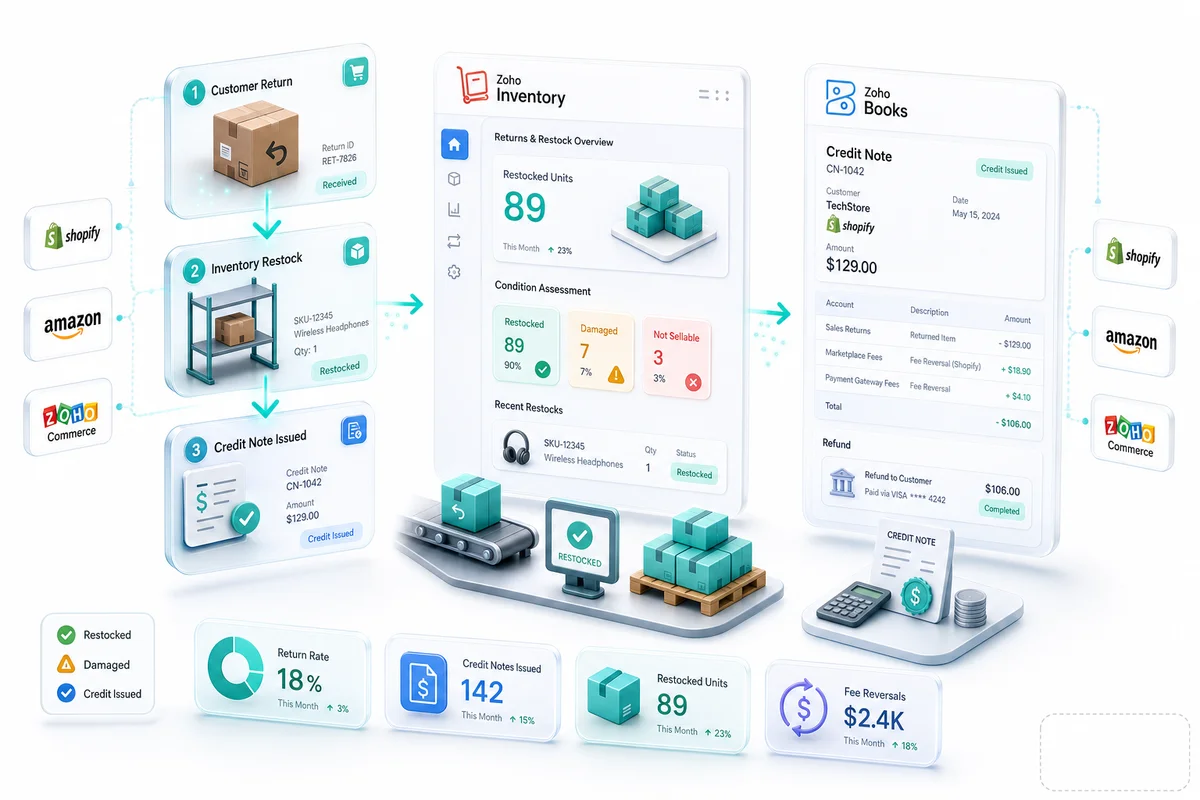
The condition assessment is the step most self-implemented setups skip. Zoho Inventory lets you route returned items to different locations based on condition. Each path has a distinct accounting treatment in Zoho Books:
| Return type | Inventory action | Zoho Books entry | Account |
|---|---|---|---|
| Restockable | Back to sellable stock | Reverse COGS; add to inventory asset | COGS (credit), Inventory Asset (debit) |
| Damaged / Unsellable | Move to damaged location | Write-down to scrap or zero | Damaged Goods Expense or Inventory Write-Down |
| Return to supplier | Debit note raised | Supplier payable credit | Accounts Payable, Inventory Asset |
| FBA unsellable (Amazon) | Remove from FBA count | Write-down; no COGS reversal | Inventory Write-Down |
Restockable items go back to your primary inventory location. The quantity count increases. Zoho Books reverses the original COGS entry and adds the inventory value back to your asset account.
Damaged or unsellable items go to a quarantine or damaged location (configured as a separate location in Zoho Inventory). Zoho Books records the write-down against a dedicated expense account, not COGS, because this is a loss distinct from the original cost of goods.
Manufacturer defects can often go back upstream. Zoho Inventory supports returns-to-vendor workflows where the return generates a debit note against the supplier in Zoho Books.
The setup step that matters most: create the damaged/unsellable location in Zoho Inventory before returns start flowing. Without it, damaged items default to sellable inventory, which overstates both your available quantity and your inventory asset value.
Zoho return order to credit memo: the automated flow
The biggest gap in self-implemented Zoho setups is the handoff between Zoho Inventory and Zoho Books at return time. When someone creates a return receipt in Zoho Inventory, a corresponding credit memo should appear in Zoho Books automatically. Without that automation, someone creates it manually, and at BFCM return volumes, that manual step becomes a bottleneck fast.
The flow from return request to reconciled credit memo:
| Step | System | Action | Who triggers |
|---|---|---|---|
| 1. Customer initiates return | Shopify / Amazon / WooCommerce | Return request created | Customer |
| 2. Return request syncs | Zoho Inventory | Sales return created, linked to original order | Integration or Zoho Flow |
| 3. Item received at warehouse | Zoho Inventory | Return receipt recorded; condition assessed | Warehouse team |
| 4. Condition routing | Zoho Inventory | Item moves to sellable or damaged location | Warehouse team |
| 5. Credit memo created | Zoho Books | Credit memo auto-generated against original invoice | Zoho native sync |
| 6. Marketplace fee reversal | Zoho Books | Fee credit from Amazon/eBay settlement mapped to fee expense account | Settlement import or Zoho Flow |
| 7. Refund issued | Payment processor / marketplace | Refund to customer's payment method | Platform auto-process |
| 8. Bank reconciliation | Zoho Books | Refund debit matches credit memo | Auto-match on bank import |
Steps 2 and 5 are where Zoho Flow earns its place. Zoho Flow listens for the "return received" event in Zoho Inventory and triggers the credit memo creation in Zoho Books without waiting for a human to open both applications.
The condition routing in step 4 stays manual. Zoho Inventory can route items based on the return reason code, but the physical assessment of whether an item is actually sellable requires someone in the warehouse to look at it.
For how this integration connects to your Shopify store specifically, see the Shopify-Zoho integration setup guide.
How Zoho Books records refunds correctly
Credit notes and the refund workflow
When a customer is owed a refund, Zoho Books uses a credit note. The credit note references the original invoice, specifies the items being returned, and reduces revenue by the return amount.
Credit notes can apply to the customer's next invoice, convert to a cash refund, or hold as a customer credit balance. The choice depends on your refund policy.
For Shopify refunds: Shopify updates the order status, your Zoho integration records the credit note, and when you issue the refund through Shopify Payments, the bank reconciliation in Zoho Books matches against the credit note automatically. Each step is recorded. For how this fits into your monthly close process, see Monthly Bookkeeping for Shopify Sellers Using Zoho Books.
Marketplace fee reversals
This is where generic accounting setups tend to go wrong. When Amazon or eBay processes a return, they reverse some of the original selling fees. That reversal appears on the next settlement report as a credit line item.
If you record the original sale and deduct referral fees as an expense, the fee reversal needs to reduce that same expense account, not appear as revenue. Posting a fee reversal to a revenue account overstates income. Posting it to the wrong expense account makes your fee data unreliable.
For sellers processing returns at volume, these reversals add up fast. Getting the account mapping right during initial setup is easier than correcting months of misclassified reversals.
For a detailed breakdown of marketplace fee accounting, see our eCommerce marketplace fee reconciliation guide.
Platform-specific returns: Shopify, Amazon, eBay, and WooCommerce
Shopify returns in Zoho
Shopify's 2026 Returns Rules feature lets you configure return windows, restocking fee rules, and return label policies per product type directly in the Shopify admin. For BFCM, most sellers extend to 60-90 days; set that up in Shopify's return settings before November, not after returns start arriving.
Shopify's native returns flow creates a refund event in the Shopify admin. Your Zoho integration captures that event and creates a return receipt in Zoho Inventory (if the item ships back) and a credit note in Zoho Books. The Shopify Payments refund posts to the same bank account used for payouts, so the bank reconciliation in Zoho Books sees a debit that matches the credit note automatically.
Where Shopify returns get messy: return shipping labels charged to the seller post as expenses that Shopify deducts from the payout directly, without a separate line item on most plans. These need a dedicated expense account in Zoho Books to avoid polluting your COGS or marketplace fee accounts.
Amazon FBA returns in Zoho
Amazon's 2026 BFCM policy extends the standard 30-day return window to January 31 for purchases made November 14 through December 2. That timeline matters for your Zoho Books setup: returns arriving in January need to reconcile against BFCM-period revenue, not January revenue.
Amazon processes FBA returns independently and notifies you via a returns report. Units marked as sellable are added back to your FBA inventory in Zoho Inventory. Units marked as unsellable (customer-damaged, seller-damaged, or defective) need a write-down in Zoho Inventory and Zoho Books.
The most common Amazon accounting error: unsellable FBA returns that are never written down, leaving the inventory asset overstated on the balance sheet. Amazon's settlement reports also include reimbursements for items lost in the FBA warehouse; these need to post to a separate "FBA reimbursement" income account, not to sales revenue, so your revenue figures stay clean.
For the full Amazon monthly bookkeeping workflow in Zoho Books including settlement reconciliation, see Monthly Bookkeeping for Amazon Sellers Using Zoho Books.
eBay returns in Zoho
eBay's Managed Returns program handles most sellers' return requests automatically. When a buyer opens a return request, eBay approves it based on your policy; the buyer ships the item back and eBay notifies you when it arrives.
In Zoho Inventory, you record the eBay return as a sales return against the original order. The condition assessment matters here specifically because buyers can mark items as "not as described" (triggering a full refund and a potential fee credit from eBay) or "changed my mind" (where return shipping costs may transfer to the buyer). These two scenarios have different fee reversal amounts on your next eBay settlement payout.
eBay's final value fee reversal posts on the payout settlement when the return resolves. Unlike Amazon, eBay does not provide detailed line-item reports by default; you pull transaction reports from Seller Hub and reconcile them against Zoho Books. Dedicated accounts for eBay referral fees, eBay shipping label costs, and eBay fee reversals keep your P&L readable and make the reconciliation manageable.
For the complete eBay accounting setup in Zoho Books (transaction mapping, fee accounts, and settlement reconciliation), see our eBay Seller Zoho Books guide.
WooCommerce returns in Zoho
WooCommerce does not have a managed returns flow like Shopify or eBay. Returns processing depends on which plugins you use. The common setup: a WooCommerce order management plugin (or a custom integration via Zoho Flow) listens for refund events in WooCommerce and triggers the corresponding workflow in Zoho Inventory and Zoho Books.
Because WooCommerce refunds process through your payment gateway (Stripe, PayPal, or similar) rather than through a marketplace payout, the accounting is simpler: the credit note in Zoho Books matches a direct bank debit from your payment processor. There are no marketplace fee reversals to track.
The error pattern we see in WooCommerce setups is the missing gateway refund fee. Most payment processors charge a non-refundable transaction fee on the original charge, which means you pay roughly 2.9% on the transaction and do not get it back when you issue a refund. That fee needs to post as an expense in Zoho Books even when the customer receives a full product refund. It is a small number per transaction; at WooCommerce return volumes, it adds up.
For the complete WooCommerce RMA automation setup — covering the Zoho Flow trigger, Zoho Books credit note creation, and Zoho Inventory stock adjustment in a single sequence — see the WooCommerce returns management automation guide.
Automating returns for multi-channel operations
Manual returns processing works at low volume. At 200+ returns per month across multiple channels, it becomes a bottleneck. Post-BFCM, that threshold can hit 200 returns in a single week.
Shopify: When a Shopify return is initiated, a webhook fires. Your Zoho integration receives that webhook and creates the return receipt in Zoho Inventory and a draft credit note in Zoho Books. Your team reviews and approves the draft before it posts; the draft step keeps a human in the loop for returns needing condition assessment.
Amazon FBA: Amazon's returns data is available via the SP-API. A daily pull of that data into Zoho Inventory keeps your FBA return counts current. The unsellable disposition step stays manual; Amazon tells you the return reason but you decide whether an "item damaged" return goes to your damaged location or back to a supplier for a defect claim.
eBay Managed Returns: eBay's API exposes return case data. A Zoho Flow integration can pick up completed return cases and create the corresponding entries in Zoho Inventory and Zoho Books. For high-volume eBay sellers, this eliminates the daily manual reconciliation step.
Multi-channel 3-way reconciliation: The hard part in multi-channel returns is getting three figures to agree: return receipts in Zoho Inventory, credit notes in Zoho Books, and fee reversals plus refund debits on your marketplace settlement reports. When these three do not match, the discrepancy sits unresolved until month-end close, when it becomes a much larger problem to trace. Zoho Flow can normalize return events from Shopify, Amazon, eBay, Etsy, and WooCommerce into a single workflow inside Zoho Inventory, with each event creating corresponding entries in both systems. Running that reconciliation weekly during the post-BFCM window (rather than monthly) catches discrepancies before they compound.
For how multi-channel inventory and returns connect across platforms in Zoho, see our multi-channel inventory operations guide.
If your returns volume comes through a helpdesk, Zoho Desk for eCommerce can trigger the Zoho Inventory return automatically when an agent applies a "Return Approved" tag on a support ticket.
For how returns, settlements, and payouts reconcile across multiple channels in Zoho Books, the Zoho Books bank reconciliation guide for eCommerce covers the monthly workflow in detail.
Full automation without the condition-assessment step is possible only if you trust the platform's disposition reporting completely. Most sellers run at least a weekly review of returns in the damaged location to catch high-value items that need supplier credit claims.
Implementing returns management with Zolify
A correctly configured returns workflow requires deliberate chart of accounts design and multi-location setup in Zoho Inventory, plus integration logic that handles fee reversal accounting correctly across every channel. These are not default configurations; they require eCommerce-specific setup that most Zoho implementations skip.
Zolify has implemented returns workflows for 100+ eCommerce operations across Shopify, Amazon, WooCommerce, eBay, and Etsy — as part of our broader inventory and warehouse operations implementations. Our Chartered Accountant validates the financial logic on every returns setup before go-live. The errors we fix most often: damaged returns posting back to sellable inventory, fee reversals posting to wrong accounts, and credit notes that do not reconcile against the bank account.
As an Official Zoho Authorized Partner, Zolify brings both the technical integration capability and the accounting domain knowledge to get returns right the first time. If you are setting up returns management for the first time, or if you are heading into BFCM with a returns setup you are not confident in, an eCommerce Ops Audit is the right starting point: we review your current returns workflow, chart of accounts, and integration configuration, then deliver a concrete fix plan.
Returns management is one operational layer within the wider Zoho eCommerce platform. For how returns, inventory, accounting, and multi-channel operations connect across Shopify, Amazon, WooCommerce, eBay, and Etsy, see Zoho for eCommerce: The Complete Operations Platform Guide.
Frequently Asked Questions
In Zoho Inventory, a return starts as a sales return linked to the original sales order. When the returned item arrives, you record whether it goes back into sellable inventory (restocked), transfers to a damaged goods location, or gets written off. Each path has a different accounting treatment in Zoho Books. Restocked returns increase your inventory asset; damaged returns require a write-down to reduced value or zero.
In Zoho Books, a customer refund flows through a credit note. When a customer returns an item, you create a credit note against the original invoice. The credit note reduces your accounts receivable (or applies against a future invoice) and adjusts the revenue account. If the customer paid by credit card and you are issuing a monetary refund, you record the refund payment against the credit note. Net effect: revenue decreases, the customer account balances correctly, and the refund appears in your bank reconciliation.
Amazon processes FBA returns independently and notifies you via a returns report. Units Amazon marks as sellable are added back to your FBA inventory in Zoho Inventory. Units Amazon marks as unsellable (customer-damaged, seller-damaged, or defective) need a write-down in Zoho Inventory and Zoho Books: the inventory asset value reduces to zero or scrap value. This is one of the most common sources of accounting errors in Amazon seller setups: unsellable returns that are never written down, leaving the inventory asset overstated on the balance sheet.
Three things to configure before BFCM return volumes hit. First, create a dedicated BFCM returns location in Zoho Inventory so high-volume return processing does not mix with regular cycle counts. Second, set up the Zoho Inventory return order to Zoho Books credit memo automation via Zoho Flow, because manual credit note creation does not scale past 50-100 returns per day. Third, map the extended BFCM return window in Shopify (through January 31) and Amazon (through January 31) to your chart of accounts in Zoho Books, so returns that arrive in January still reconcile against the correct BFCM revenue period.
A restocked return reverses the original COGS entry: the inventory asset comes back at cost, and the COGS account reduces by the same amount. A damaged return cannot be fully restocked, so the inventory value is written down to scrap value or zero. The write-down posts as a loss to a separate account like 'inventory write-down' or 'damaged goods expense,' not as a COGS reduction. Keeping these separate in your chart of accounts gives you accurate margin data and a clear picture of how much damaged returns cost you each month.
See exactly where your Shopify, Amazon, or WooCommerce ops are leaking — free.
Get a personalised eCommerce Ops Audit: inventory gaps, accounting leaks, and order-flow bottlenecks — with a Zoho fix roadmap. Delivered in 48 hours, at no cost.