Amazon Zoho Integration: Connect Seller Central to Zoho Books and Inventory
Amazon settlement reports contain 25+ line items. Most sellers book the net deposit as revenue and miss thousands in deductible fees. This guide covers the full Amazon Zoho integration architecture: Seller Central to Zoho Inventory, Zoho Books, CRM, and Analytics.
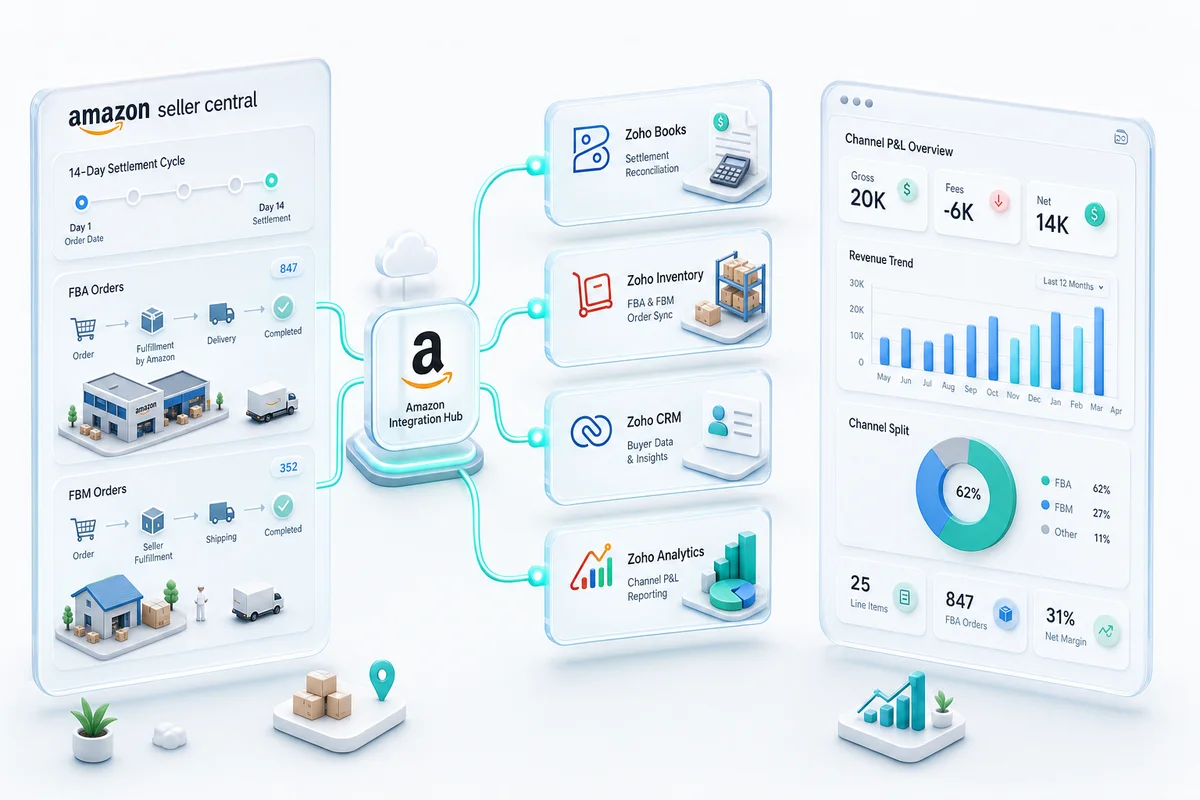
Amazon sellers recording the settlement net deposit as revenue typically understate gross sales by 20 to 35 percent and miss tens of thousands in deductible fees annually. The amazon zoho integration prevents this by connecting Seller Central to four Zoho products: orders and FBA/FBM inventory in Zoho Inventory, settlement reconciliation in Zoho Books, buyer data in Zoho CRM, and channel P&L in Zoho Analytics. For the accounting setup foundations specific to Amazon sellers, see our Amazon seller Zoho Books accounting guide.
TL;DR: The Amazon-Zoho integration covers four data flows: FBA/FBM order sync in Zoho Inventory, 25+ line-item settlement reconciliation in Zoho Books, buyer records in Zoho CRM, and channel P&L in Zoho Analytics. Settlement reconciliation is the setup step most sellers get wrong. A standard single-marketplace setup takes four to six weeks with CA validation before go-live.
What the Amazon-Zoho Integration Covers
The Amazon Zoho integration is not a single connection. It is four distinct data flows linking Seller Central to four Zoho products, each handling a different layer of your operations.
Zoho Inventory: Order Sync, FBA vs FBM, and Inventory Management
Zoho Inventory receives Amazon orders in real time. FBA orders track inventory at Amazon fulfilment centres. FBM orders route through your warehouse in Zoho Inventory, where pick, pack, and ship happen before COGS records. The two fulfilment paths differ at every step and need separate configuration from the start.
Zoho Books: Settlement Reconciliation and Financial Reporting
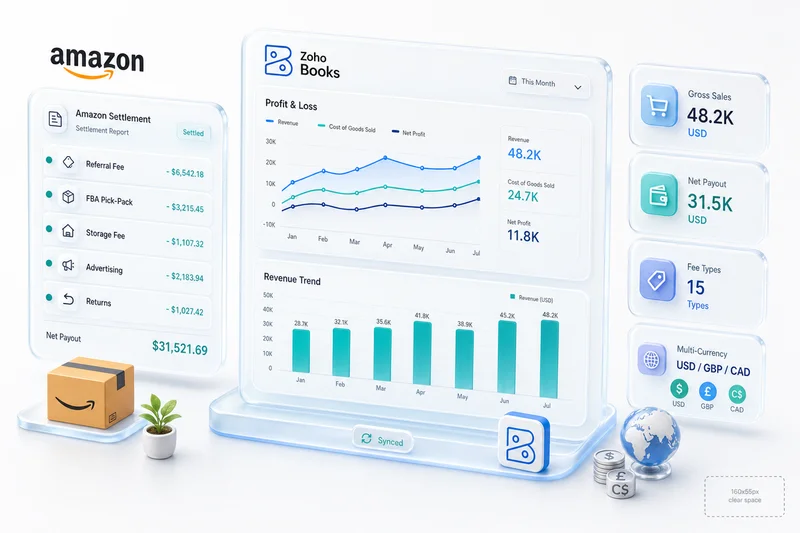
Amazon pays every 14 days. Each settlement contains 25 or more line items covering gross sales, returns, referral fees, FBA fees, storage fees, advertising costs, and reimbursements. Zoho Books maps each line item to a dedicated account so that reconciliation is an automated matching process rather than a manual data entry task every two weeks.
Zoho CRM: Amazon Customer Data and Post-Purchase Retention
Amazon order data creates customer records in Zoho CRM within Amazon's data sharing rules. Repeat buyer patterns, order history, and product preferences become visible across your full Zoho stack without violating Amazon's messaging restrictions.
Zoho Analytics: Channel P&L and Amazon Advertising Performance
Zoho Analytics connects to Zoho Books and Zoho Inventory to produce channel-level P&L reporting: revenue by ASIN, COGS by product, fees by category, and advertising cost of sales. Seller Central shows gross revenue. Zoho Analytics shows net margin.
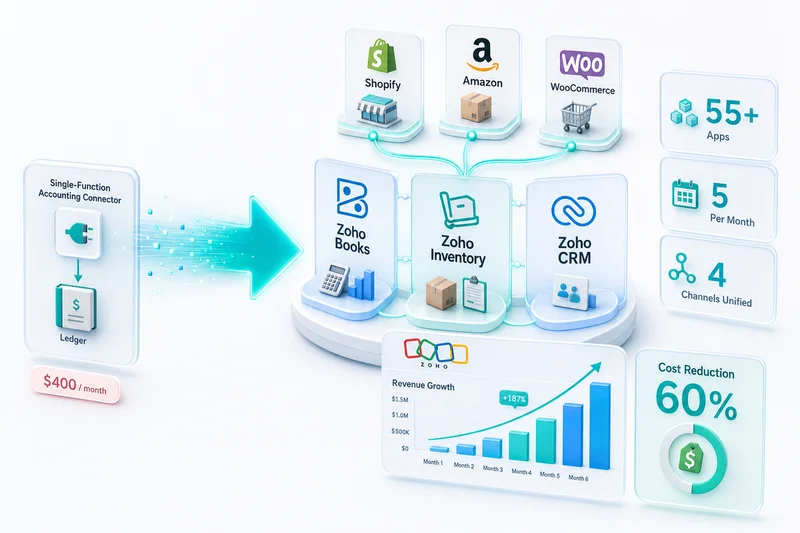
For how Amazon connects alongside Shopify, WooCommerce, eBay, and Etsy in a single Zoho backend, see Zoho for eCommerce: The Complete Operations Platform Guide.
Connecting Amazon Seller Central to Zoho Inventory
How Amazon Orders Flow Into Zoho Inventory in Real Time
Zoho Inventory's native Amazon marketplace connector pulls orders as they are placed on Seller Central. Each order creates a sales order in Zoho Inventory and triggers the appropriate fulfilment path. Stock levels update on each fulfilment event. For multi-channel sellers, Zoho Inventory draws from a shared pool across Amazon, Shopify, and other connected channels.
FBA Orders: Fulfilment by Amazon and How Zoho Inventory Handles Them
FBA orders close automatically in Zoho Inventory once Amazon confirms shipment. COGS posts at shipment confirmation, not at order creation. Amazon holds the inventory in its fulfilment centres; Zoho Inventory tracks those units as a dedicated "Amazon FBA" warehouse. Units in transfer between fulfilment centres, units reserved for pending orders, and units returned by customers each appear as distinct inventory states with separate accounting treatment.
FBM Orders: Fulfilment by Merchant, Warehouse, and COGS in Zoho Inventory
FBM orders require your warehouse team to pick, pack, and ship. Zoho Inventory generates the pick list, confirms shipment, records COGS from your inventory cost at dispatch, and updates stock in real time. COGS records when you ship, not when the customer places the order. For sellers splitting products across FBA and FBM, this is a configuration that must be set explicitly at the SKU level or COGS timing will be wrong across the catalogue.
Multi-ASIN Inventory: Keeping Zoho Inventory and Amazon Stock in Sync
Zoho Inventory tracks every ASIN in your Amazon catalogue with its own cost basis. As units sell, FIFO or weighted average cost calculates COGS per unit and passes the figure to Zoho Books automatically. For multi-channel operations, Zoho Inventory maintains a shared stock pool across Amazon, Shopify, and other channels, preventing oversells by treating all channels as draws from one master count. See Zoho multi-channel inventory management for the full multi-channel configuration.
Amazon Returns and Refunds: How Zoho Inventory Adjusts Stock and COGS
Amazon classifies each returned unit as sellable or unsellable. Sellable returns re-enter your FBA inventory at original cost. Unsellable units require a write-down in Zoho Books. According to Amazon's FBA returns documentation, return rates vary significantly by category. Zoho Inventory handles both outcomes systematically rather than requiring manual stock adjustments at month-end.
Amazon Settlement Reports in Zoho Books
What Is an Amazon Settlement Report? (And Why It's Not Your Revenue)
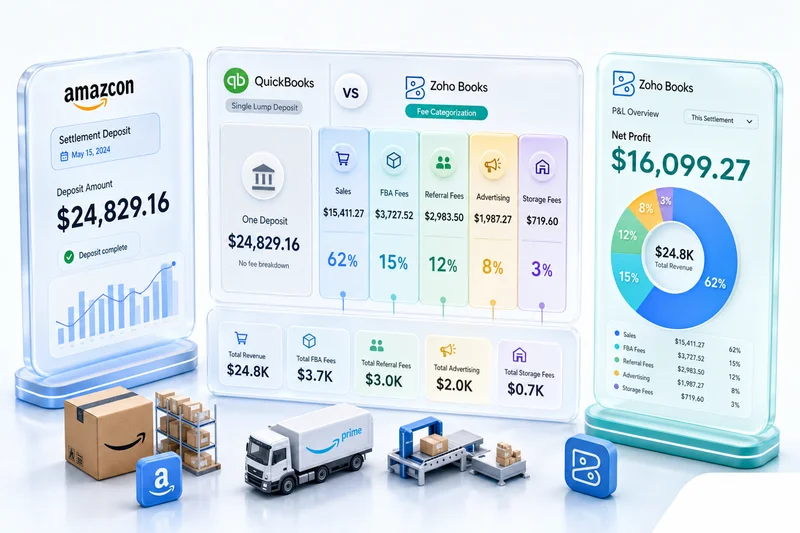
Amazon issues a settlement every 14 days. The settlement contains one number: the net deposit to your bank account. The settlement report shows every transaction that produced that number, which is gross sales minus every fee Amazon deducted. The deposit is what remains after Amazon has taken its share. Recording the deposit as revenue is the single most expensive accounting mistake Amazon sellers make in Zoho Books.
The 25+ Line Items on an Amazon Settlement Mapped to Zoho Books Accounts
| Settlement line item | Zoho Books account category |
|---|---|
| Product sales (gross) | Amazon Product Sales (Revenue) |
| Shipping charges collected | Amazon Shipping Revenue (Revenue) |
| Customer returns and refunds | Amazon Returns (Contra-Revenue) |
| Referral fees | Amazon Referral Fees (Operating Expense) |
| FBA pick-and-pack fees | Amazon FBA Fees (Operating Expense) |
| FBA monthly storage fees | Amazon FBA Storage (Operating Expense) |
| FBA long-term storage fees | Amazon FBA Long-Term Storage (Operating Expense) |
| FBA inbound placement fees (2025) | Amazon Inbound Placement Fees (Operating Expense) |
| Sponsored Products / Sponsored Brands / Sponsored Display | Amazon Advertising (Marketing Expense) |
| FBA reimbursements for lost or damaged stock | Amazon Reimbursements (Miscellaneous Income) |
| Vine programme charges | Amazon Vine (Operating Expense) |
| Promotions and coupon redemptions | Amazon Promotions (Revenue Reduction) |
| Liquidation proceeds | Amazon Liquidation Proceeds (Miscellaneous Income) |
| Removal order fees | Amazon Removal Fees (Operating Expense) |
| Professional selling plan subscription | Amazon Subscription (Operating Expense) |
Each line item maps to one account. Amazon updated its FBA fee structure in 2025, adding inbound placement fees for shipments that do not meet Amazon's preferred placement routing. These appear as a separate settlement line item and require their own Zoho Books account. Getting the account structure wrong at setup means months of misclassified expenses before the error surfaces.
Get an Amazon-Zoho Integration Assessment →
Gross Sales vs Net Payout: Recording the Difference in Zoho Books
Gross sales post to the Amazon Product Sales revenue account when Amazon confirms each order. Fees post to their respective expense accounts from the settlement report. The settlement deposit reconciles against the net total in Zoho Books: if gross sales minus all mapped fees equal the deposit, reconciliation closes cleanly. Any discrepancy flags immediately rather than appearing as an unexplained gap at year-end. The Amazon FBA accounting guide covers COGS recording, Q4 storage fee spikes, and reimbursement classification in detail.
FBA Fees, Referral Fees, and Storage Fees: Three Separate Expense Accounts
Referral fees, FBA fulfilment fees, and storage fees serve different analytical purposes. Referral fees are the cost of selling on the Amazon marketplace. FBA fulfilment fees are the cost of your logistics model. Storage fees are the cost of your inventory management decisions. Combining them into one "Amazon fees" account makes it impossible to benchmark or manage any of them independently. Three accounts takes five minutes to set up and produces a materially better P&L for the life of the business.
Amazon Advertising Costs: Tracking ACoS as a Marketing Expense
Amazon Advertising (Sponsored Products, Sponsored Brands, Sponsored Display) appears on your settlement report as an aggregate deduction. In Zoho Books, advertising costs belong in a dedicated marketing expense account, separate from operating expenses and completely separate from revenue. Amazon Advertising Cost of Sales (ACoS) measures advertising spend as a percentage of attributed revenue. When ACoS has its own account, Zoho Analytics can calculate it by product category and compare it against margin. Without a dedicated line, advertising costs are invisible inside the net payout figure.
FBA Reimbursements: How to Record Amazon's Compensation for Lost or Damaged Stock
Amazon reimbursements compensate sellers when FBA inventory is lost, damaged at a fulfilment centre, or damaged during return processing. In Zoho Books, reimbursements post to a dedicated miscellaneous income account, separate from product revenue. This separation matters for tax treatment and for understanding the true economics of FBA fulfilment. A business with frequent reimbursements may have a fulfilment centre handling problem worth investigating, not a revenue line worth celebrating.
Multi-Marketplace Amazon in Zoho Books (US, UK, CA, AU, DE)
Multiple Amazon Marketplaces in One Zoho Books Organisation
Amazon US, UK, Canada, Australia, and Germany each operate as separate marketplaces with their own settlement cycles, currencies, and fee structures. Zoho Books manages all of them within a single organisation. Each marketplace connects as a separate bank account in Zoho Books with its own settlement import workflow and currency configuration. A seller on five marketplaces does not need five separate Zoho Books accounts.
Currency Accounts: Separating USD, GBP, CAD, AUD, EUR Revenue
Multi-marketplace sellers need separate revenue accounts by currency: USD for Amazon US, GBP for Amazon UK, CAD for Canada, AUD for Australia, and EUR for Germany and other EU markets. Zoho Books records each transaction in the settlement currency and converts to your base currency at the exchange rate on the settlement date. Exchange rate gains and losses track automatically. Sellers who skip this configuration end up with forex variances that accumulate month by month and require manual correction at year-end close.
VAT and GST on International Amazon Sales: What Zoho Books Handles and What It Doesn't
Amazon collects and remits VAT on behalf of sellers for most EU and UK sales under marketplace facilitator rules. In Zoho Books, configure these as pass-through items, not revenue. VAT Amazon collected is not your income. For VAT-registered sellers above country-specific thresholds in the UK or EU, additional obligations may apply beyond what Amazon remits automatically. Our CA reviews VAT configuration for every multi-marketplace implementation before go-live.
Amazon Customer Data in Zoho CRM
Why Amazon Customer Data Is Valuable (Even With Amazon's Messaging Restrictions)
Amazon restricts direct marketing to buyers using Amazon-provided contact data. You cannot email Amazon buyers through your own system using Amazon-provided addresses. What you can do is build customer records in Zoho CRM that track Amazon purchase history, product preferences, and lifetime value by channel. This data matters for understanding who your customers are and how they behave, even when direct marketing through Amazon is off the table.
Repeat Buyer Identification: Using Amazon Order History in Zoho CRM
Amazon order data in Zoho CRM identifies repeat buyers by ASIN, order frequency, and average order value. For sellers with a DTC channel alongside Amazon, Zoho CRM links Amazon purchase history to direct website orders when the same customer appears on both channels. Over time, the combined record shows where each customer is in the relationship and informs decisions about whether they are worth pursuing through off-Amazon channels.
Post-Purchase Sequences: What Amazon Allows and How Zoho CRM Supports It
Amazon allows sellers to send one follow-up message per order through the Buyer-Seller Messaging system. The Request a Review button is the only mechanism for soliciting reviews within Amazon's policies. Zoho CRM tracks which customers have received these communications, flags timing for review requests, and manages customer service conversations that originate from Amazon orders. When those buyers later interact with your website or DTC channel, the Zoho CRM record connects the full picture. For a detailed guide to building TOS-compliant post-purchase workflows — including SP-API configuration, insert card opt-in flows, and Zoho Campaigns sequences — see Zoho CRM eCommerce: automating post-purchase workflows across channels.
Amazon Reporting in Zoho Analytics
Amazon Channel P&L Dashboard: Revenue, COGS, Fees, Advertising, Net Profit
Zoho Analytics connects natively to Zoho Books and Zoho Inventory, pulling data without manual exports. An Amazon P&L dashboard shows gross revenue, COGS by product, referral fees, FBA fees, storage fees, advertising costs, and net profit in one view. This is the reporting Seller Central cannot produce on its own: Seller Central shows gross revenue, not margin.
Amazon vs Shopify vs WooCommerce: Cross-Channel Reporting in One Dashboard
Multi-channel sellers with Amazon alongside Shopify or WooCommerce can compare channel P&L in a single Zoho Analytics dashboard. Revenue, COGS, fees, and net margin appear by channel. Profitability per channel drives decisions about where to invest in growth and which products to list where. For the full multi-channel operations picture, see multi-channel eCommerce with Zoho.
Amazon ACoS Tracking: Advertising Efficiency by Product Category
ACoS by product category in Zoho Analytics identifies which product groups are profitable after advertising and which are subsidising the rest. A product with 15% gross margin running at 20% ACoS loses money on every advertising-driven sale. This analysis is only possible when advertising costs are in a dedicated account in Zoho Books and mapped to product-level revenue in Zoho Inventory. Without that configuration, ACoS is a Seller Central metric disconnected from actual margin.
For a step-by-step walkthrough of how to build FBA profitability and ad ROI dashboards in Zoho Analytics, covering ASIN-level gross margin calculations, advertising ROI against gross margin, and multi-channel P&L reporting.
Common Amazon-Zoho Integration Mistakes
Booking the Settlement Net Payout as Revenue (The Most Expensive Error)
A seller with $30,000 in gross Amazon sales receiving a $20,000 settlement deposit who records $20,000 as revenue has understated gross sales by $10,000 and made $10,000 in deductible expenses invisible in the P&L. At a 30% effective tax rate, that error costs approximately $3,000 in overpaid tax per settlement. Across 24 settlements per year, the financial impact is material. The fix is a chart of accounts that maps gross sales to revenue and all fee categories to separate expense accounts, reconciled against the settlement report rather than the bank deposit.
Not Separating FBA and FBM Fulfilment Paths in Zoho Inventory
FBA and FBM orders have different COGS timing, different inventory locations, and different logistics cost structures. FBA COGS records at Amazon shipment confirmation. FBM COGS records at your warehouse dispatch. Combining both into one fulfilment path in Zoho Inventory produces COGS figures that are wrong in timing and wrong in amount. Sellers who use mixed fulfilment need both paths configured from day one. The Amazon FBA accounting guide covers the FBA-specific accounting implications of this timing difference.
Missing Amazon Advertising Costs: They're a Deductible Expense, Not a Revenue Reduction
Amazon advertising appears on the settlement report as a deduction from gross proceeds. Sellers who do not map this to a dedicated advertising expense account treat it as a revenue reduction rather than a business expense. The distinction matters for P&L structure: advertising should appear below gross margin as a measurable cost with its own ROI calculation, not blended into a net revenue figure that obscures what you actually spent on ads.
Not Configuring Multi-Currency for International Marketplaces
Sellers who sell on Amazon UK or EU without multi-currency configured in Zoho Books end up with foreign currency transactions posting to a base-currency account at an incorrect or missing exchange rate. The resulting forex variances accumulate each settlement and require manual correction during year-end close. Configure one bank account per settlement currency before importing the first international settlement and the problem does not arise.
Why Zapier and Make Won't Handle Settlement Reconciliation
Zapier and Make can move Amazon order data into Zoho Inventory. What they cannot do is reconcile a 25+ line-item settlement report, handle FBA and FBM COGS timing correctly, classify reimbursements as miscellaneous income, or configure multi-currency exchange rate accounts for international marketplaces. Settlement reconciliation is not a data-sync problem. It is an accounting configuration problem that requires a CA to design correctly.
| Capability | Zapier/Make | Native Zoho + Zolify |
|---|---|---|
| Order sync to Zoho Inventory | ✅ Basic order records | ✅ FBA and FBM paths configured separately |
| FBA COGS timing | ❌ Manual or incorrect | ✅ Records at Amazon shipment confirmation |
| Settlement line-item reconciliation | ❌ Not supported | ✅ 25+ items mapped to separate accounts |
| FBA reimbursement classification | ❌ Not handled | ✅ Separate miscellaneous income account |
| Multi-currency multi-marketplace | ❌ Requires custom scripts | ✅ Native Zoho Books multi-currency |
| CA-validated chart of accounts | ❌ No accounting review | ✅ CA sign-off before first live settlement |
Sellers who build no-code Amazon integrations through automation tools typically discover the gap at their first settlement reconciliation. Correcting six months of misclassified fees and wrong COGS timing is a larger project than configuring the integration correctly the first time.
How Zolify Integrates Amazon With Zoho
Discovery Sprint: Mapping Your Amazon Stack Before Building
Before any configuration begins, Zolify maps your Amazon seller account structure: which marketplaces you operate, whether you use FBA, FBM, or both, your ASIN count, your advertising setup, and whether additional channels like Shopify or WooCommerce need to connect into the same Zoho Inventory pool. This discovery produces the chart of accounts design and integration scope before a single setting is touched. Building without this mapping produces an integration that needs to be redone when edge cases emerge in week two.
CA-Validated Settlement Reconciliation: Every Account Reviewed Before Go-Live
Our Chartered Accountant reviews the complete chart of accounts mapping before the integration goes live. Every settlement line item maps to the correct account type. Fee categories land in the right account class. Multi-currency exchange rate handling is configured correctly. The CA sign-off means the first live settlement processes through a validated system rather than a configuration that gets corrected during month-end close. Across 100+ eCommerce implementations, the errors this step catches are consistent and expensive without it.
No-code automation setups skip this step entirely. Sellers who rely on Zapier or Make workflows to handle settlement reconciliation end up with order data in Zoho Inventory but no reconciliation framework in Zoho Books. The first settlement processes against a chart of accounts that was never designed for Amazon's fee structure.
FBA and FBM Fulfilment Paths Configured Separately in Zoho Inventory
Zolify configures FBA and FBM as distinct fulfilment workflows in Zoho Inventory. FBA inventory tracks at the Amazon warehouse level with correct COGS timing at shipment confirmation. FBM orders route to your fulfilment location with COGS recording at dispatch. Sellers running mixed catalogues get both paths operational with the correct accounting treatment for each. See the Amazon seller Zoho Books accounting guide for the bookkeeping workflow that sits alongside the integration.
Multi-Marketplace Setup: US, UK, and CA in One Zoho Books Organisation
Multi-marketplace configurations require separate settlement bank accounts per currency, currency-specific revenue accounts, exchange rate settings, and VAT or GST handling appropriate to each market. As an Official Zoho Authorized Partner, Zolify has delivered this configuration for Amazon sellers operating across US, UK, and Canadian marketplaces in a single Zoho Books organisation. The setup runs once and handles ongoing settlements without currency conversion errors or manual rate adjustments.
Get an Amazon-Zoho Integration Assessment
If your current setup books the net Amazon settlement as revenue, runs FBA and FBM through the same account, or lacks per-ASIN profitability visibility, the financial picture you see does not match what is actually happening in your business.
Get an eCommerce Ops Audit and Zolify's team will review your Amazon seller account structure, identify configuration gaps, and design the Zoho integration that produces clean books from the first settlement. With 100+ eCommerce implementations delivered and a CA on staff, Zolify has configured this integration for Amazon sellers across single-marketplace, multi-marketplace, FBA-only, FBM-only, and mixed fulfilment setups.
For the broader eCommerce operations view, see Zoho for eCommerce and our eCommerce industry page.
Frequently Asked Questions
Amazon Seller Central connects to Zoho Inventory for order sync and FBA/FBM inventory tracking, and to Zoho Books for settlement reconciliation. Orders flow from Seller Central into Zoho Inventory in real time. Every two weeks, the Amazon Settlement Report maps to dedicated accounts in Zoho Books: gross sales, returns, FBA fees, referral fees, advertising costs, and reimbursements each post to separate accounts. Zoho CRM and Zoho Analytics connect downstream for buyer data and channel reporting.
FBA orders in Zoho Inventory auto-close after Amazon confirms shipment because Amazon handles fulfilment. COGS posts when Amazon ships. FBM orders require warehouse fulfilment in Zoho Inventory before COGS records. Stock levels, pick-pack-ship, and shipping confirmation all happen in Zoho Inventory for FBM orders. The two paths must be configured separately or COGS timing and stock counts will be wrong.
Amazon deducts referral fees, FBA fees, storage fees, advertising costs, and returns from gross sales before issuing the payout. A seller with $20,000 in gross Amazon sales might receive a $14,000 settlement deposit after $6,000 in fees. Recording $14,000 as revenue understates gross sales by $6,000 and makes those fees invisible as deductible business expenses. The settlement report shows exactly what Amazon kept. The deposit is just what remained.
Yes. Zoho Books handles multi-currency settlements natively. Each marketplace (US, UK, CA, AU, DE) settles in its local currency and maps to currency-specific accounts in Zoho Books. Zoho Inventory tracks orders and stock across all marketplaces in one view. VAT for UK and EU sales requires separate configuration based on your registration status in each market.
A standard Amazon Zoho integration takes four to six weeks: discovery and chart of accounts design in weeks one and two, integration configuration and testing in weeks three and four, and go-live validation in weeks five and six. Multi-marketplace setups or configurations that include Shopify or WooCommerce alongside Amazon typically run six to ten weeks depending on complexity.
See exactly where your Shopify, Amazon, or WooCommerce ops are leaking — free.
Get a personalised eCommerce Ops Audit: inventory gaps, accounting leaks, and order-flow bottlenecks — with a Zoho fix roadmap. Delivered in 48 hours, at no cost.