Zoho Inventory Multi-Warehouse: Managing Stock Across Shopify, Amazon FBA, and 3PL
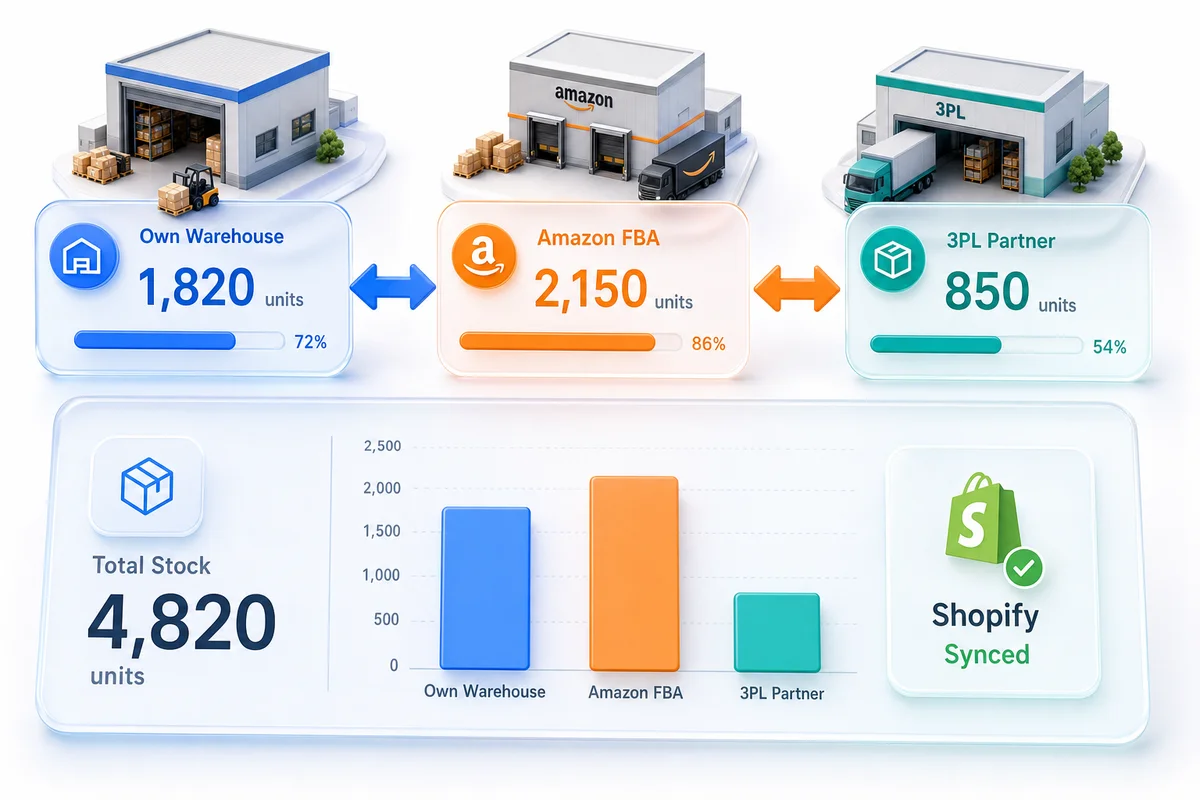
A Shopify plus Amazon seller with a third-party logistics partner has three separate inventory pools that drift apart the moment any system falls out of sync. Zoho Inventory's multi-warehouse feature consolidates all locations into a single system with per-location stock counts, inter-warehouse transfer orders, and reorder points that trigger by warehouse rather than total on-hand.
A Shopify store plus an Amazon seller account plus a third-party logistics provider is the standard growth path for eCommerce sellers moving past the garage-fulfillment stage. The problem: each system carries its own inventory number, and those numbers drift apart from day one.
Your 3PL ships a Shopify order and updates their WMS. Shopify gets notified - sometimes. Amazon processes an FBA return and adds units back to sellable inventory. Your own fulfillment team counts stock on Friday and finds a 12-unit discrepancy that nobody can explain. By Monday, you have three different numbers for the same SKU and no authoritative answer on what you actually have to sell.
Zoho Inventory's multi-warehouse system treats all of those locations as one unified inventory network. Stock levels are tracked per location. Transfers between locations create an audit trail. Reorder points fire by warehouse, not by total on-hand. And every count flows into the same Zoho Books financial records.
With Black Friday eight weeks out, that per-location accuracy is also the foundation for BFCM readiness. FBA inbound deadlines, 3PL pre-positioning, and channel safety reserves all depend on having separate warehouse counts in Zoho before October ends. The BFCM configuration section below covers what to act on now.
The full picture of how multi-warehouse fits into multi-channel operations is in our multi-channel inventory management with Zoho guide.
Why Total On-Hand Is the Wrong Number
Most inventory systems show one number: total units on hand across all locations. That number is operationally useless for a multi-location seller.
If you have 150 units of a SKU - 100 at Amazon FBA and 50 in your own warehouse - and a Shopify customer places an order today, you have 50 units available for that order. The 100 at FBA are committed to Amazon's fulfillment network and cannot be diverted to a Shopify order without a removal order, which takes 10–14 business days.
Selling against the combined 150 leads to overselling. Reordering when total on-hand hits 150 leads to excess stock. Reporting total on-hand as "available inventory" gives your accounting team an overstated asset number on the balance sheet.
Per-location inventory is not just an operations requirement. It is an accounting requirement. Zoho Inventory enforces the distinction from the start.
Setting Up Your Warehouse Structure
In Zoho Inventory, each physical or virtual location is a separate warehouse. The structure maps directly to how your fulfillment actually works.
Your own fulfillment warehouse is where you pick, pack, and ship Shopify orders, direct WooCommerce orders, and any B2B shipments. This is your primary owned inventory location.
Amazon FBA is a virtual warehouse in Zoho that mirrors your actual FBA inventory at Amazon's fulfillment centers. You do not control the physical location, but you can track the inventory count and manage replenishment from Zoho.
3PL locations are third-party warehouses that receive your stock and ship on your behalf. Each 3PL you use gets its own warehouse in Zoho. If the 3PL uses a WMS with an API, stock updates can flow automatically; otherwise, you update from the 3PL's reports on a defined schedule.
Retail or B2B locations - if you operate a physical showroom, retail store, or dedicated B2B fulfillment location - each gets a separate warehouse record with independent stock counts.
The setup in Zoho Inventory is straightforward: navigate to Settings > Warehouses, create each location, and add the relevant address and contact details. Item quantities are then distributed across warehouses, and reorder points are configured independently per location.
Shopify Multi-Location Sync
Shopify's multi-location inventory system lets merchants track stock at different physical locations and route orders to the correct fulfillment point. Zoho Inventory integrates with this at the location level.
When the integration is configured, each active Zoho warehouse maps to the corresponding Shopify location. Stock levels update in Shopify as they change in Zoho - not as a total, but per mapped location. A Shopify order placed for standard shipping routes to your own warehouse; a Shopify order flagged for Amazon-routed fulfillment routes to the FBA location if you use that workflow.
For available-to-sell calculations, this distinction is what matters. If you want Shopify to show only your own warehouse stock - because FBA inventory is not accessible for direct Shopify fulfillment - configure Shopify to take inventory feeds from that warehouse only. Zoho Inventory pushes the correct number to the correct Shopify location without manual intervention.
Pushing total on-hand to Shopify means accepting orders you cannot fulfill from your own warehouse on the timeframe customers expect.
Amazon FBA as a Zoho Inventory Warehouse
Amazon FBA operates on its own inventory logic. Units sent to FBA are in Amazon's possession, and Amazon reports four statuses: sellable, unsellable (customer-damaged), unsellable (seller-damaged), and pending removal.
In Zoho Inventory, the FBA warehouse tracks sellable units as your available FBA inventory. When Amazon reports units as unsellable, those units need a separate accounting step: a write-down in Zoho Books against the inventory asset. This is one of the most common accounting gaps in Amazon seller setups - unsellable FBA units sit on the books at cost indefinitely because no one flags them for write-off. Zoho Inventory's integration with Amazon Seller Central provides the inventory feed that surfaces these discrepancies.
FBA replenishment happens through a transfer order in Zoho Inventory. When your FBA warehouse hits its reorder point, you create a transfer order from your own warehouse, prepare the shipment, and send it to Amazon. When Amazon confirms receipt, the units move from in-transit to the FBA warehouse location in Zoho.
This creates a complete paper trail: stock exits your own warehouse on a specific date, arrives at FBA on a specific date, and the per-location counts update accordingly. No manual adjustments, no reconciliation surprises.
For more on how FBA inventory fits into the broader Amazon accounting workflow, see our Amazon Zoho integration guide.
Inter-Warehouse Transfer Orders
A transfer order in Zoho Inventory moves stock from one warehouse to another without triggering a sale or a purchase. It does not create revenue. It does not change COGS. It simply moves units from one location to another, with the transfer tracked as in-transit until the destination warehouse confirms receipt.
Common transfer scenarios for eCommerce sellers:
- Own warehouse to Amazon FBA - restocking FBA before inventory runs out
- 3PL to own warehouse - pulling stock back for a promotional period or channel rebalancing
- Main warehouse to secondary location - seasonal stock positioning for a retail or B2B location
- FBA removal - when you pull excess or aging FBA inventory back to your own warehouse
Each transfer order records the sending warehouse, receiving warehouse, items and quantities, and the dates of shipment and receipt. The in-transit quantity is visible in Zoho Inventory, so you know what is moving between locations even before it arrives. Seeing in-transit quantities prevents the common mistake of creating a purchase order for stock already moving from another of your own locations - a cash flow problem that shows up on delivery when you suddenly have twice what you needed.
Per-Location Reorder Points
Setting a single reorder point per SKU without reference to location leads to two problems simultaneously: stockouts at the warehouse that matters and excess stock somewhere else.
Zoho Inventory sets reorder points per item per warehouse. A practical example for a seller on Shopify and Amazon:
| Location | SKU | Reorder Point | Why |
|---|---|---|---|
| Own warehouse | WIDGET-A | 50 units | 7-day supplier lead time × 7 avg daily sales |
| Amazon FBA | WIDGET-A | 200 units | 30-day Amazon intake + processing + safety stock |
| 3PL East | WIDGET-A | 30 units | Lower volume channel, shorter replenishment cycle |
When the FBA warehouse hits 200 units, Zoho creates a replenishment alert or auto-generates a transfer order from your own warehouse. When the own warehouse hits 50, it generates a purchase order to your supplier. These operate independently - the FBA replenishment does not wait for the supplier PO to arrive.
The common misconfiguration: a single reorder point tied to combined on-hand, with no per-location logic. Your FBA warehouse stockouts while your own warehouse shows 300 units and no alert fires - total on-hand is above the threshold, so Zoho stays quiet. Amazon removes your listing. Revenue drops. The 300 units in your own warehouse cannot be there in time to fix it.
These thresholds also need seasonal adjustment. Normal-velocity reorder points are wrong for BFCM. The section below covers how to recalibrate them before the Q4 window closes.
BFCM Multi-Warehouse Readiness: The October Configuration Window
Black Friday 2026 falls on November 27. Amazon's FBA inbound blackout (the cutoff after which new shipments cannot arrive before BFCM weekend) lands in early November. That leaves October as the last workable window across three fronts: FBA replenishment, 3PL pre-positioning, and channel safety reserves.
FBA replenishment: the hard deadline
FBA sellers face a constraint that own-warehouse sellers do not. Once the inbound blackout hits, any SKU that has run out at FBA cannot be restocked in time. The only fallback is Fulfillment by Merchant from your own warehouse, and that only works if your own warehouse stock is staged and FBM listings are active before November.
In Zoho Inventory, update the FBA warehouse reorder point for each top-revenue SKU using BFCM velocity. BFCM daily demand typically runs 8 to 10 times the September daily average for high-volume products. Amazon's inbound lead time in Q4 runs 18 to 21 days due to freight congestion (versus 10 to 12 days in August). A practical BFCM FBA threshold:
(BFCM daily velocity × Q4 FBA lead time in days) + (BFCM daily velocity × 5 days safety buffer)
For a SKU selling 12 units per day in September, that is roughly (96 × 20) + (96 × 5) = 2,400 units as the FBA reorder point. That alert needs to fire in October for the replenishment shipment to clear Amazon's receiving before the blackout.
Do the same for your own warehouse, using your supplier's Q4 lead time. A supplier who ships in 14 days in spring typically needs 18 to 22 days in October and November. For the purchase order automation and multi-channel allocation that pairs with this recalibration, see BFCM inventory planning for Shopify and Amazon sellers.
3PL pre-positioning for peak overflow
If your 3PL handles overflow fulfillment when your primary warehouse is at capacity during BFCM, stage that buffer stock now before October freight lanes get congested.
In Zoho Inventory, create a transfer order from your own warehouse to the 3PL location with the BFCM overflow quantity. Set a temporary elevated reorder point for the 3PL warehouse to match the expected BFCM throughput rate. The in-transit quantity is visible in Zoho Inventory, so you can track the shipment status without manual calls to the 3PL for updates.
Channel safety reserves: preventing Amazon from draining Shopify stock
The most common BFCM configuration gap in multi-channel setups is the absence of a channel-specific safety reserve. When FBA hits a demand spike, it draws down from the same stock pool Shopify is selling against if both channels share a single combined on-hand count. The result is Shopify oversells during the exact hours Amazon is converting hardest.
The fix is the warehouse structure itself. Keep FBA and your own warehouse as separate Zoho Inventory locations, each with independent stock counts and reorder points. An FBA spike draws against the FBA warehouse only. Your own warehouse stock stays available for Shopify, WooCommerce, and other channels you fulfill directly.
If your current Zoho setup does not have that separation, this is the highest-priority BFCM fix to complete in October.
Returns Across Multiple Locations
Returns complicate multi-warehouse accounting because the returned unit may not go back to the same location it shipped from. An Amazon FBA return goes back into Amazon's possession - into sellable or unsellable FBA inventory, not your own warehouse. A Shopify return from your own warehouse fulfillment comes back to your own warehouse.
Zoho Inventory handles this by routing the return receipt to the warehouse where the item physically lands. The credit note in Zoho Books is linked to the original invoice regardless of location. The inventory adjustment posts to the receiving warehouse.
For a detailed breakdown of the returns accounting workflow, see our eCommerce returns management with Zoho guide.
What Zolify Configures on a Multi-Warehouse Implementation
Multi-warehouse setup looks simple in the Zoho Inventory UI - add warehouses, assign quantities, set reorder points. Where implementations go wrong is in the mapping decisions: which Shopify location gets which Zoho warehouse feed, how FBA unsellable units trigger write-offs, what reorder thresholds make sense for each SKU-location combination, and how inter-warehouse transfers affect the financial statements.
Across 100+ eCommerce implementations, our team (including a CA on staff who validates every inventory accounting flow) has configured multi-warehouse setups for Shopify-only sellers scaling to their first 3PL, and for established multi-channel retailers managing FBA, WooCommerce, and eBay fulfillment from a single Zoho Inventory instance. We also run pre-BFCM configuration audits specifically for sellers who need BFCM reorder points, FBA replenishment timelines, and channel safety reserves configured before the October window closes. The configuration decisions are operational and financial simultaneously, and getting them wrong costs real money in overstocked warehouses, stockout-driven lost sales, and balance sheets that do not reflect reality.
Multi-warehouse complexity is rarely the first problem. Most sellers who struggle with per-location stock counts and reorder points are also dealing with foundational setup errors: missing cost prices, incorrect opening stock, bundle items configured as regular items. The 10 Zoho Inventory setup mistakes eCommerce sellers make covers the configuration decisions that cause the most downstream damage, many of which appear before any multi-warehouse work begins.
As an Official Zoho Authorized Partner, we implement multi-warehouse inventory as part of a full eCommerce operations setup - not as a standalone configuration. The warehouse structure is designed around your actual fulfillment model, not a generic Zoho template.
Get a Multi-Warehouse Inventory Audit
If you are running stock across more than one location - own warehouse, Amazon FBA, 3PL, or retail - and your inventory numbers never quite agree between systems, an eCommerce Ops Audit is the starting point.
We map your current fulfillment locations, identify where inventory data is breaking down, and configure Zoho Inventory with the warehouse structure, transfer order workflows, and per-location reorder points your operations actually need. Our Zoho inventory and warehouse automation service covers the full scope - from warehouse mapping to purchase order automation and Zoho Books integration.
Request an eCommerce Ops Audit to see what a multi-warehouse Zoho Inventory setup looks like for your specific channels and fulfillment model.
Multi-warehouse inventory is one component of the broader Zoho eCommerce stack. For how inventory management connects with accounting, CRM, and order operations across Shopify, Amazon, WooCommerce, eBay, and Etsy, see Zoho for eCommerce: The Complete Operations Platform Guide.
Frequently Asked Questions
Yes. In Zoho Inventory, Amazon FBA is configured as a separate warehouse location. You can see FBA sellable inventory distinct from your own warehouse stock, create FBA replenishment shipments as transfer orders, and set independent reorder points for the FBA location. When Amazon reports unsellable FBA inventory, that is tracked separately and written off against the correct account in Zoho Books rather than merged into your available stock count.
In Zoho Inventory, go to Settings > Warehouses and create each location: your own fulfillment warehouse, Amazon FBA, 3PL locations, and any retail or B2B locations. Each warehouse gets a name, address, and contact. Once created, you assign item quantities per warehouse, set per-warehouse reorder points, and link each warehouse to the relevant Shopify location or Amazon marketplace. Sales orders can then be routed to the correct fulfillment warehouse at the line-item level.
A transfer order moves stock from one warehouse to another inside Zoho Inventory without treating the move as a sale or purchase. When you ship inventory from your own warehouse to Amazon FBA for replenishment, that is a transfer order - the stock exits your warehouse, shows in transit, and arrives at the FBA warehouse when Amazon confirms receipt. The transfer creates an audit trail and keeps both warehouse counts accurate without creating a revenue event or inflating COGS.
Zoho Inventory sets reorder points per item per warehouse, not just per item in total. Your FBA warehouse might trigger a replenishment alert at 60 units (to account for Amazon's lead time and processing delays), while your own warehouse triggers at 20 units. When either location hits the threshold, Zoho can notify you or auto-generate a purchase order to your vendor or a transfer order from another warehouse. This prevents the common mistake of showing 100 units on hand when 80 are at FBA and out of reach for same-day Shopify fulfillment.
Yes. Zoho Inventory maps to Shopify's multi-location inventory API, which means each Zoho warehouse can push its stock levels to the corresponding Shopify location. If you fulfill Shopify orders from your own warehouse and not from FBA, Shopify shows only your warehouse stock as available for online sales - preventing oversells against FBA inventory you cannot access for that channel. Orders in Shopify route to the correct Zoho Inventory warehouse for fulfillment processing.
See exactly where your Shopify, Amazon, or WooCommerce ops are leaking — free.
Get a personalised eCommerce Ops Audit: inventory gaps, accounting leaks, and order-flow bottlenecks — with a Zoho fix roadmap. Delivered in 48 hours, at no cost.