Zoho Commerce: Zoho's Native eCommerce Platform Explained for Online Sellers
Every connection between Shopify and Zoho is an integration point that can break, lag, or need maintenance. Zoho Commerce removes it — the storefront is part of the Zoho product, so orders, inventory, and accounting live in the same system. Here's what that actually means for eCommerce sellers evaluating the full Zoho stack.
For eCommerce sellers already running Zoho Books and Zoho Inventory, Zoho Commerce is the storefront that removes the biggest friction in the stack: the API integration sitting between your Shopify store and your Zoho backend. Zoho Commerce is Zoho's own hosted eCommerce platform, and when it's part of your setup, orders, inventory, and accounting records live in the same system rather than syncing across it.
Bottom line: Zoho Commerce is not a Shopify replacement for every seller. It's the right choice when you're building a Zoho-first operation, running B2B or mixed B2B/B2C sales, or when the overhead of maintaining a Shopify-to-Zoho integration has become a real cost. For sellers already deep on Shopify with thousands of products and an active customer base, the migration calculus rarely favors switching. For new deployments or businesses evaluating the full Zoho stack, Commerce is worth a serious look.
What Zoho Commerce Actually Is
Zoho Commerce is a hosted eCommerce storefront platform — the equivalent of Shopify or WooCommerce, but built inside the Zoho product ecosystem. You get a public-facing online store with product pages, checkout, payment processing, and order management. The difference from Shopify or WooCommerce is where the data lives.
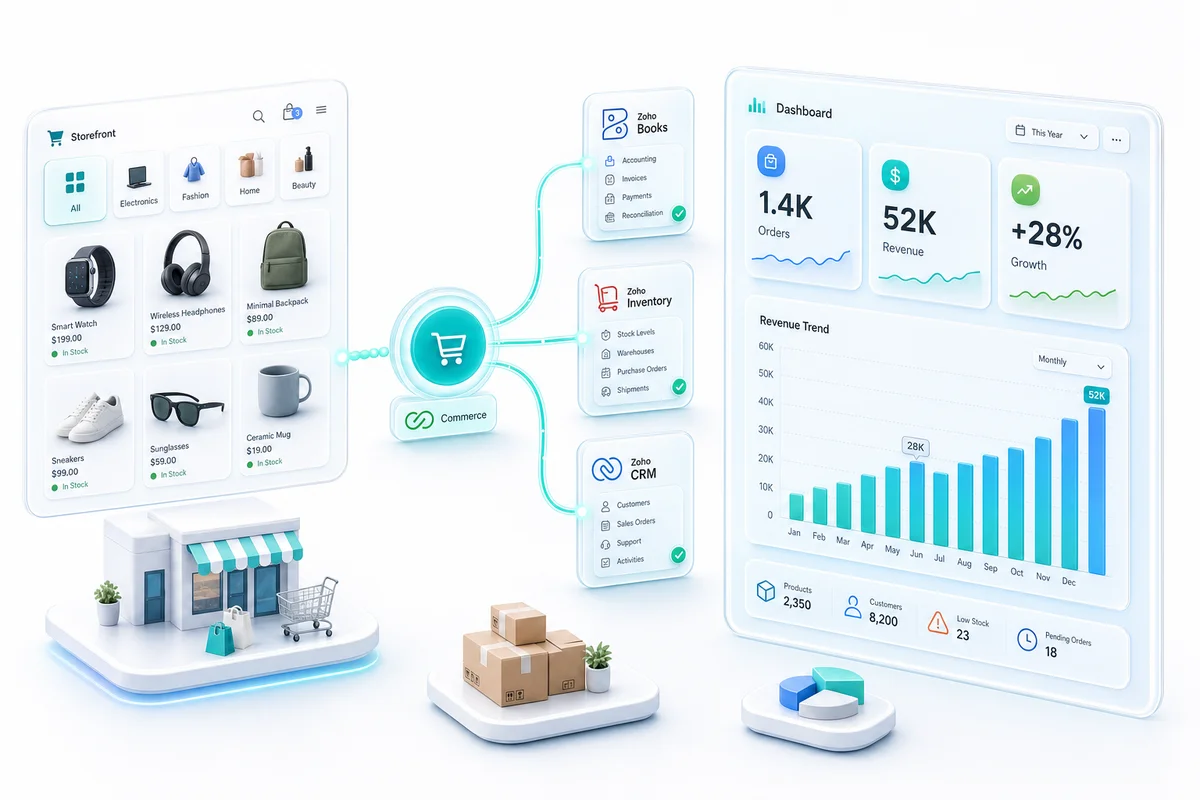
With Shopify, your storefront manages its own inventory and order records, and you connect Zoho via an API integration to keep both systems in sync. With Zoho Commerce, the storefront IS Zoho. When a buyer places an order, it goes directly into Zoho Inventory as a sales order, decrements the master stock count, and flows COGS to Zoho Books at fulfillment — with no integration layer in between.
That distinction matters more as your operation grows. Every API connection between systems is a point of failure: webhooks that miss events, sync jobs that run on polling intervals, integration logic that breaks when either platform updates its API. Zoho Commerce removes that layer entirely for sellers whose storefront and backend are both Zoho.
What's Included in Zoho Commerce
Zoho Commerce covers the standard requirements of a hosted eCommerce platform:
- Storefront and themes: Responsive templates with visual customisation, custom domains, and SEO-friendly URL structures
- Product management: Physical, digital, and service products; multi-variant support (size, color, material); bulk import via CSV
- Order management: Order tracking, fulfillment status, returns, and refund processing
- Payment processing: Native gateway integrations including Stripe, PayPal, Razorpay, and Authorize.Net — no additional transaction fees beyond processor charges
- Marketing tools: Abandoned cart recovery emails, discount codes, coupon management, and email capture
- B2B portal: Customer-specific pricing, purchase order payment terms, and a separate login for approved wholesale buyers
- Native Zoho connections: Direct sync with Zoho Inventory (stock), Zoho Books (accounting), Zoho CRM (customer records), and Zoho Campaigns (lifecycle email)
The app ecosystem is significantly smaller than Shopify's 10,000+ app marketplace. If your operations depend on specific Shopify apps for shipping, reviews, loyalty, or specialized checkout features, verify that Zoho Commerce either supports those natively or has equivalent options before committing.
How Zoho Commerce Connects to the Zoho Backend
The native integration chain works like this:
Orders: A buyer places an order in Zoho Commerce. Zoho Inventory receives it as a sales order immediately — not on a polling interval, not via a webhook, but as a native system event. The fulfillment team sees it in Inventory without waiting for a sync.
Inventory: When the Inventory sales order is created, the available stock count for that SKU decrements. The updated count pushes back to the Commerce storefront. Other buyers see the correct availability without a lag window during which they could order stock that doesn't exist.
Accounting: When fulfillment is confirmed in Zoho Inventory, a COGS journal entry records automatically in Zoho Books using your configured costing method (FIFO or weighted average). Revenue, cost, and inventory asset value update from one transaction, not from systems reconciled at month-end.
CRM and marketing: Customer records from completed orders sync to Zoho CRM, where post-purchase sequences, loyalty tracking, and upsell campaigns can run from the same customer data that finance and operations use. Zoho Campaigns connects to order history for segmentation — repeat buyers, high-AOV customers, lapsed buyers — without a separate data export.
For a comparison of how this works when you run multiple channels alongside Commerce, our multi-channel inventory management guide covers how Zoho Inventory handles Commerce, Shopify, Amazon, and WooCommerce from one stock pool.
Zoho Commerce vs Shopify vs WooCommerce
| Factor | Zoho Commerce | Shopify | WooCommerce |
|---|---|---|---|
| Hosting | Fully hosted | Fully hosted | Self-hosted (WordPress) |
| Native Zoho integration | Built-in, no API required | Integration setup required | Integration setup required |
| App / plugin ecosystem | Limited | 10,000+ apps | 50,000+ plugins |
| Transaction fees | None beyond processor fees | 0.5–2% on lower plans | Processor fees only |
| B2B features | Included | Shopify Plus required | Plugin dependent |
| Multi-warehouse inventory | Via Zoho Inventory | Via app or integration | Via WooCommerce + integration |
| Zoho Books sync | Native | API integration | API integration |
| Abandoned cart recovery | Built-in | Built-in | Plugin required |
| Best fit | Zoho-first businesses, B2B sellers | High-volume, brand-focused sellers | WordPress-native businesses |
If you're already using Zoho products as your backend, Commerce removes a maintenance burden. If you need Shopify's app ecosystem, performance infrastructure for high-volume traffic spikes, or features tied to Shopify's platform (like Shopify Markets for international selling), staying on Shopify and running a proper Shopify-to-Zoho integration is the right call.
For a detailed look at how Shopify connects to Zoho Books, Inventory, and CRM as a combined backend, our Shopify Zoho integration guide covers the full implementation.
When Zoho Commerce Is the Right Choice
1. You're building a Zoho-first operation. A new eCommerce business choosing Zoho One or Zoho Finance Plus as its operating stack should consider Commerce before defaulting to Shopify. The total cost of ownership is lower when the storefront and backend don't require a custom integration to communicate.
2. Your business has significant B2B volume. Zoho Commerce's B2B portal, customer-specific pricing, and purchase order support are included without a premium tier. Comparable Shopify B2B features require Shopify Plus, which starts at $2,300/month. For businesses doing $1M–$10M in annual B2B eCommerce, that gap is meaningful.
3. Your Shopify-to-Zoho integration has become a maintenance burden. If your team spends time each month troubleshooting failed syncs, reconciling order counts between Shopify and Inventory, or managing integration configuration after platform updates, those hours have a cost. Commerce eliminates that category of work.
4. You sell primarily in India or UAE. Zoho's product development is heavily oriented toward these markets. Local payment gateways, tax treatment (GST, VAT), and compliance workflows are better supported natively in Commerce than through Shopify's localization options.
When Shopify or WooCommerce Still Makes More Sense
You need a specific app from Shopify's ecosystem. Shipstation, Gorgias, Yotpo, Klaviyo, and hundreds of other eCommerce tools have deep Shopify integrations and surface-level or no Zoho Commerce integrations. If your operations depend on tools like these, Commerce's limited ecosystem is a real constraint.
You're already on Shopify with an established customer base. Migrating an active Shopify store to Zoho Commerce means customers re-entering payment details on first purchase, transferring product catalogs and order history, and rebuilding any automation that was tied to Shopify's event system. For most live Shopify stores, the integration overhead of connecting to Zoho is lower than the disruption cost of switching storefronts.
Your order volume is high enough that infrastructure matters. Shopify's global CDN and checkout infrastructure are purpose-built for high-volume eCommerce. For sellers processing thousands of orders per day during peak periods, Shopify's performance track record under load is well documented. Commerce performs well at moderate volumes; at very high volumes, the infrastructure comparison matters.
For sellers on WooCommerce, the WooCommerce-to-Zoho integration path is covered in our WooCommerce Zoho integration guide.
What a Zoho Commerce Implementation Looks Like
A fresh Zoho Commerce deployment for an eCommerce business moving to the full Zoho stack typically runs three to five weeks. The steps: store configuration (theme, URL, tax settings), Zoho Inventory connection and product catalog import, payment gateway setup and checkout testing, B2B portal configuration if needed, and a go-live walkthrough confirming the full order-to-accounting chain works correctly.
For businesses migrating from Shopify to Zoho Commerce, add one to three weeks for catalog migration, customer data transfer, and parallel-run verification. The cutover timing matters. Avoid migrating during a peak period. Your DNS change is visible to customers within minutes, so make sure the new store has been tested under realistic load first.
Tax configuration is the most common post-launch fix. US sellers with multi-state nexus, UK sellers managing VAT, and India-based sellers handling GST all have specific setup requirements in Commerce that differ from Shopify's tax handling. Getting this right before you process real transactions is worth the extra time.
What Zolify Brings to a Zoho Commerce Setup
Across 100+ eCommerce implementations as an Official Zoho Authorized Partner, we've set up Zoho Commerce as both fresh deployments and migrations from Shopify. The native integration with Zoho Inventory and Zoho Books makes Commerce setups faster than comparable Shopify-plus-integration implementations. That speed holds only when the configuration underneath is done correctly from the start.
Our CA reviews the accounting configuration on every Commerce deployment: chart of accounts mapping, costing method selection (FIFO vs weighted average), tax account assignment, and revenue recognition rules. These choices affect how your P&L and balance sheet read at month-end and whether the output holds up under CPA review. A misconfigured COGS account or incorrect tax mapping in Commerce creates accounting problems that compound with every transaction.
For businesses on Zoho One or Zoho Finance Plus considering Commerce as the storefront piece of their stack, our eCommerce Ops Audit covers whether Commerce fits your specific sales model, what the implementation involves, and how it connects to the rest of your Zoho architecture.
Get an eCommerce Ops Audit
If you're evaluating Zoho Commerce for a new build or considering a migration from Shopify or WooCommerce, the implementation decision depends on your specific sales model, order volume, B2B mix, and existing Zoho footprint.
Zolify's eCommerce Ops Audit maps your current setup to the right Zoho architecture — including whether Commerce is the right storefront choice or whether a Shopify-to-Zoho integration serves you better. You'll leave with a clear recommendation, not a sales pitch.
Frequently Asked Questions
Zoho Commerce is Zoho's hosted eCommerce storefront platform. The key difference from Shopify: Zoho Commerce connects natively to Zoho Books, Zoho Inventory, and Zoho CRM without any middleware or third-party integration. An order placed in Zoho Commerce creates a Zoho Inventory sales order, decrements the master stock count, and flows COGS to Zoho Books automatically. Shopify does the same things through API integrations that require setup, maintenance, and monitoring. If your business is already running on Zoho's backend, Commerce removes a major integration layer. If you're starting fresh on Shopify, the switching cost usually isn't justified unless you're building the full Zoho stack from day one.
Yes. Zoho Commerce has B2B-specific features including customer-specific pricing tiers, purchase order-based payment terms, and a dedicated B2B portal where approved buyers can log in, browse their negotiated pricing, and place orders that route directly into Zoho Inventory and Zoho Books. This is where Zoho Commerce has an edge over Shopify for B2B sellers: Shopify Plus is required for comparable B2B features, while Zoho Commerce includes them at a lower price point. For mixed B2B and B2C operations, both buyer types can be served from the same Commerce storefront with separate pricing rules.
Yes, though it's more involved than a fresh deployment. The migration covers product catalog, customer records, and order history. Historical orders import as read-only records in Zoho Books and Inventory. Customer payment methods cannot migrate — buyers need to re-enter them on their first purchase after the switch. The Shopify product catalog exports cleanly and imports to Zoho Commerce, though product metafields and complex variant structures need manual review. For high-volume Shopify stores with large customer bases and active subscriptions, the migration effort is significant. It's most justified when you're already using Zoho Books and Inventory and the Shopify-to-Zoho integration overhead has become a maintenance burden.
Zoho Commerce draws from Zoho Inventory, which manages the actual inventory state. Warehouse assignments, reorder rules, and stock allocation happen in Zoho Inventory, not in Commerce directly. When an order is placed in Zoho Commerce, Zoho Inventory handles fulfillment routing based on your warehouse configuration. If you run FBA alongside a Commerce storefront, your FBA stock and Commerce-fulfilled stock sit in separate Zoho Inventory warehouse locations with their own reorder triggers. This is handled the same way as any other Zoho Inventory multi-warehouse setup — Commerce is just another demand channel reading from the central stock pool.
Zoho Commerce supports a range of major payment gateways including Stripe, PayPal, Razorpay, Authorize.Net, and several region-specific processors. The exact gateway list depends on your country. Zoho does not charge additional transaction fees beyond what your payment processor charges, which gives it a cost advantage over Shopify's standard plans where transaction fees apply unless you use Shopify Payments. For sellers in the US, Stripe or PayPal cover most use cases. For India and UAE-based sellers, Razorpay and regional gateways are supported directly.
See exactly where your Shopify, Amazon, or WooCommerce ops are leaking — free.
Get a personalised eCommerce Ops Audit: inventory gaps, accounting leaks, and order-flow bottlenecks — with a Zoho fix roadmap. Delivered in 48 hours, at no cost.